

Ambassadors
This is an iMIS Crowdfunding edition feature.
One of Donate Now - Premium's Template modes is Ambassador mode. Ambassador mode allows a Donate Now - Premium staff user to select an existing iMIS committee and generate unique donation links for each active member in that committee. Then, each ambassador can raise funds using their own personalized link. Donations are tracked in a Donate Now - Premium table which can then be reported on.
Using Ambassador mode
Do the following to use Ambassador mode:
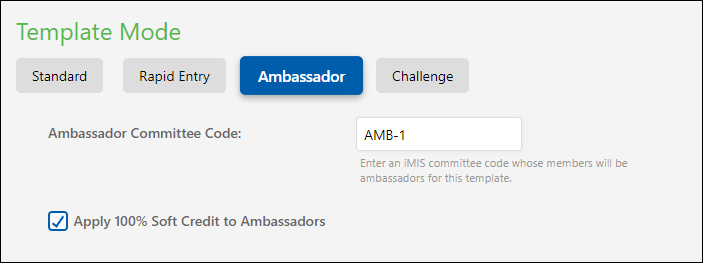
- Edit a template and change the mode to Ambassador.
- Enter a valid iMIS committee code.
- (optional) Choose to soft credit ambassadors with each gift entered on their template.
- Click Save.
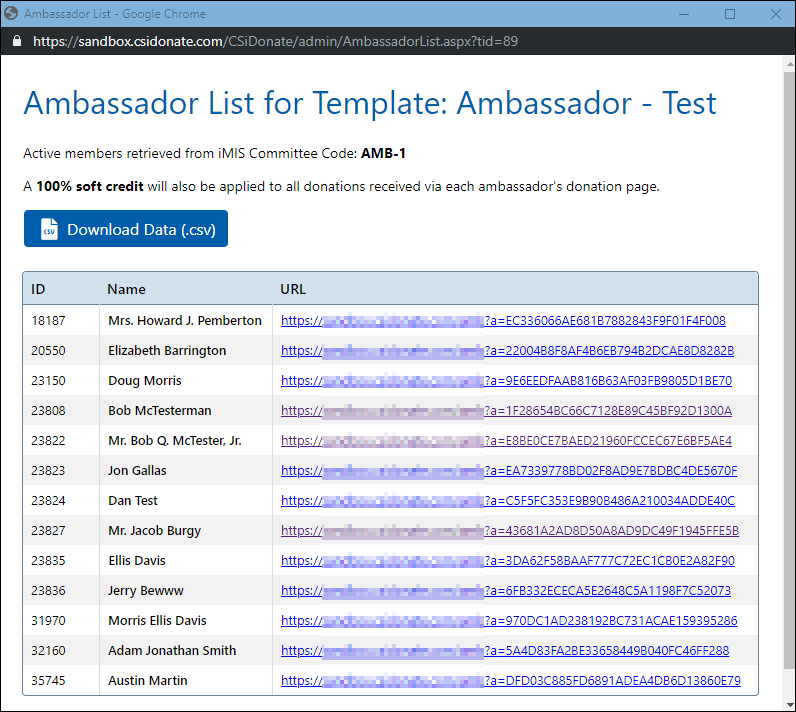
After saving, you will notice the template URLs have been replaced by a View Ambassador Links option. Clicking this option will open up a new window which allows you to view each active committee member and their specialized donation link.
Using the Ambassador links
Do the following to use Ambassador links:
- After opening the Ambassador Links window, click Download Data to download the current URL list for this template as a .csv file, which can be imported into another application for distribution to each ambassador.
- Alternately, you can make use of the csi_iDonate_Ambassador_Links table (by importing it as a Business Object and displaying it in the Staff site) which also contains the links for each ambassador.
NoteDonate Now - Premium is not capable of refreshing the ambassador links automatically if any committee changes occur. The intended use is to first set up the ambassador committee with any ambassador contacts, and then set up the ambassador template in Donate Now - Premium. If committee membership changes occur, to also update the ambassador links in Donate Now - Premium, (re-)save the ambassador template. Saving the template will trigger the ambassador links for that template to update in the database.
Template customization
Donate Now - Premium staff users have the ability to customize certain aspects of the donation form with "replacement tokens" which will display basic information about the ambassador.
Donation Form / Template
On the template, on the Form tab, in the Page Header and Page Description fields, you may enter the following replacement tokens (surrounded by double curly braces {{...}}).
- FirstName
- LastName
- MaidenName
- FullName
- ChapterName
- AmbDonationMessage*
- AmbReceiptMessage*
* see below for ambassador customization options
Example
In the Page Header field, if you enter the following text: Help Support {{FullName}}'s Cause!
Browsing to the ambassador link specific to John Smith would render the template header as follows: Help Support John Smith's Cause!
On-screen receipt
In the Text and Content section, on the Content Blocks tab, any content blocks in the Receipt section can use the following replacement tokens:
- AmbassadorFirstName
- AmbassadorLastName
- AmbassadorMaidenName
- AmbassadorFullName
- AmbassadorChapterName
- AmbDonationMessage*
- AmbReceiptMessage*
* see below for ambassador customization options
Additionally, you can use a conditional block so that the ambassador content only displays on receipts that have ambassador mode enabled.
To do this, surround any content in a {{#if: ambassador}}...{{#endif: ambassador}} block.
For example, to display a thank you message on the on-screen receipt, you could enter the following text into the Content After Amount section:
{{#if: ambassador}}

Here is {{AmbassadorFirstName}}'s message to you:

{{AmbReceiptMessage}}

{{#endif: ambassador}}
Any content inside the #if...#endif block will only show up for Ambassador-enabled donations.
E-mail receipt
The e-mail receipt has a similar format to the on-screen receipt.
For full instructions on formatting the e-mail receipt, please refer to the Receipts article which includes the custom Ambassador tokens available for use in e-mail templates.
Ambassador customization
Ambassador messages are stored in the Demo_Ambassador_Content table. Individual ambassadors are allowed to enter two custom messages that can be rendered on the donation form and receipts. These messages are referred to the Donation Message and Receipt Message, respectively.
Important Setup and Usage Note
While this table comes pre-installed with Donate Now - Premium, it is not set up in iMIS or RiSE automatically.
CSI can assist with importing this table into RiSE as a business object, where it can be added to a profile page that each ambassador has access to, allowing each ambassador to update their own personal donation and receipt messages.
Alternately, as long as the data is somehow entered or imported into the Demo_Ambassador_Content table correctly, and follows the iMIS user-defined single-instance table schema, Donate Now - Premium will read the data in that table and use it accordingly.
The two fields in the table map to the AmbDonationMessage and AmbReceiptMessage replacement tokens detailed above.
If no record exists in the Demo_Ambassador_Content table matching the current ambassador's iMIS ID, the donation message and receipt message fields will not work, and will instead render empty text.
Donation tracking
Donations are tracked in the csi_iDonate_Gift_Metadata table, however a view is provided which aggregates a number of iMIS tables in addition to the Donate Now - Premium gift metadata. This view is called vcsi_iDonate_Gift_Metadata_Combined.
Sample Query
To view the sum of gift amounts raised for each individual ambassador, for example, you could run the following SQL statement:
SELECT AmbassadorId,
SUM(GiftAmount) AS TotalRaised,
COUNT(*) AS GiftCount
FROM vcsi_iDonate_Gift_Metadata_Combined
WHERE AmbassadorId IS NOT NULL
GROUP BY AmbassadorId
ORDER BY TotalRaised DESC
NoteThis sample makes use of the vcsi_iDonate_Gift_Metadata_Combined view.
Business Objects and RiSE Reporting
Business objects and RiSE reports are not installed with Donate Now - Premium by default for ambassador data, however ASI can assist with setting up these items for you. Please contact us if you are interested in setting up these reports for your organization.
Updated 2 months ago