

Panel data guide
| Complexity | Intermediate |
| EMS Compatible | Yes |
| iMIS 2017 Compatible | Yes |
| Actions | Insert, Insert w/ Matching Help, Update, Insert / Update, Delete |
Learn how to use iDMS to modify panel data. See the Delete Action guides for information on deleting panel data, including clearing a file upload field with the ERASE keyword.
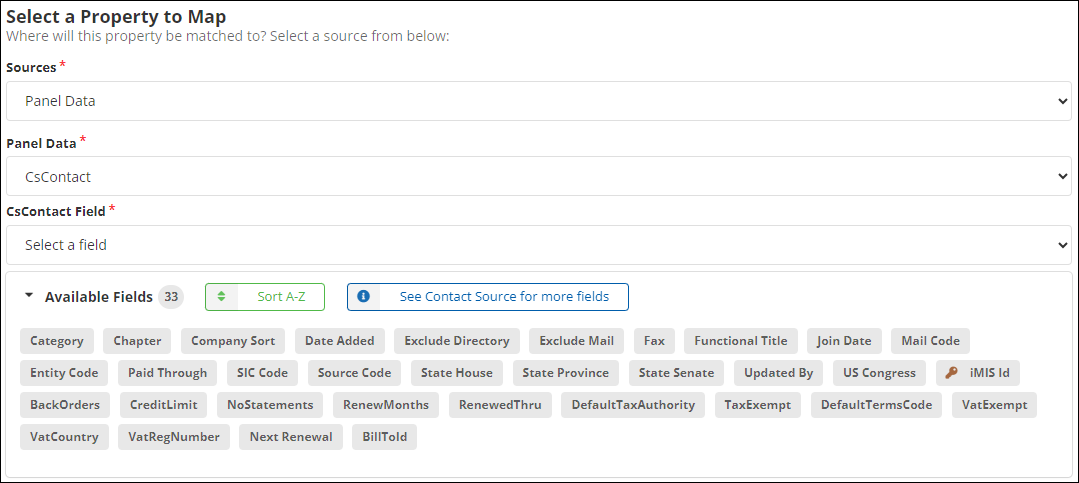
Mapping - Insert
Required Fields
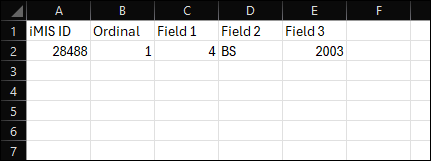
- iMIS ID - The ID of the person whose panel data will be updated. Use the Contact Details Source to match on the iMIS ID.
Optional Fields
All other fields are optional. These fields are dictated by the specific panel source.
Mapping - Update
Required Fields
- iMIS ID - The ID of the person whose panel data will be updated. Use the Contact Details Source to match on the iMIS ID.
- Ordinal - The number associated with the specific panel for an ID in a multi-instance panel. If Ordinal is not an available field, then the panel is single instance and only ID is required.
Optional Fields
All other fields will be optional. These fields are dictated by the specific panel source.
NotePanel fields of type File upload are mapped through a File URL prompt. To remove an existing document from a record rather than upload a new one, enter ERASE in place of the URL. See Clearing a file upload field.
Mapping
Optional Fields
- BackOrders - Determines if backorders are allowed for this record.
- BillTold - Determines if the billing information has been communicated.
- Category - The category of the record.
- Company Sort - The criteria for sorting the company.
- CreditLimit - The maximum credit allowed for this record.
- Date Added -The date the record was added to iMIS.
- DefaultTaxAuthority -The default tax authority applied to transactions associated with the record.
- DefaultTermsCode - The default terms code for the record.
- Exclude Directory - Determines if the record should be excluded from the directory.
- Exclude Mail - Determines if the record should be excluded from the mail.
- Functional Title - The functional title associated with the record.
- Join Date - The date the contact joined.
- Mail Code - The code used for managing the mail preferences.
- Next Renewal - The next renewal date for the subscription.
- NoStatements - Determines if statements should not be sent to the record.
- Paid Through - The paid through date for the record’s subscription.
- RenewMonths - The number of months for a subscription renewal.
- RenewedThru -The date the subscription was renewed through.
- SIC Code - The Standard Industrial Classification code associated with the record.
- Source Code - The code indicating the source of the record.
- State House - The state house district associated with the record. See Legislative district fields below.
- State Province - The state province associated with the record.
- State Senate - The state senate district associated with the record. See Legislative district fields below.
- TaxExempt - Determines if the contact is exempt from taxes.
- Updated By - The user who last updated the record.
- US Congress - The congressional district associated with the record. See Legislative district fields below.
- VatCountry - The country associated with the record with VAT.
- VatExempt - Determines if the record is exempt from VAT.
- VatRegNumber - The VAT registration number associated with the record.
Legislative district fields
The US Congress, State Senate, and State House fields behave differently depending on what the panel is built over, because iMIS defines the two sets differently:
| Panel is built over | Length | Writable? | What the fields are |
|---|---|---|---|
| The address | 5 characters | Yes | The same values as the Address Details district fields — same limit, and US Congress carries the same congressional gating. |
| The contact | 20 characters | No — read-only and locked | iMIS's own copies on the contact record, which iMIS maintains by copying them up from the matching-purpose address. |
The contact-level fields cannot be imported or updated through iDMS. They are populated by iMIS itself — and for US Congress, only when the address purpose matches the Address to use for congress setting.
To import legislative districts, map the US Congress, State Senate, and State House fields under Address Details. See Importing legislative districts in the Address guide for the value format, the required iMIS settings, and how to confirm the import worked.
Updated about 2 months ago