

Calendar
Released with ICE version 5.1, a new calendar control option provides a way to use a typical calendar display to show specified dates.
- Add a new sitemap node and select the "~/ICE/Events/EventCalendar.aspx?calname=" option. You can have multiple calendars showing different data so you should add a unique value after the "=" sign to identify each calendar in use.
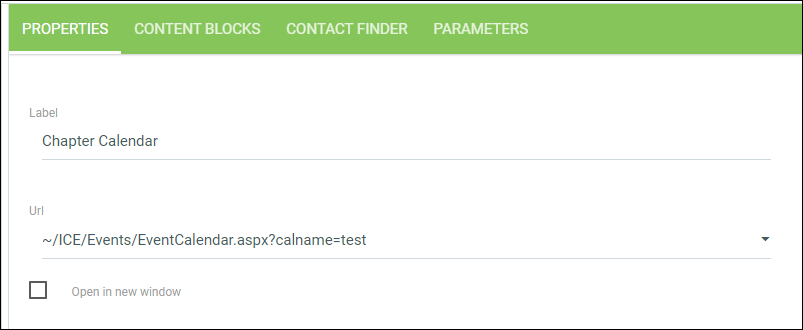
- Once properties are saved, click the Parameters tab. A view is required to supply the calendar with the data you would like to display. The view should return the following fields:
Field Data type Description Event ID CHAR ID to identify unique event ( workflowtran_keycould be used).Chapter ID CHAR ID to be passed in for ContactIDparameter.Title CHAR Title to be shown for event. Description CHAR Description to be shown for event. Begin Date DATE or DATETIME Start date of event. End Date DATE or DATETIME End date of event.
The following is an example view:
CREATE VIEW [dbo].[vcsi_GetChapterCalendarEvents] AS SELECT d.WORKFLOWTRAN_KEY as EventId, d.ID as ContactId, d.Title as Title, d.Description as Description, d.CD_Start as BeginDate, d.CD_End as EndDate FROM Demo_Chapter_Dates d GO
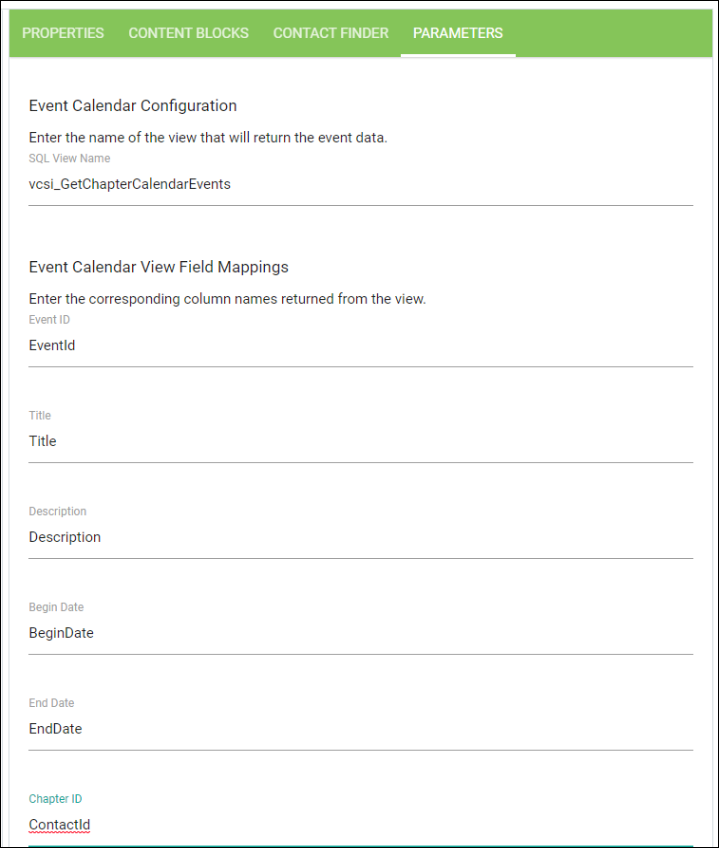
3. Enter the name of the view on the Parameters tab.
4. Enter the field names provided by the view to define each field:
- Once data is submitted, events will appear on Calendar.
Updated 2 months ago
Did this page help you?