

Multiple Tributes
This article outlines the new Multiple Tributes feature of Donate Now - Premium 2.10.
Multiple Tributes is a new feature that allows a donor to provide a name, e-mail, and tribute message for up to 25 other individuals. For matching iMIS records, these are written as tribute notifications into iMIS. Optionally, tribute notification e-mails can be enabled, which allows named tributes to receive a (customizable) notification e-mail alerting them that they were named as a tribute.
Configuration
In the System Settings > Tributes area, configure the following settings to ensure multiple tributes work accordingly:
- Tribute search lookup IQA query path
- Tribute search results limit
- Enable multiple tribute contact matching
- Show partially obscured e-mails
Enabling multiple tributes
Do the following to enable multiple tributes:
- Edit a donation template with the Template Manager and on the Form tab
- Find the Tribute Settings section.
- Set the Tribute Mode to Multiple Tributes.
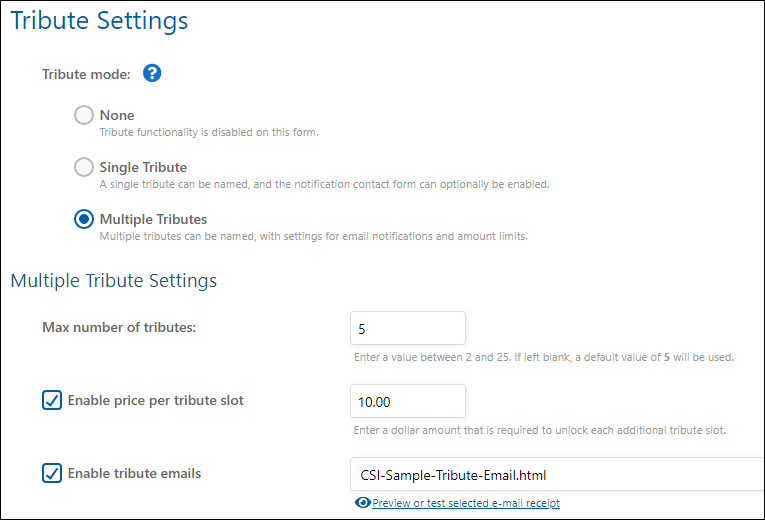
After enabling multiple tributes, enter the maximum number of multiple tributes you would like a donor to be able to add with their gift into the Max number of tributes field.
NoteDue to performance concerns, the Donate Now - Premium system maximum is 25 tributes and cannot be increased at this time.
Optionally, you may also elect to enable a "Price per Tribute" option, and choose whether or not e-mail notifications should be sent for tributes for this form. See below for more information on these features.
Tribute Data
The following data points are captured by the multiple tribute system:
- Name (Required)
- E-mail Address
- Tribute Note / Message
The Name field is a free-form field that is designed to allow donors to enter multiple types of tribute names onto their donation without any limits, for example:
- First Name and Last Initial
- Full Name
- Name and Chapter
- Name and School
- Family Name
- Name and Spouse Name
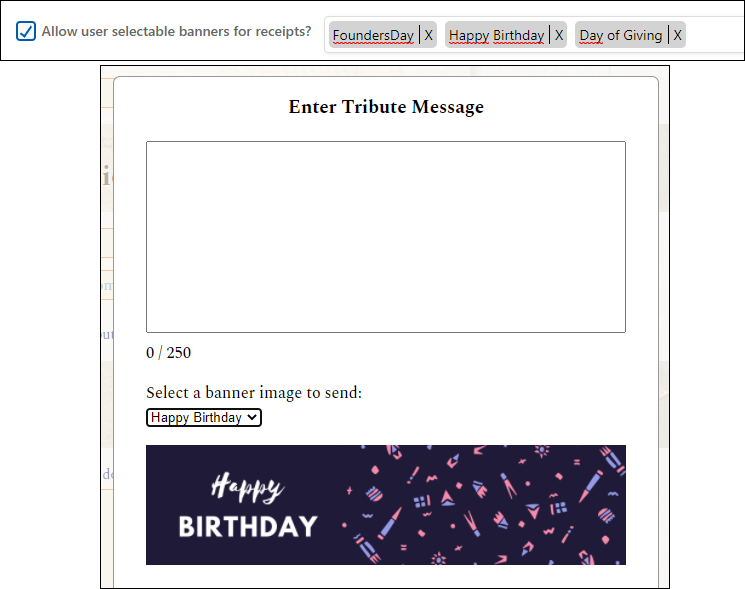
A tribute message can be provided by clicking Add or Edit Message. Donors can type a personalized message to that tribute (up to 250 characters).
To decrease user frustration and the number of failed donations due to tribute data, the only required field is the Name field.
If an e-mail address is not entered, no e-mail is attempted for that person and no contact matching is performed by that user. It is up to the organization headquarters to decide what to do with these name-only tributes, which may also include a tribute message.
Optional features
The following fields are optional multiple tribute settings which you can enable to provide additional functionality to your donors.
Tribute contact matching
If the Enable multiple tribute contact matching option is enabled, each individual named tribute is looked up in iMIS by their last name and e-mail address (the same matching formula that Donate Now - Premium uses for anonymous donors).
If a match is found, a Trans_Notify record is written and the matched tribute's iMIS ID is recorded in the csi_iDonate_Tribute_Notification table. The matching data is also available on the Transaction History screen for this donation.
NoteThe Last Name is obtained by taking the last "word" in the Name field, separated by spaces. While not ideal, this system allows for the most flexibility for donors to be able to enter arbitrary tribute names, while still matching some of the named tributes to valid iMIS contacts (if a "FirstName LastName"-style name is entered into the Tribute Name field).
Price per tribute
You can enable a "price per tribute" which allows you to unlock an additional tribute slot at each multiple of that price.
For example, if you set a price per tribute value of $5.00, and a donor selects a $15.00 donation, they will see the following screen:
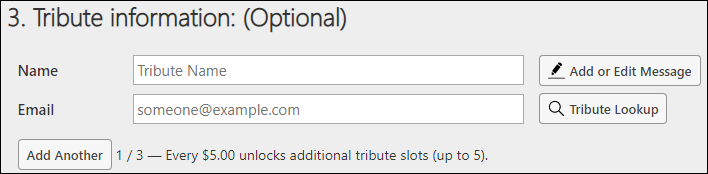
NoteThis message ("Every $X unlocks...") is customizable inText and Content. You can insert the {{amount}} token into the customized label to have it display the price per tribute, and the {{max}} token to display the maximum number of tributes allowed.
After adding three tributes, the donor sees this message:

If the donor then increases their donation to $25.00, the message automatically updates:

Which allows the donor to add up to 5 tributes.
Price Per Tribute with Maximum
The Max Number of Tributes setting is still respected even if the Price per Tribute feature is enabled.
In this example, the maximum number of tributes is set to 5, and since the price per tribute is $5.00, it doesn't matter if the donor chooses $25.00 or $500.00, the maximum number of tributes will still be 5.
Tribute Minimum
Regardless of the donation amount or other settings, donors can always enter at least one tribute.
It is not currently possible to specify a minimum amount to unlock the first tribute, however if the amount is low enough, you could set the system-wide minimum donation amount in the System Settings which would achieve the desired functionality.
If the donor chooses an amount, enters some tribute information, and then later decreases their amount such that the tribute slot is no longer allowed at that dollar amount, then the bottom-most tribute(s) will be removed without warning in order to comply with the price per tribute setting.
Tribute notification e-mails
If Enable tribute emails is enabled on the template, select a tribute email template from the dropdown to use for this template.
NoteDon't see any templates in the dropdown? An e-mail receipt file (.html) must exist in the relative installation folder /Donate Now - Premium/Receipts/ and must have a {{#purpose: tribute
tag listed somewhere inside the file.
Refer to the Receipts article for more information on creating tribute notification e-mail templates.
User selectable banner images
If emails are enabled, you can enable Allow user selectable banners for receipts and donors will have the option to choose an image to further personalize their message to the honoree.
User selectable merge/Tribute Codes for receipts
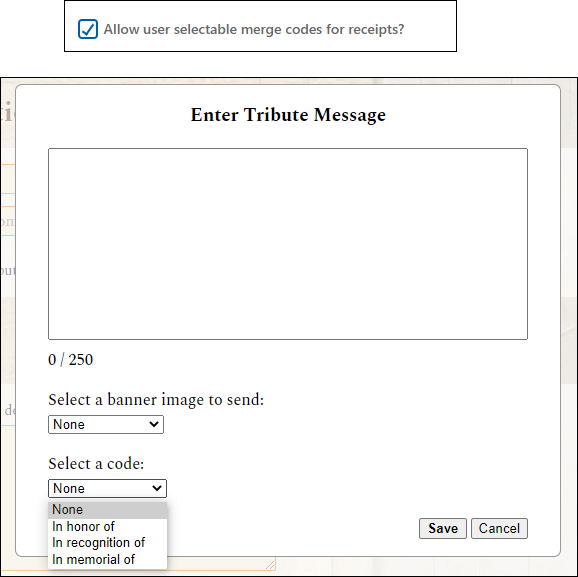
If emails are enabled, and Allow user selectable merge codes for receipts is selected donors can choose a merge code associated with their gift. See System Settings.
Tribute member lookup
If the current donor is logged in, and if their individual record in iMIS has the Name.MEMBER_RECORD flag set to 1, and the system setting for Tribute search lookup IQA query path is configured, then a Tribute Lookup button will enable on each multiple tribute.
Clicking this button will bring up the member search window. This window is 100% driven via the IQA query defined in the system setting.
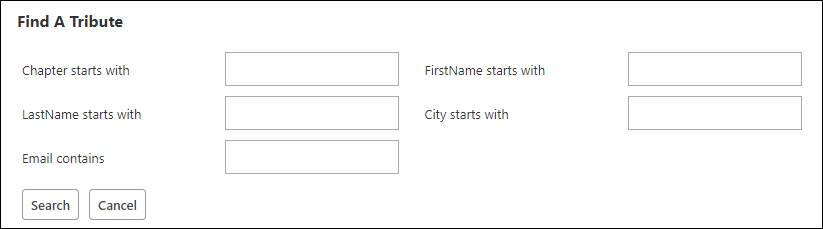
Users can enter any search criteria and press "Search" which will perform a member search in the database.
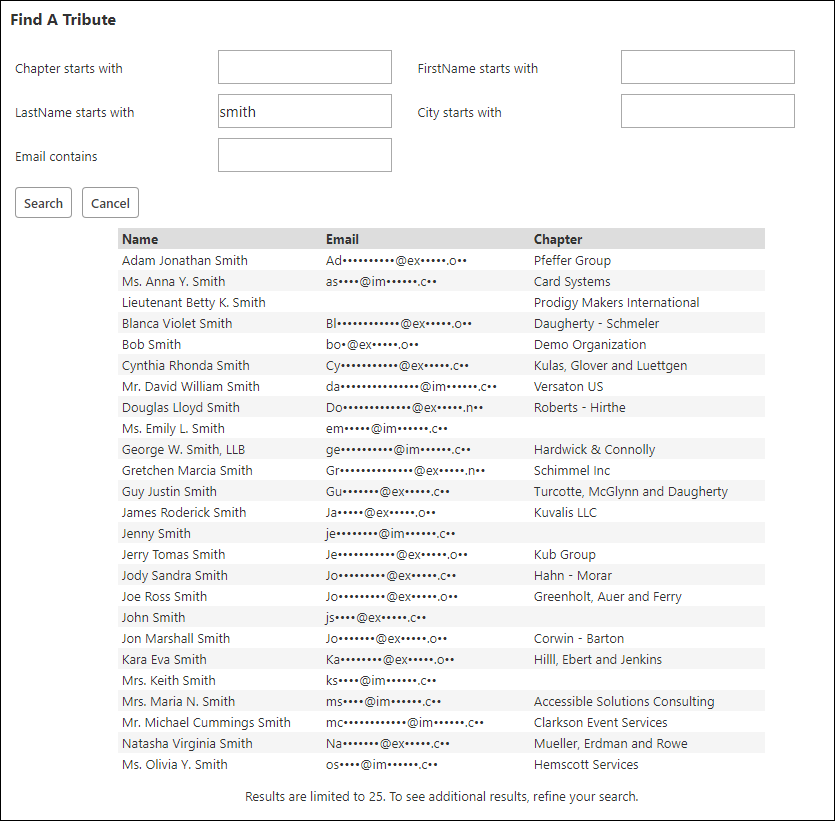
Users can click on a record, and that person's information is populated into the tribute fields. At this point, this tribute is now a known tribute contact . After selecting a specific contact, users can now:
- Enter a tribute message for this contact
- Press the Clear Tribute button to revert this to an anonymous tribute contact.
- Leave the e-mail field blank to use the contact's displayed masked e-mail for the tribute email (if enabled), OR
- Enter in a different e-mail address to send the tribute notification to.
Users are not able to:
- Change the name of the found contact (The name is driven from the IQA query Name field value.)
- Disable the tribute notification e-mail (only a Donate Now - Premium staff user is allowed to change the e-mail setting on or off, at the template level).
Configuring the member search IQA query
When building the query, please follow these recommendations and requirements.
- Recommendation: Use the CsContact business object as a base.
- Recommendation: Limit results to members only (CsContact.Is A Member = Yes).
- Requirement: All user-provided filters must be marked as Optional. (Donate Now - Premium will not display required parameters and users will see an error if they attempt to search and omit a required field.)
- Requirement: All prompts must be strings / text boxes. Dropdowns, checkboxes, multi-select boxes, numeric fields (ints) and other field types are not supported.
- Requirement: Three required fields must exist on the Display tab and must have specific display aliases: ID, Name, and Email.
- ID: Must be the iMIS ID of the contact. This field is NOT displayed to the donor in the search results, but is required.
- Name: The display name of the contact to show in the search results.
- Email: The primary e-mail address of the contact. This field is automatically masked by the system to protect user data.
If one of these fields does not exist in the query results, Donate Now - Premium will display an error.
WarningThe System Setting Tribute search results limit determines the number of records that are shown to the donor in the search results. Set this value to a reasonable number where a donor can find another member that he/she is looking for, but not enough to expose an unwanted amount of data. If a search contains more than the defined maximum, the donor sees this message: Due to security concerns, the Donate Now - Premium system maximum is 100 records per search.

Sample IQA Query
CSI has prepared a sample IQA query which you can download and import into RiSE. This query is a good jumping off point because it already contains the required ID, Name, and Email fields, has some common search criteria, and filters to member records only.
Tribute notification records
Single tributes are recorded in iMIS the same way as previous versions of Donate Now - Premium. The overview for that type of tribute can be found on the Tributes page.
Multiple tributes are recorded in iMIS in the Trans_Notify table, if a contact was found or matched on (see below).
Additionally, all multiple tribute data is logged in the csi_iDonate_Tribute_Notification table, which can be set up to display on a RiSE page if desired.
Updated 2 months ago