

Account Support
IMPORTANTAdmins cannot configure the account support buttons. To configure buttons, action type, visibility, target button action, and display order, contact the Client Account Manager.
Account Support provides configurable action buttons that give users quick access to support resources directly from My Account.
The Account Support section displays a set of action buttons configured by an admin, such as Contact Support, Report Issue, or FAQ. Each button can link to an email address, URL, or in-app action. The buttons, their labels, and display order are fully configurable through the Admin Panel.
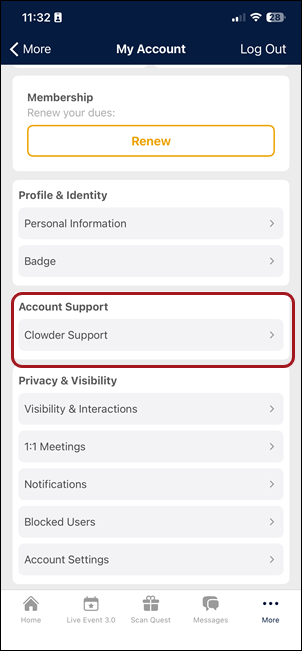
Mobile (iOS and Android)
Accessing support
The Account Support section appears as a tile in the My Account hub. Click the tile to view all available support actions.
Support actions
Each support button performs its configured action when tapped:
- Email actions: Opens the device email client with a pre-filled recipient.
- URL actions: Opens a web page in the in-app browser.
- Phone actions: Initiates a phone call.
Web app
The web app displays the same support action buttons in the My Account section.
Updated 3 months ago