

Booth Wallet
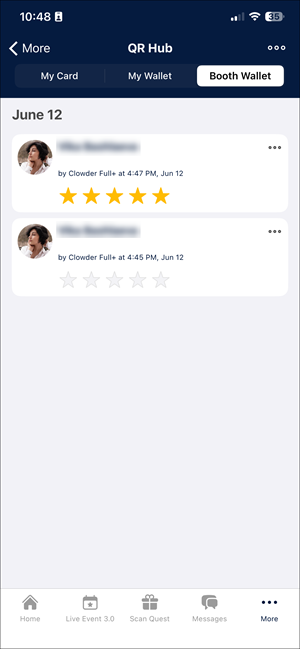
Booth Wallet is a tab in the QR Hub that is available only to users assigned as booth staff for an exhibitor in the Admin Panel. Booth Wallet helps exhibitors easily collect and organize leads during the event.
All contacts saved in this tab are shared and available to all booth staff of the same exhibitor. booth staff can manage, rate, and export contacts from this tab.
Accessing Booth Wallet
Users must be added as booth staff for an exhibitor to access the Booth Wallet tab. Admins manage booth staff and assign users in the Admin Panel.
To manage the booth staff users, refer to Adding Booth Staff.
Saving cards to Booth Wallet
All cards saved to the Booth Wallet are available to all users assigned as booth staff for the same exhibitor.
When a booth staff user scans a visitor's QR code, the scanned card will display a Save to button. By clicking this button, the user can choose where to save the card:
- Booth Wallet: Add the contact to the shared list for all booth staff users of the exhibitor.
- My Wallet: To save the card to the user's list.
- Add Both: Save the card to Booth Wallet and My Wallet.
If another booth staff user has saved the card, a message will appear indicating it is already in the Booth Wallet.
Managing cards
Booth staff users can manage cards saved in the Booth Wallet.
For each card in the list, click the More menu (three dots) to:
- Delete Card: Delete the card from the Booth Wallet.
- Share Card: Share the card using messaging apps and other on-device options.
- Add to My Wallet: Save the card to a personal wallet.
Any card can also be clicked to open the user's profile. In the profile, booth staff users can:
- Delete the card from the Booth Wallet.
- Click Save to Phone Contacts to add the contact to the device.
Rating contacts
Booth staff users can rate each contact from one to five stars. Only the person who scanned and saved the card to the Booth Wallet can set or change the rating.
If a card is saved from the Booth Wallet to My Wallet, the rating is not copied automatically. The contact must be rated again in My Wallet if needed.
Exporting contacts
The Booth Wallet tab allows exporting the list of scanned contacts saved specifically there.
The exported CSV file includes:
- QR Profile Fields (for example, full name, company, position).
- Rating.
- Scan date and time.
- Name of the booth staff user who scanned the contact.
- Exhibitor name.
- Target event.
Updated 3 months ago