

Bookmarks
Bookmarks allow users to save and organize content across the app for quick access from the My Account hub.
The Bookmarks tile in the My Account hub provides a single entry point to all saved items. Bookmarks are organized into categories: Events, Speakers, Exhibitors, and News Feed. If a user follows any Discussions, these show up in the Bookmarks section.
Bookmarks can be accessed from the mobile application on iOS and Android and the Web App.
Mobile (iOS and Android)
The Bookmarks section in My Account lets users quickly find all saved items, organized by category.
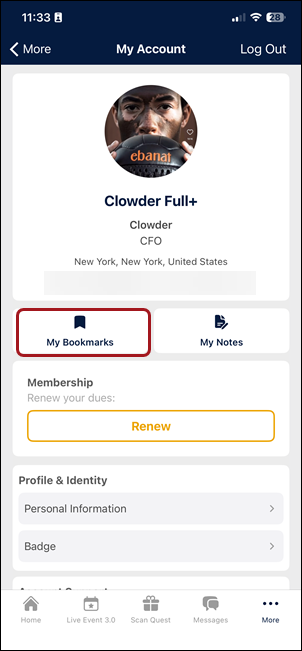
Tap the Bookmarks tile on the My Account hub to open the bookmarks list. Categories are displayed as tabs at the top of the screen.
Managing bookmarks
To remove a bookmark:
- Open the bookmarked item.
- Tap the bookmark icon to toggle it off. The item is immediately removed from the Bookmarks list.
NOTEFor Discussions, tap Following to remove it from Bookmarks. To return it to Bookmarks, tap + Follow.
Web app
On the web app, users can find Bookmarks in the My Account section. The bookmarks view uses the same category tabs (Events, Speakers, Exhibitors, News Feed) and provides the same functionality as mobile. Go to My Account > Bookmarks and click a category tab to browse saved items.
Updated 3 months ago