

Privacy & Visibility
IMPORTANTAdmins cannot configure Privacy & Visibility settings options. To configure this section, contact the Client Account Manager.
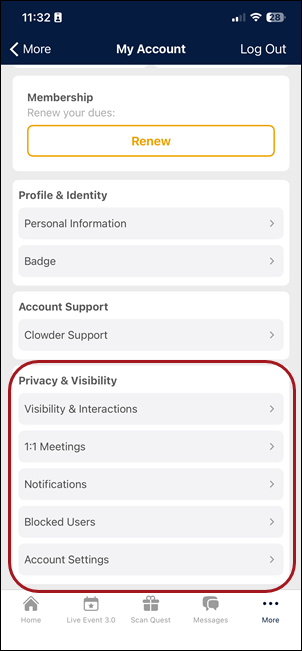
Privacy & Visibility provides controls for notification preferences, profile visibility, interaction permissions, blocked users management, and account-level settings.
This section gives users full control over how their profile is seen by others, who can interact with them, and what notifications they receive. It also includes account management actions such as password changes and account deletion.
Managing Privacy & Visibility settings
Users can interact with the Privacy & Visibility settings to manage their account preferences.
Notification settings
The Notification Settings screen allows users to control push notification preferences for different notification categories (for example, News Feed Updates, Event Reminders, Messages).
Visibility and interactions
The Visibility & Interactions screen helps users control how they appear in Users Lists, manage direct and group chat invites, enable screen rotation to display a QR code, and specify in-app notification behavior.
Blocked users
The Blocked Users screen displays a list of all users the current user has blocked. To unblock a user:
- Tap the user's card. This opens their profile.
- Tap the More (⋯) button in the upper right corner.
- Tap Unblock this User.
1:1 Meetings entry point
The Privacy & Visibility section includes a 1:1 Meetings entry point that allows the user to manage their meeting availability settings.
Navigating the web app
The Web App provides the same privacy and visibility controls in a desktop-friendly layout.
Updated 3 months ago