

Forums (App flow)
In the application, Forums organize discussions inside Communities. Admins create communities in the Admin panel for users to browse, join, and participate in. Forum posts (Discussions) allow users to share files, photos, comments with replies, and content.
For admin setup and moderation, see Forums.
Browsing and joining communities
Opening the Forums tab shows the Communities list. Each community card displays the following information:
- Community name
- User count
- Discussion count
- Last post date (for example, 1 year ago)
- Sponsorship information, if applicable
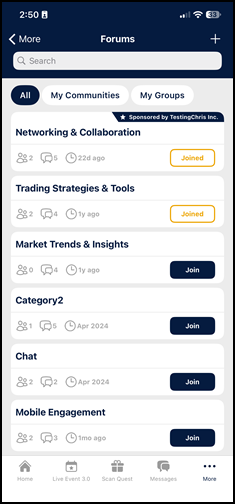
Three filter chips are available above the list:
- All – Displays every community available to the user.
- My Communities – Displays communities the user has joined.
- My Groups – Opens a dropdown of the user's groups. Selecting one or more groups filters the list to communities belonging to those groups. Hidden when the user belongs to no groups.
To join a community, the app user taps the Join button. The user is automatically added to the community, and the button changes to Joined.
To leave a community, the app user taps the Joined button. The user is automatically removed from the comminity, and the button changes to Join.
Navigating communities
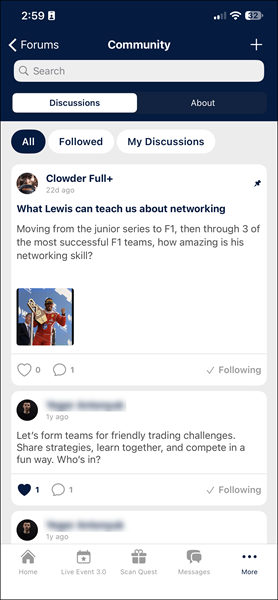
Tapping a Community card opens the community page with the following elements:
- Search bar – Allows users to search discussions by keywords in the discussion title or body.
- Navigation tabs named Discussions and About.
- Smart chips:
- All: Displays all discussions in the community, sorted from the latest to the oldest.
- Followed: Filers for followed discussions.
- My Discussions: Displays forum posts created by the user.
Discussions tab
The Discussions tab presents discussion cards showing each post's title, author, date, media, reply count, like count, and up to three lines of the body preview.
Pinned discussions appear at the top of the list, above non-pinned discussions, with a pin indicator. New discussions appear at the top of the non-pinned discussions. The list loads more discussions automatically as the user scrolls (infinite scroll). A search field helps users find discussions by title and description.
About tab
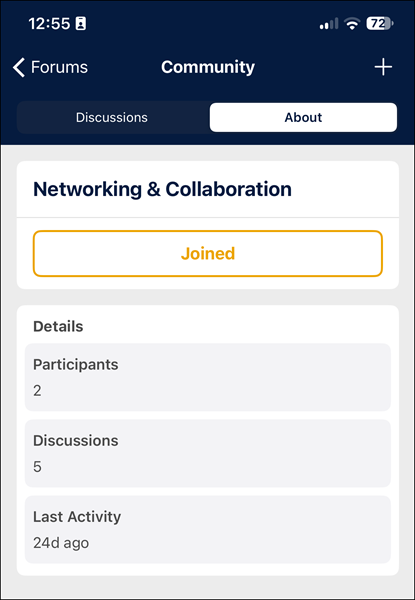
The About tab shows the following information:
- Community title
- Join status: App users see the Join button if they are yet to join the community, or the Joined button if they are already a community member. Users can click these buttons join or leave the community
- Community description – This block is not shown if no description was set by the admin.
- Participant count
- Discussion count
- Last activity status
Creating a post
Do the following to create a post:
-
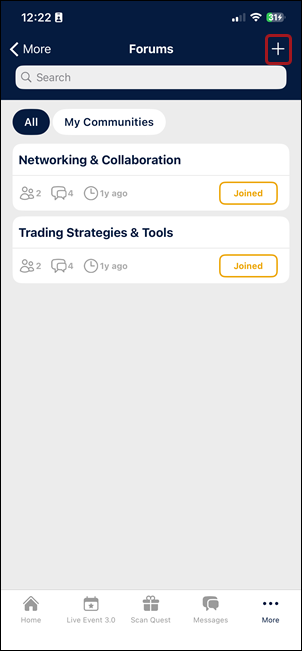
Go to Forums in the app.
-
Tap the '+' button at the top of the screen.
-
Choose the post category.
NOTEThe category is pre-selected if the user is already inside a specific category, or they belong to only one category.
-
Enter the post title.
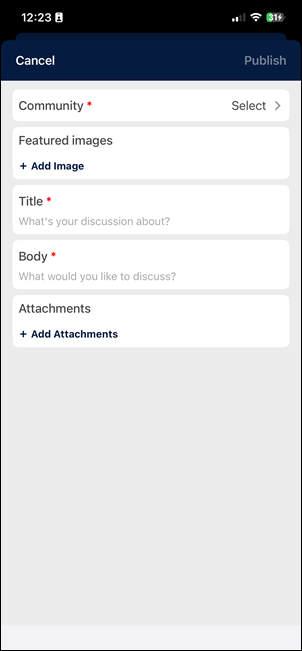
-
Enter the post description in the Body field.
-
(Optional) Attach images or files. For supported file types and upload limits, see File upload requirements and Image upload requirements.
-
Tap the Publish button.
Interacting with forum posts
Users can:
- Reply to posts.
- React to posts.
- Follow posts.
NOTEFollowed posts show up in the user's bookmarks. For more information, refer to Bookmarks.
- Share posts with others.
- Moderate posts – Every discussion and comment has a three dot menu. Tapping the three dots menu behaves differently depending on the discussion or comment's source:
- User's own content – Users can Edit Post, Share Post, or Delete Post. Deleting a post requires confirmation.
- Others users' content – Users can Share Post or Report Inappropriate. Choosing Report Inappropriate opens a comment field where users can include additional context before they can send in the report.
Following a category or post
Users can follow a forum category to stay updated on new posts. When the user follows the category:
- Posts from that category appear at the top of their News Feed
- Users receive push notifications about new posts in the categories they follow.
Users can also follow a forum post to get notified when the post gets updated with new activity.
Updated 29 days ago