

Displaying hierarchical grids
You can display query results in a hierarchical grid of summary rows and detail rows by using the Subtotal option.
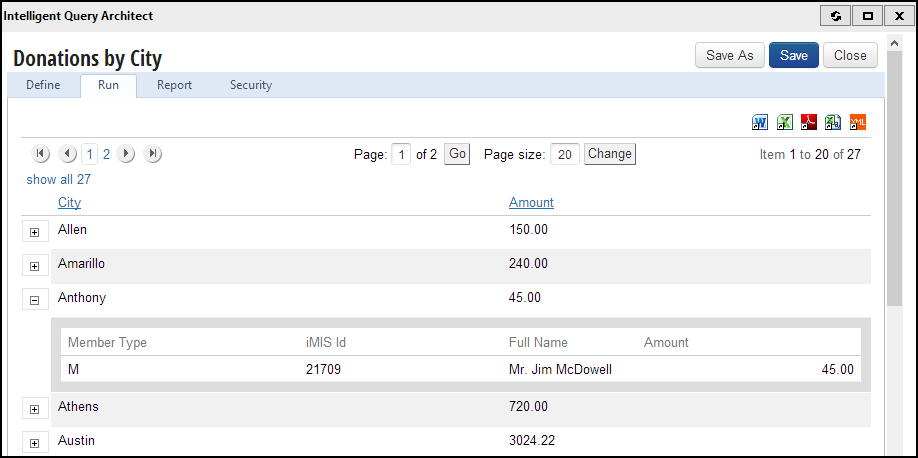
Subtotaled columns display as high-level items. Expanding one of these items displays the detailed (non-subtotaled) items.
Tips for creating a query displayed in a hierarchical grid
- If you select the Subtotal option for all properties in a query, the results will not be displayed in a hierarchical grid.
- Any properties that are not subtotaled are displayed in the detail rows only.
- To display a non-numeric property in the summary rows, select the Subtotal option.
- When any property in a query is subtotaled, then numeric, decimal properties (such as CsDonations.Amount, CsOrders.Balance, and CsDuesHistory.Amount) are automatically summed and displayed in the summary rows and also displayed in the detail rows. To display these properties in the summary rows only, select the Subtotal option.
- Non-decimal numeric properties such as CsContactBasic.Date of Birth, CsContactBasic.iMIS Id, and CsContactBasic.Home Phone are not automatically summed.
- If you select the Subtotal option for custom SQL expressions in your query, they are displayed in the summary rows. The subtotaled expression does not have any other effect on the query results.
- If the custom SQL expression is the only property subtotaled in your query, the query is not displayed in a hierarchical grid. You must select the Subtotal option for at least one property that is not a custom SQL expression to display a hierarchical grid.
Hierarchical grid example
This example illustrates a query that displays all of the donations you have received, organized by city.
- Go to RiSE > Intelligent Query Architect > New > Query.
- Name the query Donations by City.
- Select the Advanced mode.
- (Sources tab) Add CsDonations and CsContactBasic.
- (Display tab) Select the following properties to be displayed:
- CsContactBasic.City
- CsContactBasic.iMIS Id
- CsContactBasic.Full Name
- CsContactBasic.Member Type
- CsDonations.Amount
- Select the Subtotal option for Contact.City.
- Run the query.
The results display in a hierarchical grid. You can click to expand and collapse the rows. The summary rows list the city (because it is subtotaled) and the donation amount (automatically because it is numeric and decimal). All other properties display in the second-level detail rows.
Updated 3 months ago
Did this page help you?