

Modifying site themes
Several themes have been created for the Quick Start Sites. You can modify these themes to help identify and personalize your organization’s website.
WarningNever change the core style sheets 00-Reset.css and 10-UltraWave.css. All derivative themes inherit from these files, and any changes you make to them are lost on upgrade. Instead, override the base styles in your 99-[theme].css file.
- Before modifying a theme, find the best one: apply all of the themes to the default Member site in turn, and decide which theme is closest to the final look and layout that you want.
- Always work from your copy of the theme, so that you can begin again. For more information, see Copying a website theme.
- Make changes only to websites that you create. When a Quick Start Site is updated with each release, the iMIS Upgrader overwrites any changes you made to it.
- Take advantage of browser-based developer tools to test and troubleshoot changes before committing them to your style sheets:
-
Internet Explorer and Chrome: Press F12 to toggle the Developer Toolbar.

-
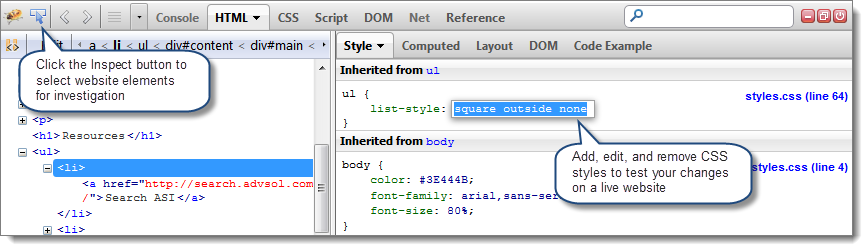
Firefox: Install the Firebug add-on to see a wealth of information about the structure of the website and the styles it is using. Turn on the element inspector and click a piece of content to see the styling that it is implementing:
-
Updated 3 months ago
Did this page help you?