

Troubleshooting iMerge
Do the following to troubleshoot iMerge:
iMerge log of merged records
iMerge tracks some limited information on every merge performed – the Merge From ID, Merge To ID, iMIS user name that performed the merge, and the date of the merge called CSI_MergedRecords.
Do one of the following to view merge records:
- Run the following statement in either SQL Management Studio
- Directly from iMIS > Utilities > SQL Query > New.
- Paste the following query:
select * from CSI_MergedRecords
order by DateOfMerge desc - Click Execute.
- Paste the following query:
- You can also create an IQA to query this table as well.
User is unable to log into iMerge
Be sure that you have a user privilege of at least four in the membership system. If you do not, you will receive the following message:
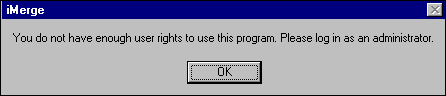
See your System Administrator to increase your user rights.
Unable to find ContactMain.ContactKey Value for iMIS ID
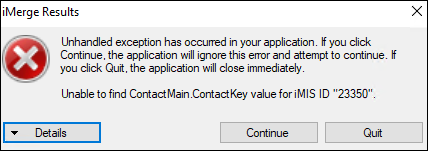
This error will occur if the SyncContactID field in the ContactMain SQL table could not be found for one of the iMIS ID (DuplicateID or MergeToID).
A SQL query to find those records would be:
SELECT * FROM ContactMain WHERE SyncContactID NOT IN (SELECT ID FROM [Name]);
Excluding the SYSTEM record where SyncContactID is blank.
To resolve, you will need to update that field to have the correct iMIS ID.
To resolve all the issues in your database, try also running this ASI SQL stored procedure that comes with all iMIS environments: asi_SyncNetContacts.
Error occurs when user tries to merge a record set
iMerge will not merge a record set in which both IDs are signed up for the same meeting and the duplicate ID has open A/R. Since iMerge cannot create duplicate registrations, one must be deleted. However, registrations with open A/R cannot be deleted.
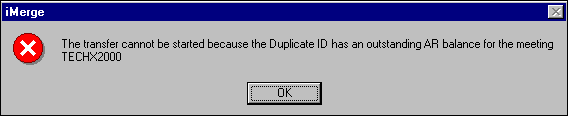
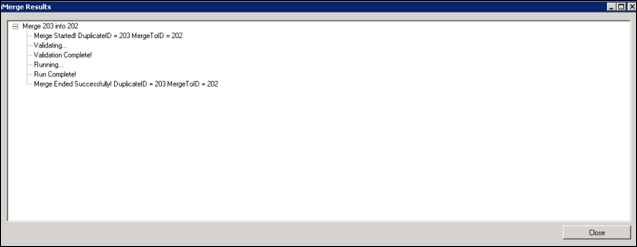
After you click OK, the Status Report will appear indicating that the merge was unsuccessful.
A message box appears asking user if he wants to delete a duplicate meeting registration… The duplicate ID has the same meeting registration as the merge to ID. You have the option of deleting* the duplicate meeting registration.
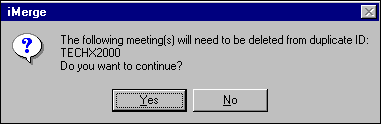
Meeting Scenarios
| Duplicate ID | Merge To ID | Outcome |
|---|---|---|
| Registered & Not Paid | Registered & Paid | Will not delete Duplicate ID with open AR. |
| Registered & Paid | Registered & Not Paid | Will not delete if Merge To ID hasn't paid for the same meeting as the Duplicate ID. |
| Registered & Paid | Registered & Paid | Provided ONE of the two registrations has a Cancelled status, let's you know that a meeting registration will be deleted. Have the option to discontinue. If you continue, then it will delete the meeting registration from the Duplicate ID and move the charges and payments (credits) to the Merge to ID. |
| Registered & Not Paid | Registered & Not Paid | Will not delete Duplicate ID with open AR. |
Message appears asking me if I want to delete a subscription for the Duplicate ID
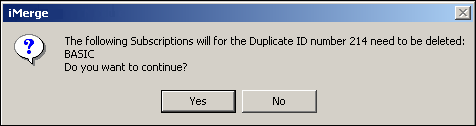
Duplicate ID has a subscription. You have the option of deleting the duplicate subscription.
Subscription Scenarios
| Duplicate ID | Merge to ID | Outcome |
|---|---|---|
| Subscription & Not Paid | Subscription & Paid | Lets you know that a subscription will be deleted. Has the option to discontinue. If you continue, then it will delete the unpaid subscription from the Duplicate ID. Always keeps the Merge To ID subscription. |
| Subscription & Paid | Subscription & Not Paid | Lets you know that a subscription will be deleted. Has the option to discontinue. If you continue, then it will delete the paid subscription from the Duplicate ID. Always keeps the Merge To ID subscription. |
| Subscription & Paid | Subscription & Paid | Lets you know that a subscription will be deleted. Has the option to discontinue. If you continue, then it will delete the paid subscription from the Duplicate ID. Always keeps the Merge To ID subscription. |
| Subscription & Not Paid | Subscription & Not Paid | Lets you know that a subscription will be deleted. Has the option to discontinue. If you continue, then it will delete the unpaid subscription from the Duplicate ID. Always keeps the Merge To ID subscription. |
ID listed multiple times in Duplicate Finder search results
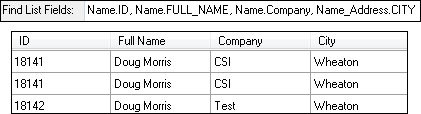
When the same ID is listed multiple times in Duplicate Finder's search results it is because a field from a multi-instance table (e.g., Activity, Name_Address, etc.) is listed in Find List Fields.
For example,
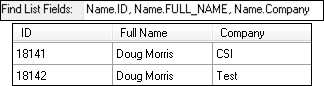
- ID 18141 contains multiple addresses; however, the ID is not listed multiple times because fields from multi-instance table Name_Address are not included in Find List Fields.
- Name_Address.ADDRESS_1 and Name_Address.CITY are added to Find List Fields. This causes 18141 to be listed multiple times,
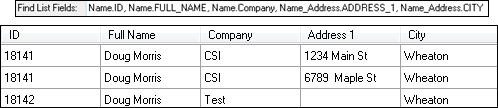
- Note that displaying any field from a multi-instance table will cause multiple listings. In the example below it is not obvious why 18141 is displayed multiple times because Name_Address.CITY is the same for both of its addresses and no additional unique identifiers (like Name_Address.ADDRESS_1) are displayed.
Error when attempting to merge two records
If, when trying to merge two records, you receive an error like the following:
Subquery returned more than 1 value. This is not permitted when the subquery follows =, !=, <, <= , >, >= or when the subquery is used as an expression.
The source of the error is likely from one of two places. Either a custom stored procedure is being included with iMerge, that incorrectly returns (see section in user guide labeled 'Developing a Stored Procedure iMerge Can Call', which discusses how the Stored Procedure Must NOT Return Any Recordsets.
Or, there is a custom trigger over one of the tables, causing this error. To test this out, we recommend turning off all custom triggers over a TEST iMIS database, and see if the error persists.
Updated 3 months ago