

About authorization levels
The Sys Mgmt. authorization level grants system administration on iMIS Desktop, as the SysAdmin role (see User-level security: Roles and Groups) does across the other views. In fact, they are intrinsically paired: If you give a user Level 8 authorization for Sys Mgmt., they automatically join the SysAdmin role; if you remove that Level 8, they automatically drop the SysAdmin role.
NoteDo not remove a user's SysAdmin role without also lowering the Sys Mgmt level: parts of the system that consider them an administrator will conflict with the parts that do not. Make sure they have both or neither.
All users who had authorization level 8 in Sys Mgmt. are granted the SysAdmin role.
How Sys Mgmt. levels affect iMIS Desktop access
The Sys Mgmt. authorization level controls what appears on iMIS Desktop menus:
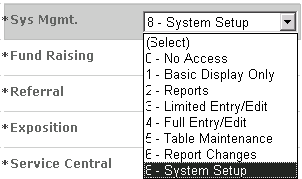
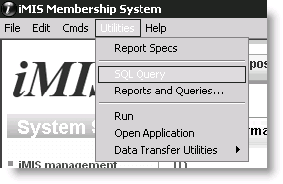
These are the menu bar privileges associated with each level:
| Level | Effect on *iMIS* Desktop menus |
|---|---|
| 0 | No *iMIS* features appear |
| 1 | Licensed features of *iMIS* appear. File > System Setup appears (Full users only) |
| 2 | No changes |
| 3 | No changes |
| 4 | No changes |
| 5 | On the File > System Setup window, Organization Names appears (Full users only) |
| 6 | No changes |
| 8 | Utilities appears (Full users only) |
Updated 5 months ago