

Add a Prospect window
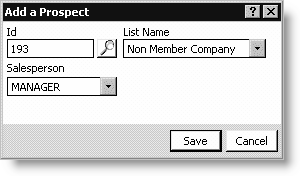
Id
Enter the ID of the prospect you are adding. Select the Find icon to look up an ID.
List Name
Select a prospect list.
Salesperson
Select a salesperson.
To add a prospect
- From Exposition, select Manage prospect lists to open the
Manage prospect lists window. - Select an Exposition.
- Click Add New Prospect to open the Add a Prospect window.
- Enter the prospect's Id (select the Find icon to look up an ID). If adding a new prospect that does not have an ID, do the following:
- Press Tab in the Id field to open the Expo Prospect - Name/Address window.
- Enter a Member Type (required) and all other applicable information about the new prospect.
- Click Save to return to the Add a Prospect window.
- Select a List Name (select NONE if you do not want to assign the prospect to a specific list).
- Select a Salesperson (select NONE if you do not want to assign the prospect to a specific salesperson).
- Click Save.
Updated 6 months ago
Did this page help you?