

How the Begin Date for an anniversary billing cycle is calculated
Begin Date with no Start Date Control options selected
The following diagram illustrates how the Begin Date is determined for an anniversary dues billing cycle:
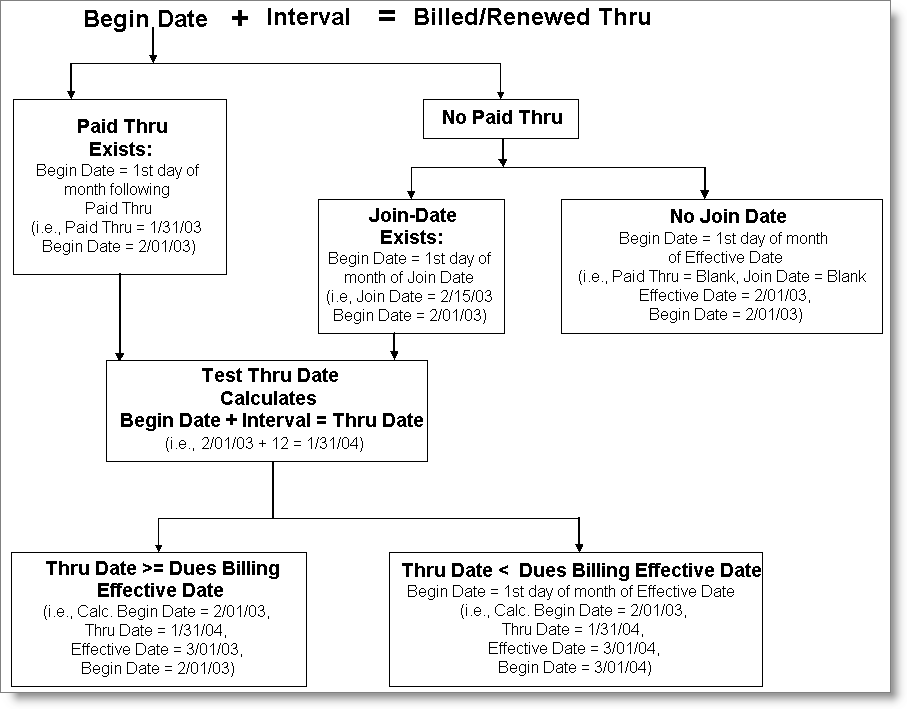
The following table shows examples of the Begin Date calculation using a dues billing Effective Date of 1/01/2004 with a 12-month term interval:
| Customer | Join Date | Paid Thru | Begin Date | Basis for Setting Begin Date |
|---|---|---|---|---|
| Sally - Renewal | 01/01/1996 (NA) | 12/31/2003 | 01/01/2004 | Paid Thru |
| Billy - Did Not Get Billed Yet | 12/01/1983 (NA) | 11/30/2003 | 12/01/2003 | Paid Thru |
| John - Hope to Reinstate | 1/01/1991 (NA) | 12/31/2003 | 01/01/2004 | Effective Date |
| Mary - New Customer | 12/15/2004 | Blank | 12/01/2004 | Join Date |
| Joyce - New Customer | Blank | Blank | 01/01/2004 | Effective Date |
| Dave - Missed the Boat | 1/01/1978 | Blank | 01/01/2004 | Effective Date |
Begin Date with Start Date Control options selected
The following diagram illustrates how the Begin Date is determined for an anniversary dues billing cycle using the Start Date Control options on the Set up general options window:
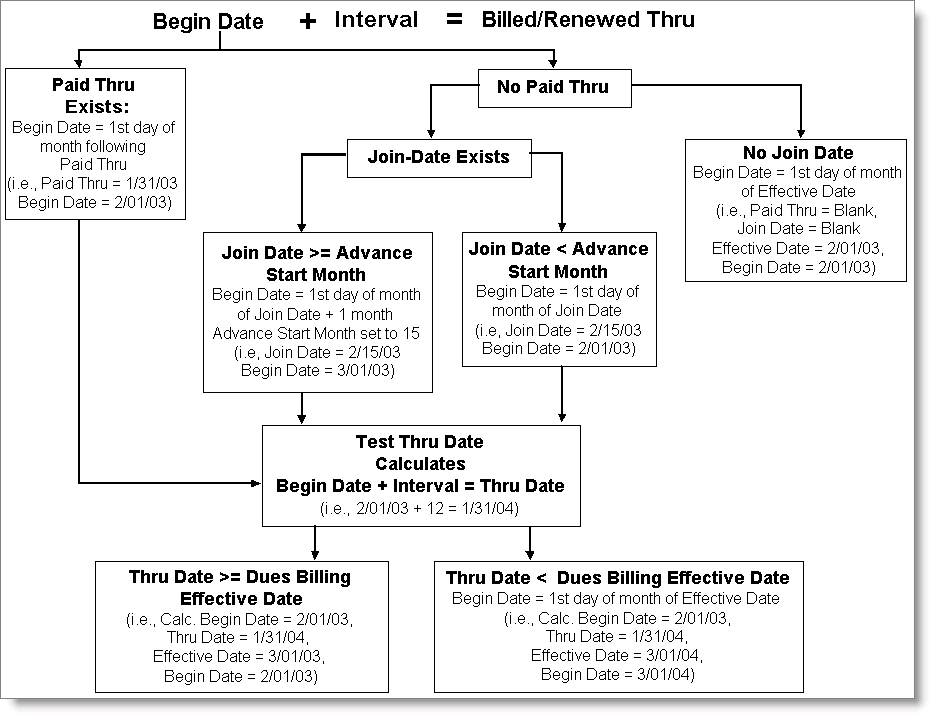
The following table shows examples of the Begin Date calculation for a 12-month term interval using the Start Date Control options on the Set up general options window:
| Customer | Subscription Term Billed | Join Date/ Payment Trans Date | Advance Start Date | Apply to New Customers | Apply to Delinquent Customers | Grace Period | New Subscription Term |
|---|---|---|---|---|---|---|---|
| Mary - New Customer | N/A | 04/27/2003 | 25 | Yes | Yes | 2 months | 05/01/2003 - 04/30/2004 |
| Joyce - New Customer | N/A | 04/27/2003 | 25 | No | No | N/A | 04/01/2003 - 03/31/2004 |
| Sally - Renewal | 01/01/2002 - 12/31/2002 | 04/16/2003 | 15 | Yes | Yes | 3 months | 05/01/2003- 04/30/2004 |
| Olga - Old Customer | 07/01/2002 - 06/30/2003 | 08/01/2003 | 15 | Yes | Yes | 3 months | Term remains the same |
Updated 3 months ago
Did this page help you?