

Defining speakers and evaluation criteria
Before you can evaluate a speaker, you first must define the speaker activity type and the speaker evaluation criteria.
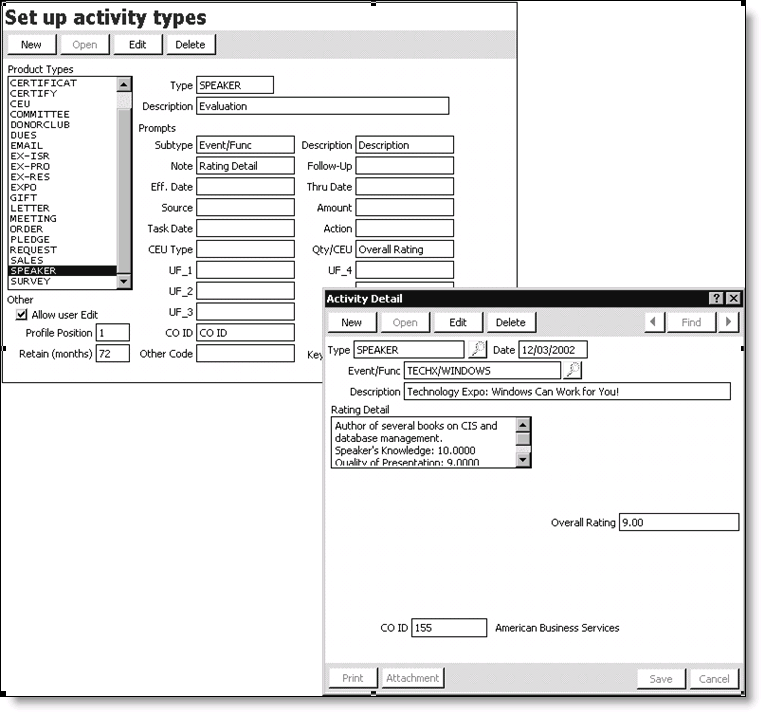
To set up a speaker activity type
- From Customers, select Set up module> Activity types.
- Click New.
- Enter SPEAKER in the Type field.
- Enter a description of the activity in the Description field (for example, Evaluation).
- Enter a prompt for the Subtype (for example, Meet/Func).
- Enter a prompt for the Description (for example, Description).
- Enter a prompt for the note area in the Note field (for example, Rating Detail).
- Enter a prompt for the overall or average rating in the Qty/CEU field (for example, Overall Rating).
NoteiMIS will automatically populate the rating for any line item within the detail section that contains the word “average” or “overall” in its description. However, you first must enter the prompt in the Qty/CEU field for the field to display on the Activity Detail window.
- Enter a prompt in the CO ID field (for example, CO ID).
- Under Other, enable or disable the Allow user Edit option.
- Enter a value in the Profile Position field.
- Enter a value in the Retain (months) field.
- Click Save. The values defined for the activity type on the Set up activity types window display on a speaker's Activity Detail window.
Updated 6 months ago
Did this page help you?