

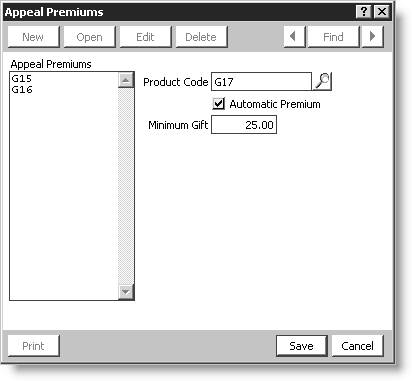
Appeal Premiums window
You can apply a premium against an appeal code to establish rules about which premium is given for a specific gift amount. For example, a gift of $10 will provide a key chain, a gift of $ 25 will provide a mug. Appeal premiums are created and assigned to products on the Appeal Premiums window.
NoteTo display the Premiums button in the Appeals window, you must enable the setup option to Allow Premiums as Products (Fundraising > Set up module).
Creating appeal premiums
Appeal Premiums is the product selected for the premium.
Product Code is the product associated with the Appeal premium. The Premium option must be enabled and defined on the Manage Products window for the product to appear in this list (Orders > Manage inventory > Manage products).
Automatic Premium controls options on the Enter and edit gifts window.
- If enabled, the premium will automatically attach.
- If disabled, the Show all premiums option is available and you can attach a general item from inventory.
Minimum Gift sets the minimum amount required to apply the premium.
Updated 6 months ago