

MenuTransJournal - AR/Cash Transactions report
The AR/Cash Transactions report runs the following reports:
- Credit Memo Journal - This report groups together adjusting transactions that typically reduce or reverse income, such as credit memo transactions entered in AR/Cash, Billing (from adjusting accrual dues invoices), Fundraising, and Order Entry (from invoicing Credit Memo type orders).
- Debit Memo Journal - This report groups together adjusting transactions that typically increase income, such as debit memo/adjustment transactions entered in AR/Cash, Billing (from adjusting accrual dues invoices), Fundraising, and Order Entry (from invoicing debit memo type orders).
- Payments Journal - This report focuses primarily on cash receipt transactions, such as those entered in the (AR/Cash) Enter and edit cash receipts, (Billing) Enter and edit payments, (Fundraising) Process payments, and (Service Central) Enter and edit payments windows.
- Refund Journal - This reported provides information on transactions generated as a result of refunds issued from AR/Cash (from AR/Cash, select Process month-end procedures, click Credit Invoices, select one or more credit invoices, and click Issue Refunds).
- Revenue-Sales Journal - This report provides a detailed audit trail of all AR/Cash transactions entered through AR/Cash.
- Transaction Recap - This report provides an accounting summary showing the net effect of the transactions.
These documents do not include transactions generated through other modules, such as Events.
NoteIf you have batch control enabled (from AR/Cash, select Set up module, and click Batch Control) print your transaction journal from the Manage batches window (from AR/Cash, select Manage batches). You can also select batch-specific printing options on the Manage batches window.
The detail journal separates transactions by type. Transactions entered on the Enter and edit sales transactions window (from AR/Cash, select Enter and edit transactions > Sales transactions) print with summary totals followed by a page break before printing transactions entered on the Enter and edit cash receipts window (from AR/Cash, select Enter and edit transactions > Cash receipts).
NoteRemember to select the output destination (printer, screen, file, and so on) before you generate this journal.
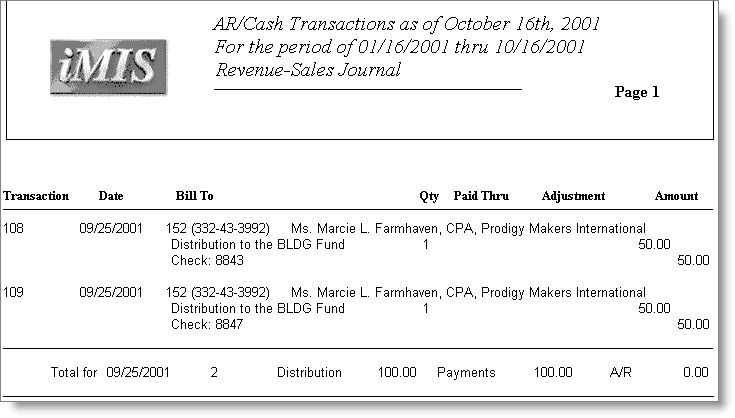
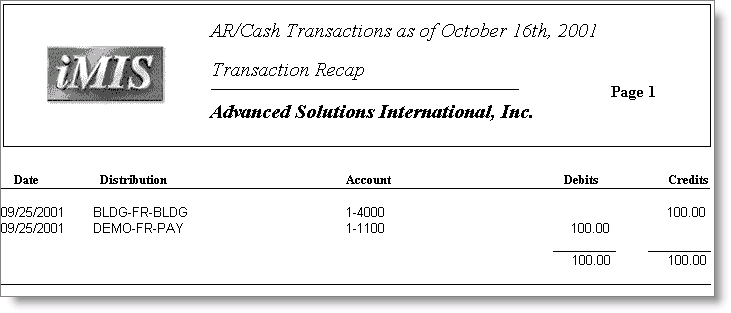
NoteThe AR Cash Transactions (Crystal) report prints as two different pages on the same report. Use the scroll feature on the Print window to view Transaction Recap.
Updated 6 months ago