

Batch and manual address verification in iMIS
Batch verification
If you are licensed for QAS Batch v4, and have properly implemented the product with iMIS (see Implementing QAS with iMIS, a task list item in the Customers module enables you to perform batch verification of iMIS addresses (see Verifying a batch of addresses with QAS Batch).
Manual verification
If you are licensed for QAS Pro v4, and have properly implemented the product with iMIS (see Implementing QAS with iMIS), a Verify Address button is accessible through the following windows:
- Customers > Manage Customers
- Events > Register a customer > select the Attendees tab
- Orders > Enter and edit orders > in the Bill to ID field, click Add
- Orders > Enter and edit order > select the Ship to Info tab
- Exposition > Process booth orders > click Options and choose Address
- Fundraising > Enter and edit gifts > select the Donor tab
- Fundraising > Enter and edit gifts > select the Soft Credit tab and click Add
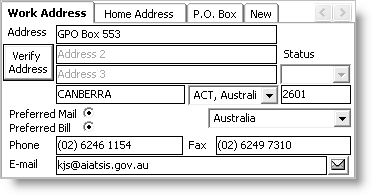
If an address cannot be verified automatically from the address data that has been entered, a new QAS for iMIS window enables you to manually verify an address (see Manually verifying addresses with QAS
Manual address verification for QAS requires purchase of a separate license key than that required for QAS batch address verification. There is no dependency between the two licenses. You can have either the batch or on-demand license or both.
Updated 6 months ago