

Set up prospect list window
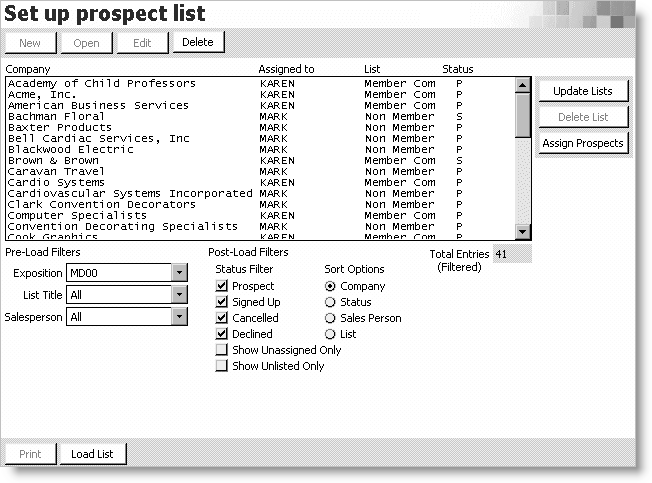
Prospect List
Lists all available prospects by Company name.
Update Lists button
Opens the Update Prospect Lists window for updating prospect lists.
Delete List button
Click to delete a single prospect list (disabled when all prospects are displayed).
Assign Prospects button
Opens the List Assignment Options window used for assigning an exhibitor/prospect to a specific salesperson (enables only when prospects are selected from the Prospect List).
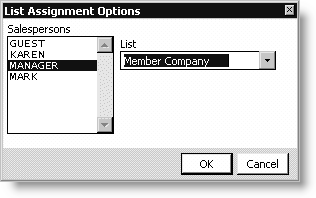
Salespersons - Select a salesperson.
List - Select the list you are assigning to the salesperson.
Pre-Load Filters
Exposition - Select the exposition's associated prospect list.
List Title - Select the customer type of a specific list of prospects (defaults to ALL).
Salesperson - Select the salesperson(s) associated with the list (defaults to ALL).
Post-Load Filters
Status Filter - Separate your list using any combination of the following:
-
Prospect - Lists prospective exhibitors. These prospects are individuals who have exhibited at a previous exposition.
-
Signed Up - Displays exhibitors who have already signed up for the selected exposition.
-
Cancelled - Displays exhibitors who have canceled their order.
-
Declined - Displays prospects who have declined to exhibit in the selected exposition.
-
Show Unassigned Only - Displays only exhibitors/prospects who are not assigned to a specific salesperson.
-
Show Unlisted Only - Displays only those exhibitors/prospects who are not assigned to a specific prospect list.
-
Sort Options - Sort your list using any combination of the following:
-
Company - Lists exhibitors/prospects alphabetically by company name.
-
Status - Lists exhibitors/prospects by status in the following order:
- S = signed up
- P = prospect
- W = wait list
- D = declined
- C = cancelled
-
Sales Person - Lists exhibitors/prospects alphabetically by salesperson.
-
List - Lists exhibitors/prospects alphabetically by list title.
Total Entries (Filtered)
Displays the total number of prospects listed.
Load List
Click to display the Prospect List on the window.
Updated 6 months ago