

Creating User-Defined Fields
On the Exposition Set up module window, create the custom, user-defined fields that you want to display on the Expo Description and Expo Registration - Other windows.
NoteThe user-defined fields display on the Expo Description and Expo Registration - Other windows only when labels are created for the user-defined fields on the Exposition Set up module window.
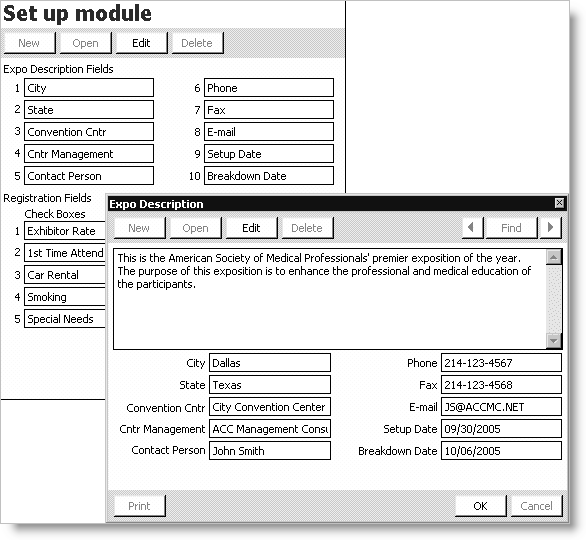
To create user-defined fields for the Expo Description window
- From Exposition, select Set up module to open the Set up module window.
- Click Edit.
- Enter the Expo Description Fields that you want to display on the Expo Description window.
- Click Save.
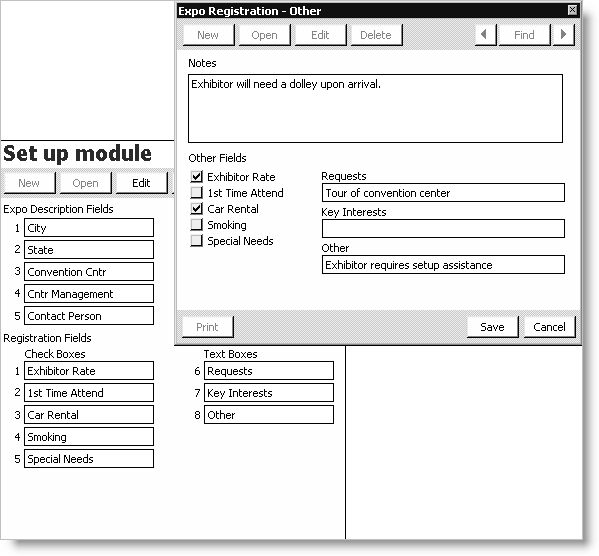
To create user-defined fields for the Expo Registration - Other window
- From Exposition, select Set up module to open the Set up module window.
- Click Edit.
- Enter the Registration Fields that you want to display on the Expo Registration - Other window. Both checkboxes and text boxes are available.
- Click Save.
Updated 6 months ago
Did this page help you?