

Sales Script window
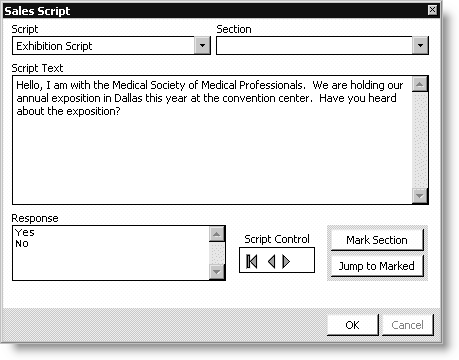
Script
Select a list.
Section
Select a section of a list.
Script Text
Displays the text of the selected section.
Response
Lists responses associated with the selected section.
Script Control
Select to move forward and backward through the script sections.
Mark Section button
Click to mark a section of the script.
Jump to Marked button
Click to jump to marked sections of the script.
To use sales scripts
- Open the Expo Sales window:
- From Exposition, select Manage prospect lists to open the
Manage prospect lists window. - Load a prospect list.
- Select a prospect from the Prospect List.
- Click Exhibitor Sales.
- Click Sales Script to open the Sales Script window.
- Select a Script from the drop-down list.
- Select a script Section from the drop-down list. The Script Text displays.
- Read the script text, and double-click the appropriate Response. Based on the response you select, move to the next appropriate section.
- Click Mark Section to put a temporary placeholder on a section. You can continue to move forward with the script, but if you need to return to the marked section, click Jump to Marked.
- Click the Script Control arrows to jump back to the beginning of your script or to move forward or backward through the script.
- Click OK.
Updated 6 months ago
Did this page help you?