

Select Specific Receipt(s) window
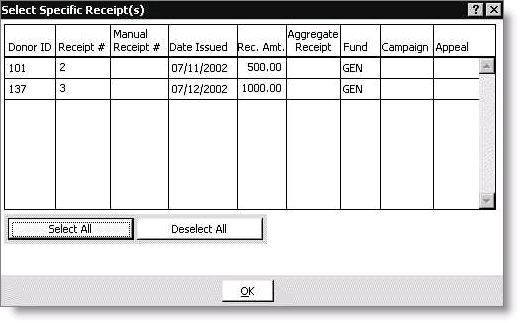
Use the Select Specific Receipts(s) window to select specific receipts for thank you receipts after the search criteria have been entered on the Auto Receipt Batch Query window. You may also use the Select Specific Receipts(s) window as the sole selection of receipts for thank you receipts.
Donor ID
Displays the customer ID number of the donor associated with the receipt.
Receipt
Displays the automatically generated receipt number.
Manual Receipt
Displays the manual receipt number.
Date Issued
Displays the date the receipt was issued.
Rec Amt
Displays the receipt amount.
Aggregate Receipt
Displays Yes if the receipt is an aggregate receipt.
Fund
Displays the fund associated with the receipt.
Campaign
Displays the campaign associated with the receipt.
Appeal
Displays the appeal associated with the receipt.
Select All
Enables you to select all the gifts in the window.
Deselect All
Enables you to deselect all selected gifts in the window.
Updated 6 months ago