

Fields: Register a customer window - Overview tab
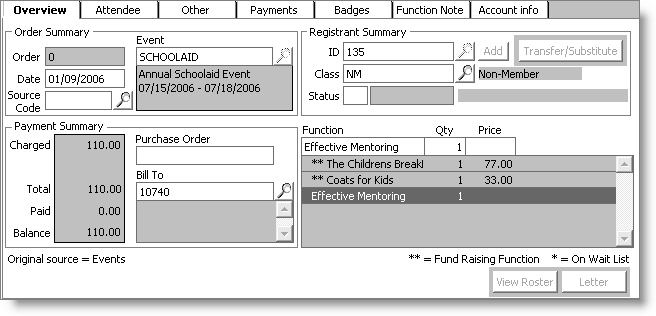
Data in the scrolling list of event functions is maintained within the Order_Lines table (each registered function is stored in a separate record). Most of the other fields are stored in the Orders table, except those noted.
| Screen Label: Field | Type | Length | Comments |
|---|---|---|---|
| Order: ORDER\_NUMBER | Number | (Order Summary area) Sequential registrant order number assigned to each new order. | |
| Event: Order\_Meet.MEETING | Character | 10 | (Order Summary area) Event code |
| Date: ORDER\_DATE | Date | (Order Summary area) Registration date, which affects assigned fee amounts | |
| ID: ST\_ID | Character | 10 | (Registrant Summary area) Registrant's customer ID |
| Class: Order\_Meet. REGISTRANT\_CLASS | Character | 5 | (Registrant Summary area) Code for broad category of registrants |
| Status: STATUS | Character | 5 | (Registrant Summary area) Code that remains blank unless a registrant is canceled normally (C) or canceled for purposes of a substitution or transfer (CT) |
| Charged: TOTAL\_CHARGES | Money | 4 dp | (Payment Summary area) Grand total of all fees charged |
| Paid: TOTAL\_PAYMENTS | Money | 4 dp | (Payment Summary area) Grand total of all payments applied to this order (both from payment window and Enter and edit cash receipts window) |
| Balance: BALANCE | Money | 4 dp | (Payment Summary area) Net balance computed by subtracting payments from charges |
| Purchase Order: CUSTOMER\_REFERENCE | Character | 40 | (Payment Summary area) Reference number for the order |
| Bill To: BT\_ID | Character | 10 | (Payment Summary area) Customer ID of party responsible for paying registrant's fees; may be the same as the registrant's customer ID |
Updated 5 months ago
Did this page help you?