

Customer Setup - Acquisition Options window
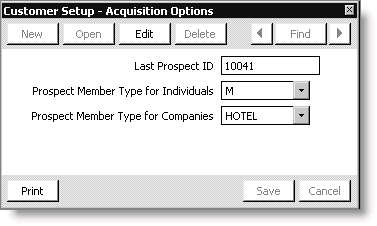
The Customer Setup - Acquisition Options window includes the following fields and options:
Edit
Used to specify the acquisition options.
Last Prospect ID
(Display-only) The last prospect ID that was assigned.
Prospect Member Type for Individuals
Use this drop-down list to select the member type to use when converting individual prospects from the drop-down list.
NoteWhen you import prospect records into iMIS, the system determines a record is an individual record if the import file contains a value for FirstName, LastName, or FullName.
Prospect Member Type for Companies
Use this drop-down list to select the member type to use when converting company prospects from the drop-down list.
NoteWhen you import prospect records into iMIS, the system determines a record is a company record if the import file does not contain a value for FirstName, LastName, or FullName.
Print
Used to generate and send a system settings report to your report destination.
To set Acquisition options
- From Customers, select Set up module > General.
- Click Basic Options to open the Customer Setup - Basic Options window.
- Click Acquisition Options.
- Click Edit on the Customer Setup - Acquisition Options window.
- Select the Prospect Member Type for Individuals from the drop-down list.
- Select the Prospect Member Type for Companies from the drop-down list.
- Click Save.
- Restart iMIS for your changes to take effect.
Updated 6 months ago