

Understanding group operations
Operations are set tasks that can be automatically performed on group members at different stages. Operations can be applied at the following stages:
- Joining - When a user is added to a group
- Leaving - When a user is removed from a group
- Instantaneous - An ad-hoc operation
Adding an operation to a group
To add an operation to a group, do the following:
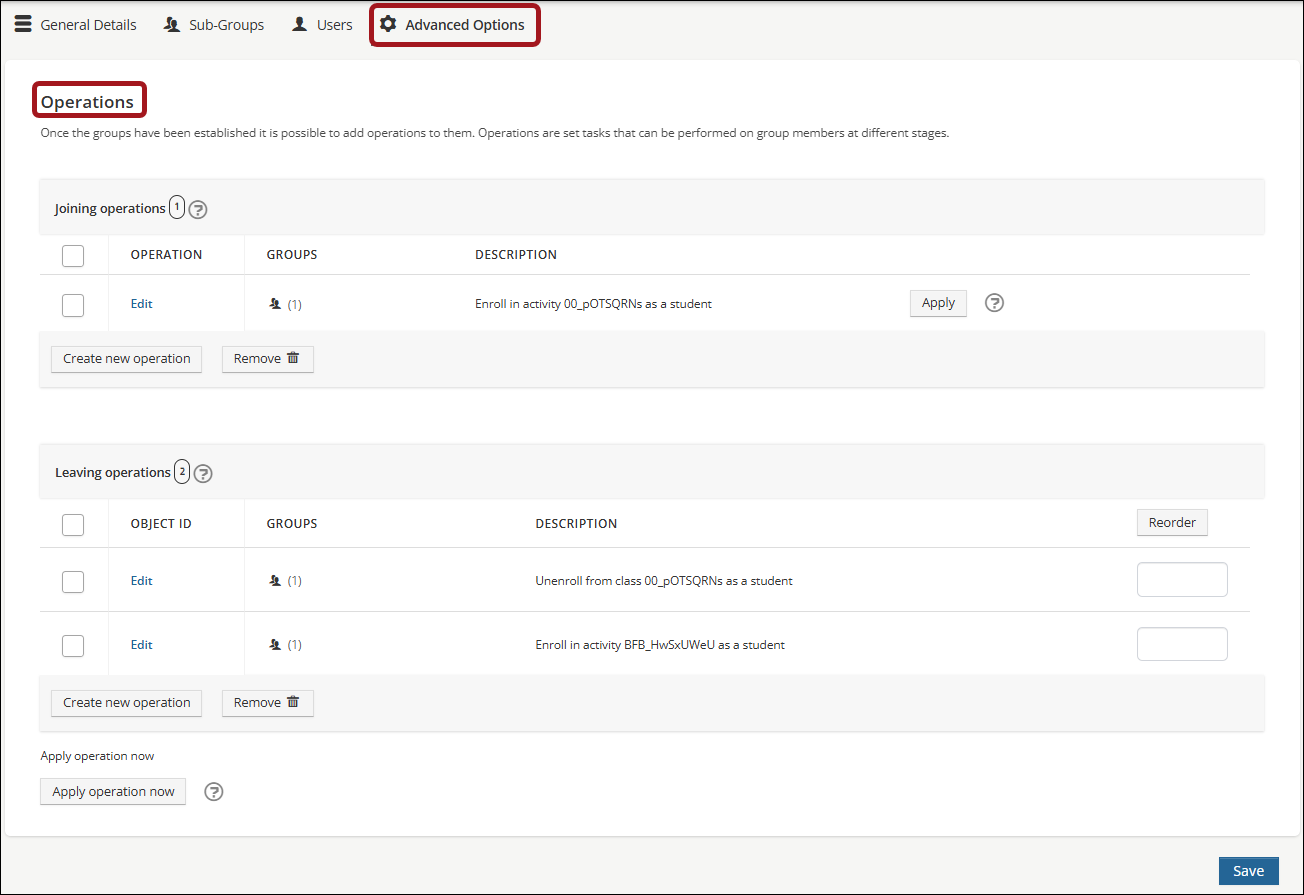
- Within the group, go to Advanced Options > Operations.
- Choose from the following options:
- To add a joining operation, click Create new operation in the Joining Operations section.
- To add a leaving operation, click Create new operation in the Leaving Operations section.
- To add an instantaneous operation, click Apply operation now.
- From the drop-down list, select the Operation you wish to add.
- Click Next.
- Configure the operation. See List of group operations for details.
- Click Previous to navigate back to the list of operations, or Cancel to exit.
- Click OK.
The operation is now listed on the operations screen.
NoteIf a joining operation is added, and there are existing group members, Click Apply to trigger the operation for all existing members.
Editing an operation
To edit a joining or leaving operation, click Edit and save the changes.
Removing an operation
To remove a joining or leaving operation, select the operation and click Remove.
Re-ordering operations
Administrators can decide the order in which joining and leaving operations are applied. To re-order operations, set the numerical order of the operation in the Reorder fields.
Updated about 1 hour ago
Did this page help you?