

2022 Release Notes
October 2022 (10.6.1)
New Features
TopClass Login Screen Customization
NEW - As a continuation of our multi-phase project to refresh the TopClass user interface, we have added the ability to customize the look and feel of the TopClass Login screen, delivering a more engaging, customer focused experience for Learners.
For customers and Learners signing in directly to the TopClass, rather than using Single Sign-On (SSO), there are two different Login screen options available.
Landing Page
This option allows customers to create a more personalized, interactive, detailed Login screen based on the existing Landing page functionality.
Customers can add additional branding, links to their catalog, articles, and social media channels.
-
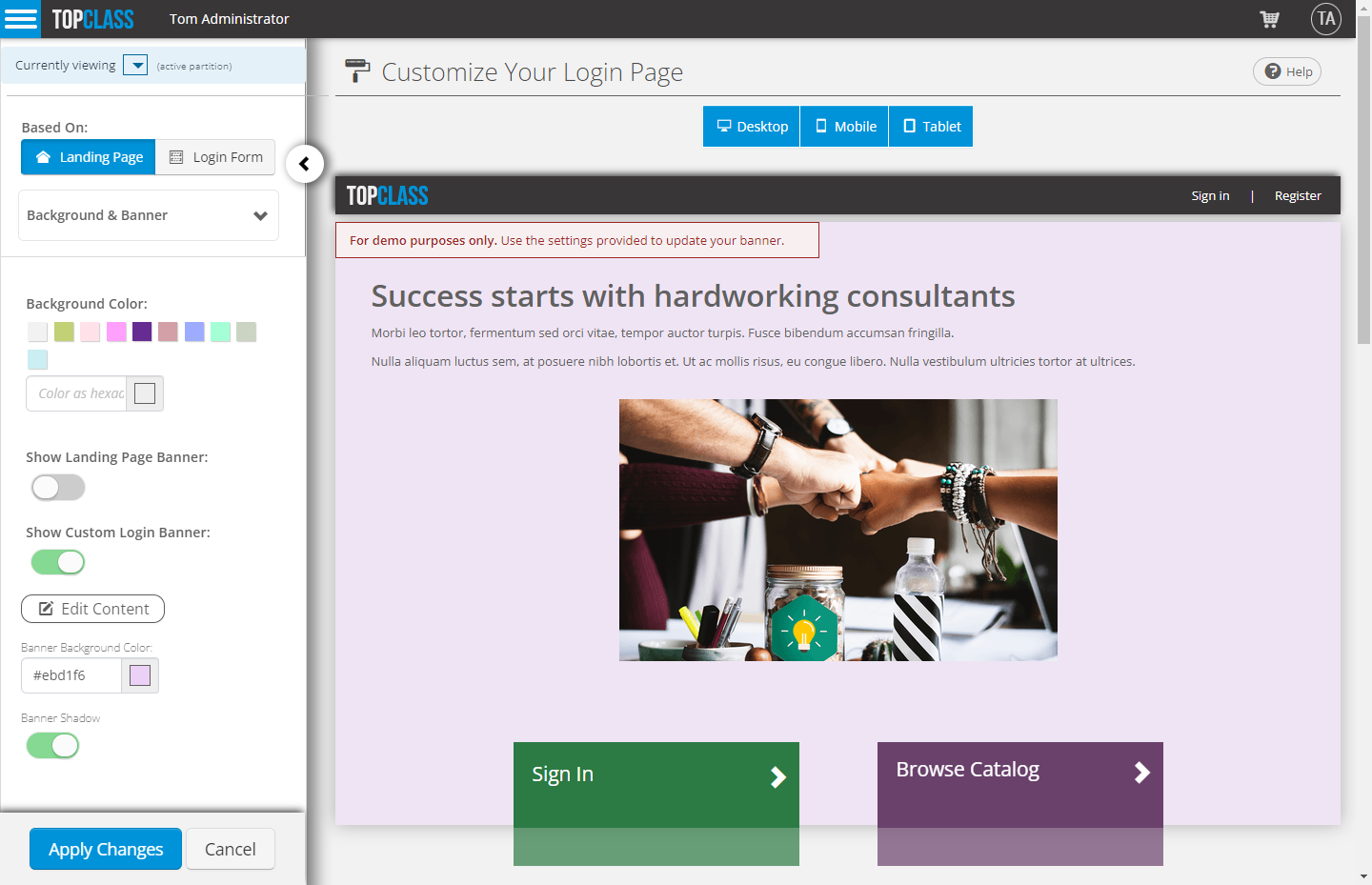
NEW – Banner & Background customization
- Customers can choose to use their configured Landing Page Banner or create their own custom Banner.
- Show Landing Page Banner:
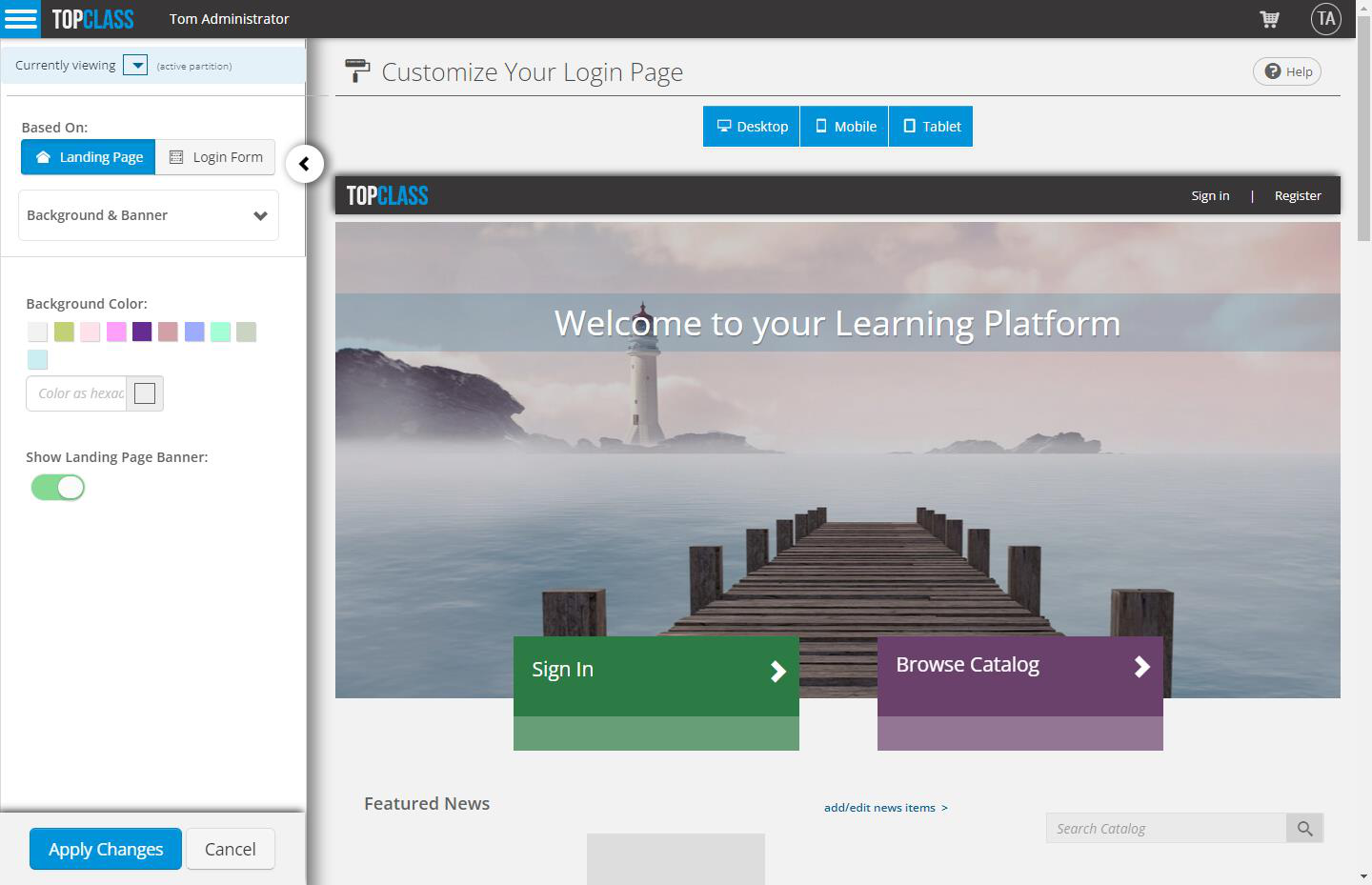
- Customize the Banner that shows on the Landing page:
-
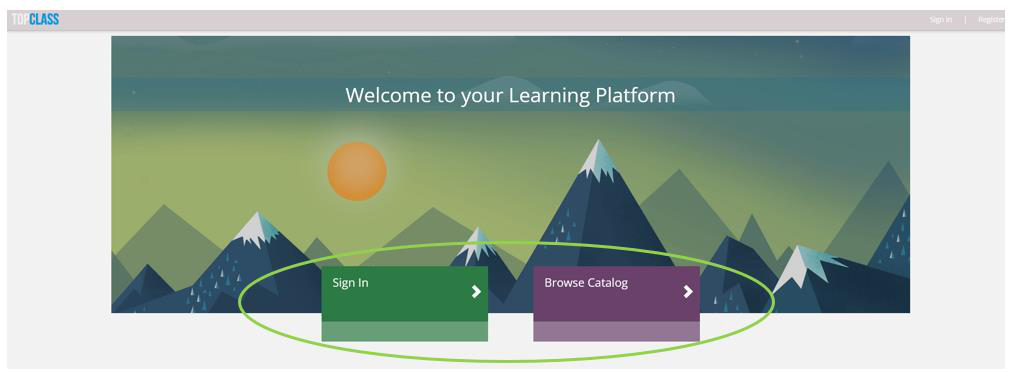
NEW – Fully customizable Call-To-Action buttons to redirect learners to specific TopClass screens or custom URLs
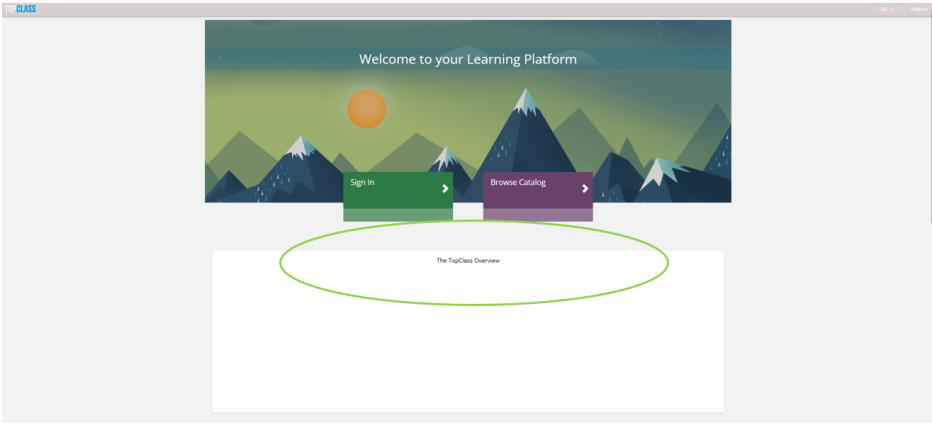
- NEW – New Overview under Landing Page Banner Section to add additional custom content if required
- NEW– Configurable Learning Streams & Learning Widgets
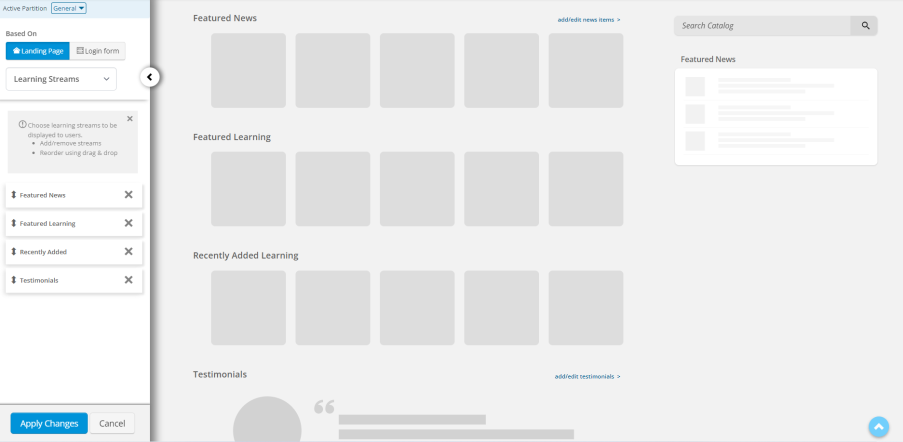
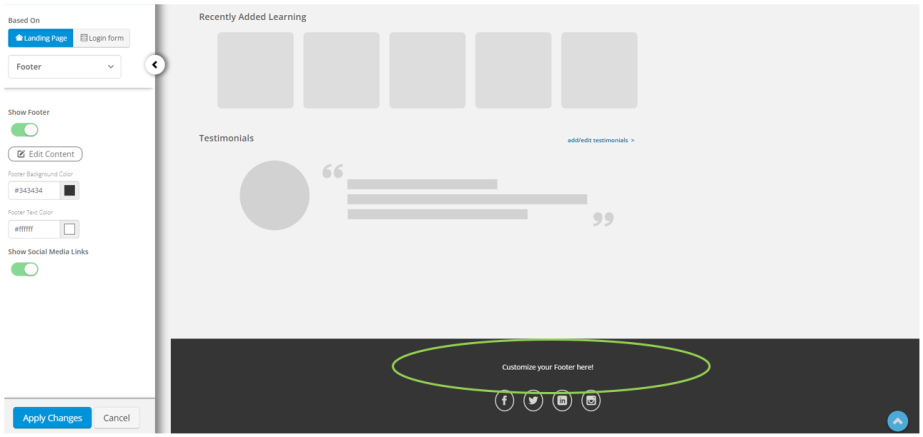
- NEW – Fully customizable Footer section for customers to add custom external links, contact information, links to policies, Terms & Conditions, and more, as well as social media links.
Login Form
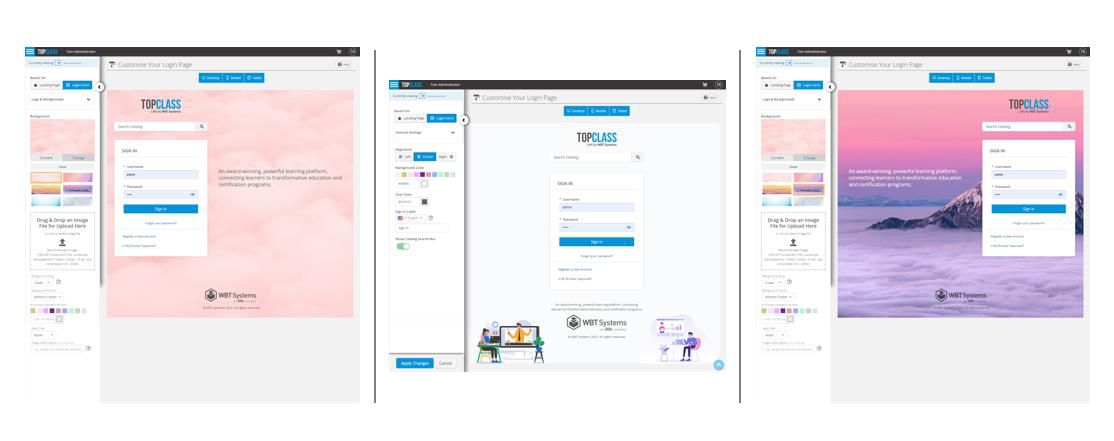
This option allows for a more simplified, clean, form like Login screen. Customers can customize the look and feel of this form, including:
- Set Full login page background color.
- Set Default text color.
- Modify text label for Sign In button (multi-language support).
- Show/hide Catalog Search.
- Align form-based layout to left/right or centered.
- Upload custom background images OR choose from several shipped examples.
- Upload a separate login page specific logo (optional).
- Add a custom section with text, HTML, images, and more.
- Display a fully customizable Footer section with custom external links, contact information, links to policies, Terms & Conditions, and more, as well as social media links.
NEW – Peer Review and Rubric Assessment
NEW – Peer Review Workflow
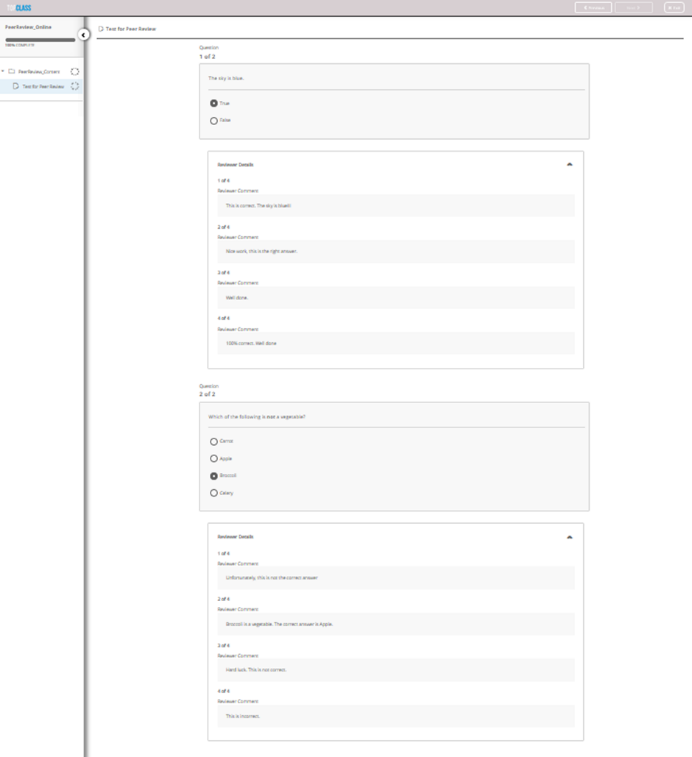
The TopClass Peer Review functionality provides Administrators the ability to assign up to 4 Instructors to grade student submissions.
- This is manually configured per enrolled User in the Online Activity that is flagged as Peer Review.
- Once a test is submitted, it will be circulated to all instructors for review. Identifying information about the student is removed from the Instructor Utilities screen so that Reviewers remain impartial.
- The TopClass Administrator will review all submitted Instructor reviews, delete any outlier grades if they wish, and determine if the student has passed or failed.
NEW - Rubric assessment
Rubric Assessment is a style of grading. A TopClass Administrator can now create a rubric breakdown of categories that an Instructor uses to grade against an essay or a pre-recorded presentation, for example.
NEW - MS Teams Integration
TopClass now integrates with MS Teams to facilitate virtual ILT classes or virtual ILT sessions.
- Create MS Teams meetings in TopClass, including:
- User registrations
- Launch with Single-Sign-One for a seamless Learner experience
- Ability to specify alternative Hosts within TopClass
- End-to-End integration support is available with MS Teams for ILT classes. For example, Create an Event in iMIS leads to an ILT class and session being created in TopClass via the integration, then a session is created in MS Teams via the integration.
NoteEnd-to-End integration is not available for Virtual Conference.
NEW - MemberSuite Integration
TopClass now has limited integration points with MemberSuite, including:
- SSO via Clarity site using RSA Key
- User synchronization – JIT/ELT
Enhancements
Integration Enhancements
- NEW - Added UI screen to configure all vendor connection details. This allows Customers & Partners to configure their integration easily through the TopClass UI.
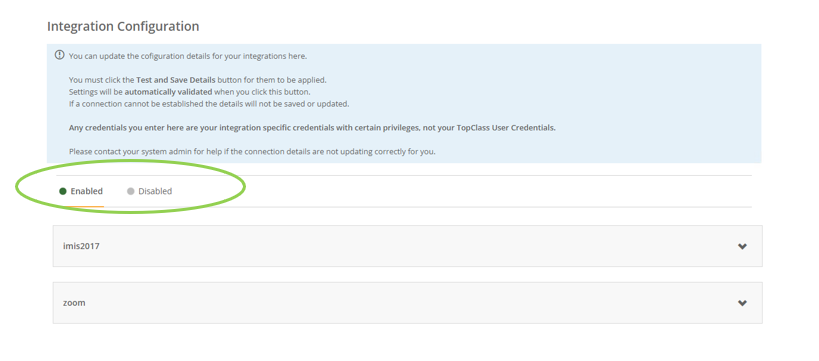
- NEW - Additional integration points MS Dynamics.
- Online activity creation batch synchronization
- Completions Writeback
- NEW - iMIS Integration support has been extended to:
- iMIS 200/300 (Professional)
- Certification Program workflow
- NEW - OAuth SSO filter is now supported by TopClass.
Certification Program Enhancements
NEW - Automatic enrollment in a Certification Path
As part of the continued development of the Certification Program module in TopClass, administrators can now configure the option to auto-enroll Learners into a Certification Path when they complete a mandatory item that is included in that Certification Path(s). This functionality allows for additional efficiency for Learners wishing to progress in their learning pathways.
Self-Registration Enhancements
NEW – Group Assignments
TopClass can now be configured to allow learners to be added to a group on successful Self-Registration.
- Any joining operations associated with the specified group will also trigger.
Reports
- NEW - Active User Report
- This new report lists all Learners that have enrolled in an activity in TopClass. It can be used by customers to track active user numbers or to check if exceeded or approaching contracted User limits.
- The Training History Credits by User report has been extended to include Instructor information
- Instructor information is now shown for both Online and ILT Activities.
- If more than one instructor is assigned to an activity, Instructors will be listed in a comma-separated list.
- The Test Responses report has been extended to include a new User filter. Customers can now select a User to view, and report on their answers only.
Miscellaneous
- Mandatory User details are now transferred from TopClass to Stripe.
- User First Name is now available as a substitution option in all of our Notifications variables list.
- General enhancements and bug fixes.
July 2022 (10.6.0)
New Features
Modernization of Administrator & Learner Content Experience
This release delivers a modernization of the TopClass user interface and functionality for creating, managing, and interacting with content for all learning activities across both the administrator and learner roles.
The user interface for both administrator and learner navigation has been updated with a modern, fresh look. Additional functionality enhances the administration and management of content and improves learner engagement with content.
A walkthrough video of all new design & configuration features is available to view on our Customer Support Portal.
Thank you to our clients who participated in our TopClass Beta testing program, whose feedback helped to finalize this release.
Learner Experience
-
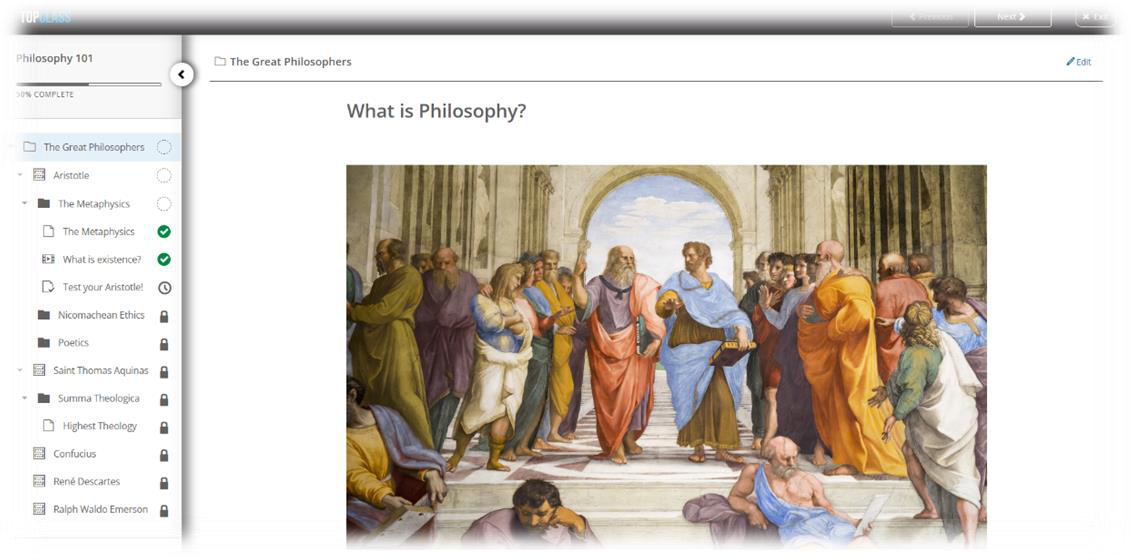
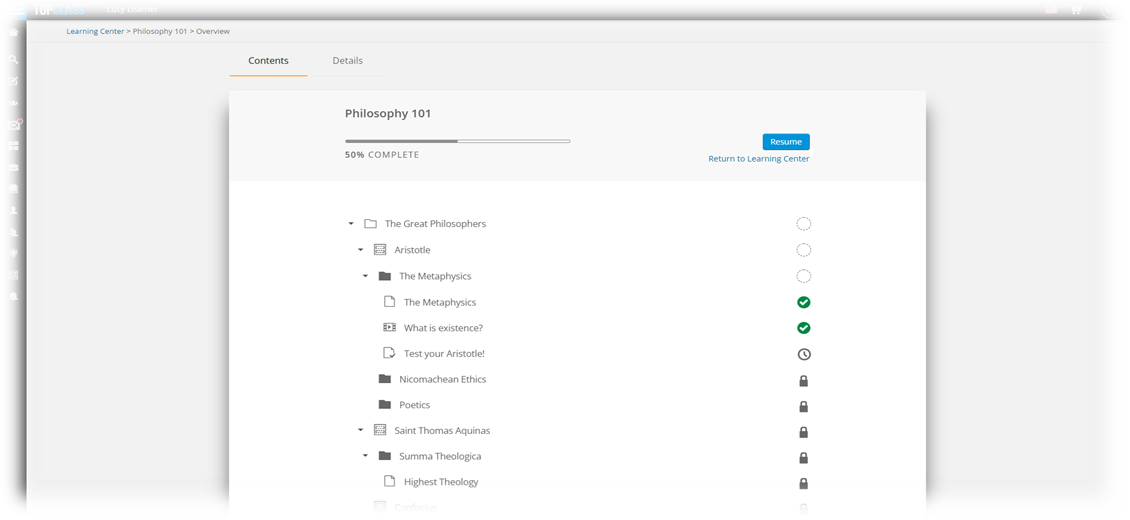
NEW – Modernized and refreshed content screens that deliver a more engaging and intuitive experience for learners taking content in TopClass
- Simplified navigation
- Revamped course content panel for easy navigation of course contents with learner progress indicators
-
NEW – Improved navigation for tests and assessments.
-
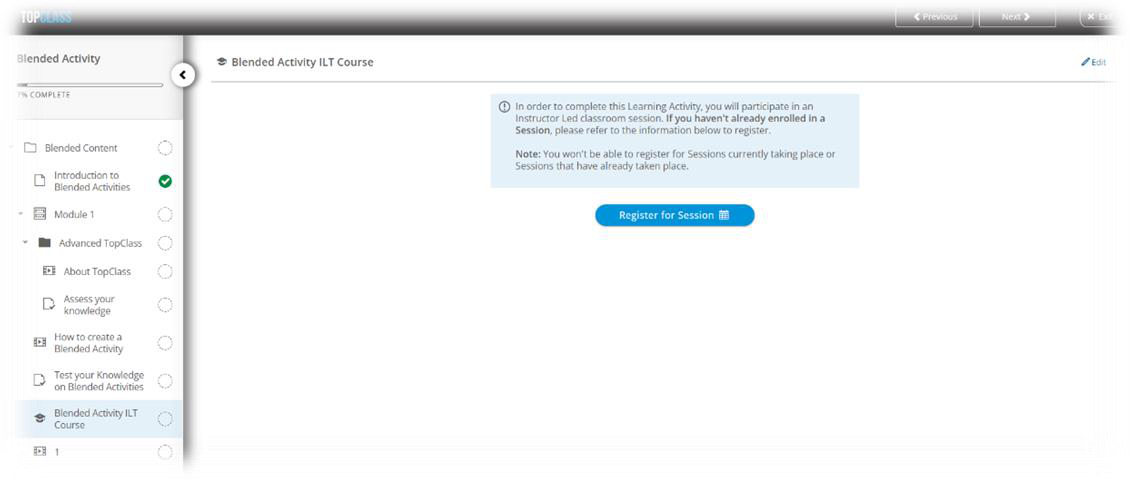
NEW – Improved workflow for registration for ILT within a blended activity. New screen layout makes it easier to find and select ILT sessions for registration.
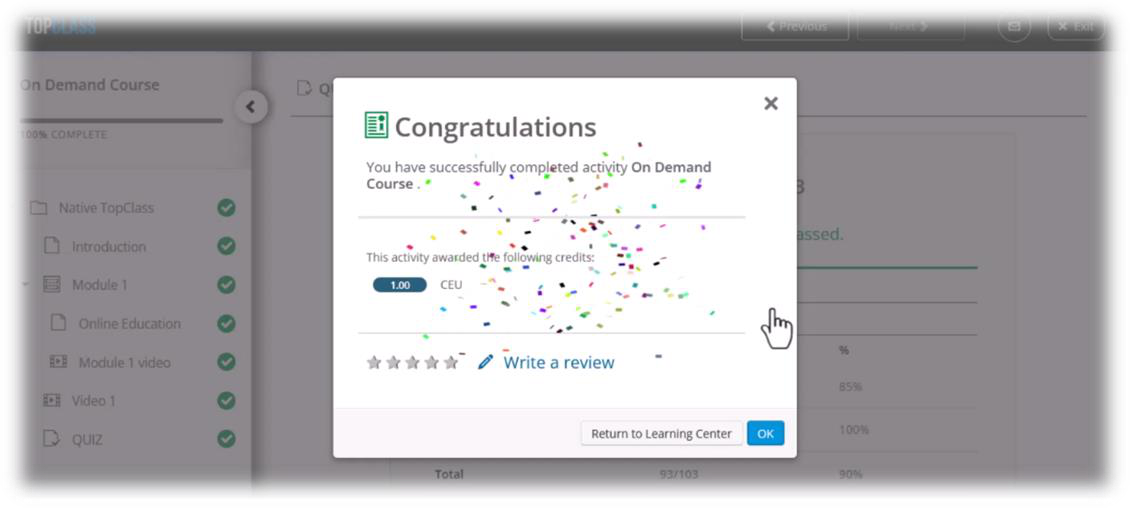
- NEW - Celebration animation on completion of course
-
Revamped course overview screens
-
Mirrors new course content panel, highlighting areas completed and items that require learner attention
-
NEW - details tab providing information on learning activity
Content Administration Enhancements
Content Administration
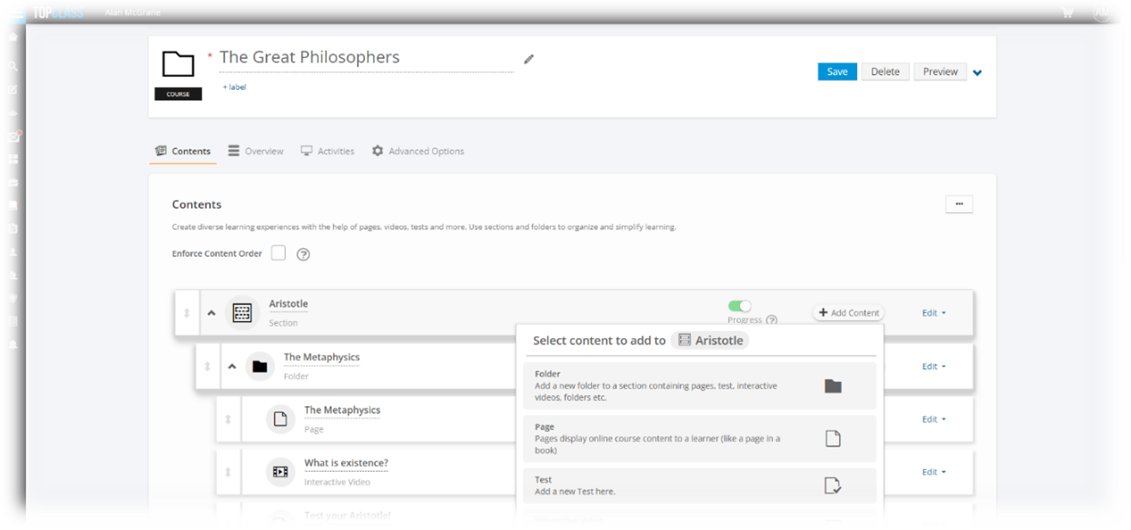
Redesigned content administration screens streamline the creation of content. Modernized layout makes the process of creating and managing content more efficient, including:
- Create content from a single place
- Visually see content hierarchy while adding/creating content
- NEW - Preview available at all levels
- NEW - drag and drop to allow reordering of content at all levels
- Content list screen can now be filtered on Label and Type
- xAPI and AICC content can now be imported directly into TopClass without creating a parent course container
- NEW -The ability to enforce content order at both activity and course levels. From a learner perspective, they will be presented with a This item is locked message if they try to access content out of order.
- NEW - Content availability restrictions can now be configured. Restrictions can be applied either by absolute date/time or relative to X number of days after enrollment. From a learner perspective, they will be presented with a This item is unavailable message if they try to access content outside of the specified date range.
- NEW - Administrators can specify whether a page should be set to auto complete
- Selecting Yes (Default) - Learners must scroll 80/90% of full page before page is considered completed
- Selecting No - Learners are required to click a button at the end of the page
- At the activity level, administrators can specify if the course content menu should be expanded or collapsed when a learner launches the course.
NoteBy default, course content expands or collapses when a learner launches the course.
- Enhancements to online activities:
- Resources tab broken down into categories for ease of use
- New functionality and updates for all types of learning activities:
- NEW – In the activity header, there is a new function to enable a preview of how activity will look in the catalog via a new menu item: Preview in Catalog
- NEW - details tab providing information on activity
- Revamped course overview screens which are accessible from learners current learning tab in learning center
Test and Assessment Administration
-
Redesigned test administration screens
- Question pools have been renamed to Question banks
- Adding/editing/removing a question bank from a test is now easier
- Ability to add question to question bank in a test is more intuitive
- Test settings broken down into categories for ease of use
- NEW - drag and drop functionality to allow reordering of questions in a question bank
-
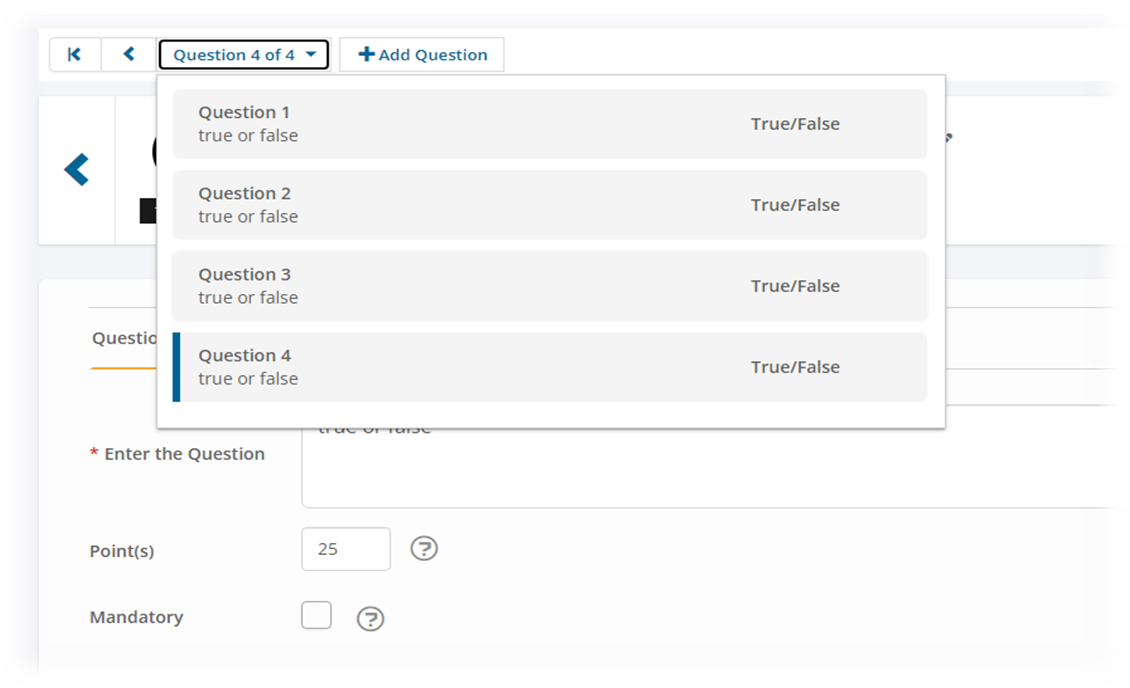
Question administration screens have been enhanced to improve and simplify question creation/editing workflows
- NEW - question creation wizard approach, provides step-by-step assistance when creating questions
- Question settings broken into categories for ease of use
- Improved question navigation
Enhancements
Integration Enhancements
-
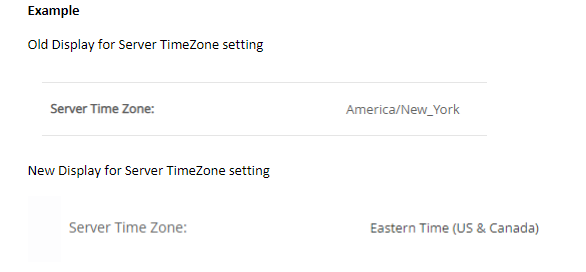
iMIS - Standardized display names for time zones to be aligned across both iMIS and TopClass. This may impact the display name for some time zones in TopClass, as shown in example below:
-
Protech Associates – additional updates and improvements
Miscellaneous
- External ID and source fields can now be viewed on group admin screens
- General enhancements and bug fixes
April 2022 (10.5.9)
New Features
Extended Integrations Support

NEW - Protech Associates Integration
- SAML SSO
- User synchronization – JIT/ELT and account creation
- Activity synchronization – Online’s, ILT’s and ILT Sessions
- Enrolment synchronization – including cancellations
- Completions writeback
Enhancements
Reports Enhancements
- For reports containing user data, TopClass now has the option to add additional columns for user extra info fields such as, users’ city/state/phone number/job title, etc.
- Test Responses enhancements
- Excludes ILT exercises from Test Responses report
- Ability to distinguish between Test, Pre and Post work test when selecting a test for Test Responses report.
Integration Enhancements
TopClass now accepts spaces in usernames by default either directly through TopClass or when using an integration.
iMIS Enhancements
For iMIS EMS, we have added a number of new IQA’s & BO’s to improve and enhance integration with your TopClass. Changes include:
- More efficient BO (business objects)
- Improved queries within iMIS IQAs
Miscellaneous
- General enhancements and bug fixes
January 2022 (10.5.8)
New Features
Awarding Partial Credits for Session Attendance
NEW – Added the ability to award partial credits for virtual or in-person ILT learning activities and/or in-person (standard) and virtual conference sessions. This allows TopClass to calculate the percentage of credits that should be awarded to a learner, if they have only partially attended a session.
NoteSettings for partial credits apply only at the session level for standard or virtual conferences; partial credits settings are not available at conference level. For ILT Activities (in-person or virtual), partial credit settings are available at either the session level or ILT activity class level.
-
If Partial Credits are enabled:
- System setting for Partial Attendance can be found in System Setting > Configuration > Award for Partial Attendance
- This setting will be on by default
-
Partial Credits for Standard (in-person) ILT/Conference sessions:
- Settings for how Partial Credits are calculated are only available at the session level.
-
On the General tab of Session, there is a new field: Partial Attendance Credits
-
Percentage: allows you to set the % of credits a student should get if they have only partially attended a session.
-
NotePartial Credits calculation can only be enabled for Standard Conferences where credits are specified to be awarded at session level. An option to have partial credits calculation when credits are set to be awarded at the conference level is not available.
- Settings for how Partial Credits are calculated are only available at the session level.
-
Partial Credits for Virtual ILTs/Virtual Conference:
- If Partial Attendance is enabled, there are two options for how partial credits are calculated for virtual ILTs or virtual conferences:
- Time spent in Zoom or GoToWebinar session
- Partial Attendance Credits Percentage
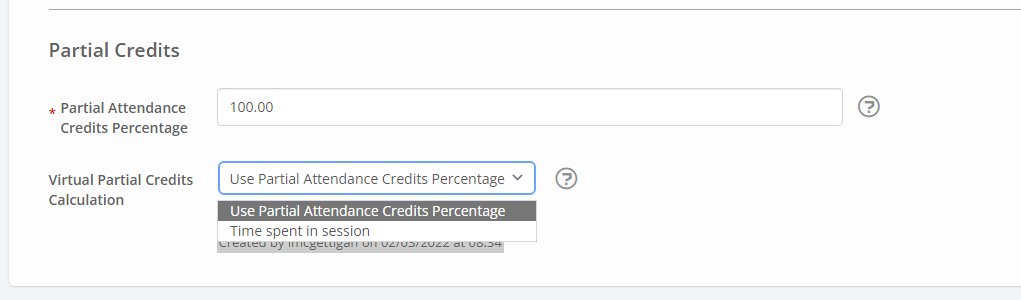 Note
NotePartial Credits calculation can ONLY be enabled for Virtual Conferences where credits are specified to be awarded at session level. An option to have partial credits calculation when credits are set at the virtual conference level is not available.
- If Partial Attendance is enabled, there are two options for how partial credits are calculated for virtual ILTs or virtual conferences:
-
ILT Administrators can edit the credits awarded to learners for both partial attendance (if this has been enabled) or full attendance at an ILT session.
- The option to edit credits is available on the Enrollment tab for each learner that has been marked Attended or Partial Attended
Redesign of Administrator User Interface
NEW – Continuing our multi-phase project to refresh the TopClass user interface, we are redesigning the user interface of Administrator screens in TopClass to bring the look and feel of these screens in line with the modern, fresh look of more recently added features. The updates in this release are primarily a user interface (UI) improvement, with the following functionality changes:
- Attachments: To provide a consistent user experience across settings screens, the Attachments tab has been moved to in accordance with the Virtual Conference and Standard (in-person) Conference settings.
- The Attachments tab that was under Advanced Options has been moved to Resources tab for:
- Onlines
- ILT Activities
- Certification Programs
- The Attachments tab that was under Advanced Options has been moved to a new Resources tab for the following settings screens:
- Products
- Fees
- Membership
- Special Interest Groups
- Donations
- Bundles
- The Attachments tab that was under Advanced Options has been moved to Resources tab for:
- Branding Configuration:
- Branding configuration settings were available by default in TopClass; this setting has been changed to now allow branding configuration settings to be turned On or Off.
- Added the ability to Reset all in branding settings.
- Partition support:
- Super Administrator in General Partition – the Reset button will only affect settings in selected Partition.
- Super Administrator in a Partition – the Reset button will only affect settings in the user’s Partition.
Enhancements
Notification Enhancements
- Added the ability to specify a CC on external emails, for example, not TopClass messages.
- Option is only available if an SMTP host is configured and Mail Option is set to Both or User's Email Address
Partition Enhancements
- Allow users in a partition to see all courses published in the General partition in the Catalog.
- This can be enabled via System setting > Security > Public Catalog.
- Administrators within in a partition are not allowed to edit General partition courses.
Integration Enhancements
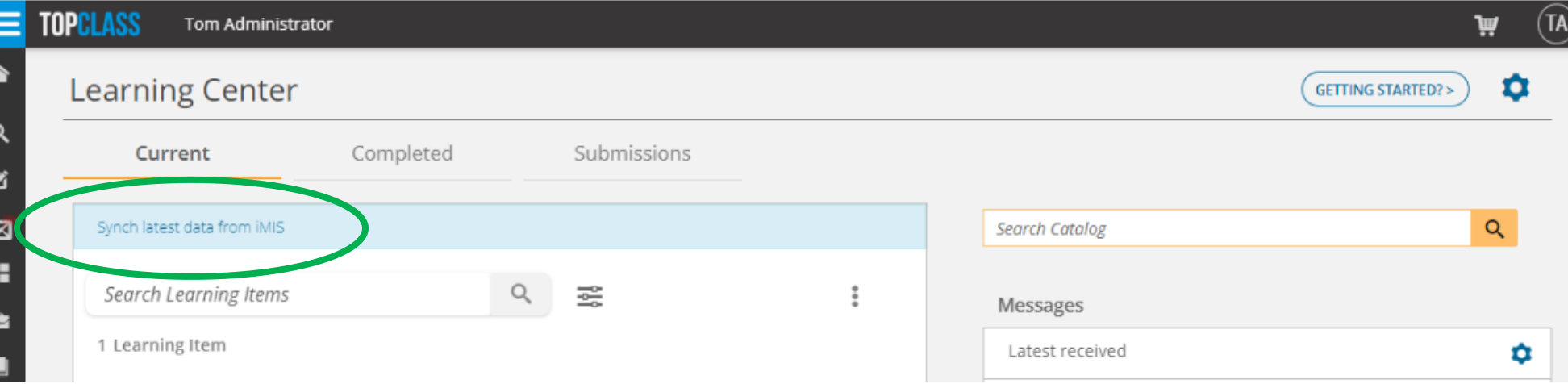
NEW – Enrollment Sync: Customers who use TopClass catalogue with an external shopping cart (for example, the eCommerce or shopping cart facility in any integrated AMS/EMS/CRM) now have the ability to synchronize enrollments outside of the authentication process, without requiring a learner to logout and log in again.
- Provided a Synch latest data from [AMS/CRM] link at the top of Current tab in the Student Learning Center view.
Miscellaneous
- Australian states are now available in TopClass
- Log4j Security fixes for
- CVE-2021-44228
- CVE-2021-44832
- CVE-2021-45105
- General enhancements and bug fixes
Updated 5 months ago