

Awarding Partial Credits in ILT activities
For ILT activities, credits can be awarded for partial attendance of a session. When a learner is marked as partially attended, they can be awarded a percentage of the allocated credits for that session.
To configure credits for partial attendance, do the following.
-
Go to System Administration > System Settings > Configuration.
-
Set Award for Partial Attendance to Yes.

-
Revert back to the ILT Schedule and click the relevant session.
-
On the General Details tab, go to Partial Credits.
-
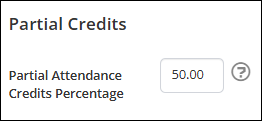
Enter the credits percentage to be awarded when a learner is marked as Partially Attended.
Note- If set to zero, learners will be awarded no credits for partial attendance.
- If set to one hundred, learners will be awarded all credits for partial attendance.
Awarding partial credits for Zoom Webinars and Meetings
When a session is created as a Zoom Webinar or Zoom Meeting, there are additional options to award credits for partial attendance.
To award credits for parital attendance on a Zoom webinar or meeting session, do the following:
- In the ILT Schedule, click the relevant Zoom webinar or meeting session.
- On the General Details tab, go to Partial Credits.
- Under Virtual Partial Credits Calculation, select one of the following options:
-
Use Partial Attendance Credits Percentage - a percentage of the credits will be applied to the learner when marked as Partially Attended.
- Enter the credit percentage to be awarded.
-
Time spent in session - credits are awarded based on the percentage of the virtual session attended by the learner.
- Enter the percentage of the session a learner must attend to be awarded credits.
-
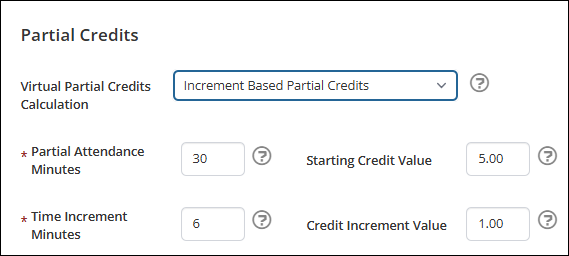
Increment Based Partial Credits - credits are awarded progressively based on attendance time, starting with an inital credit value, increasing by a configured amount at each time increment.
ImportantTo enable increment based partial credits go to System Settings > Virtual Activities and set Enable Increment-Based Credits to Yes.
- Enter the Partial Attendance Minutes - The minimum number of minutes the learner must attended to be considered partially attended and begin to earn credits.
- Enter the Starting Credit Value - The number of credits awarded when a learner reaches the Partial Attendance Minutes.
- Enter the Time Increment Minutes - The number of additional attendance minutes required for each subsequent credit increase.
- Enter the Credit Increment Value - The number of additional credits awarded for each completed Time Increment.
ExampleA virtual Zoom Meeting session is one hour long and worth ten credits. After attending for 30 minutes, a learners is considered Partially Attended and awarded the starting credit value of five credits. After each subsequent six minutes, an additional one credit increment is awarded.
If the learner attends the full one hour session, they will be awarded the full ten credits.
If the learner attends for 50 minutes, they will be awarded eight credits.
If the learner attends for 35 minutes, they will be awarded five credits.
If the learner attends for less than 30 minutes, they will be awarded zero credits.
-
Updated about 3 hours ago