

2026 Release Notes
June 2026 (10.8)
The June 2026 release (10.8) builds on the Learning Contracts and AI Test Generator features introduced in February, expanding their capabilities while also delivering key updates to Test configuration and Price Plan functionality. Additional enhancements to administrative privileges and reporting help reduce administrative effort and improve the management of learning at scale.
Our commitment to improving the overall learner experience across TopClass has brought about updates to certificate templates and to maintain alignment with accessibility standard WCAG 2.0 Level AA.
Key Enhancements
Assigning Multiple Price Plans to Users
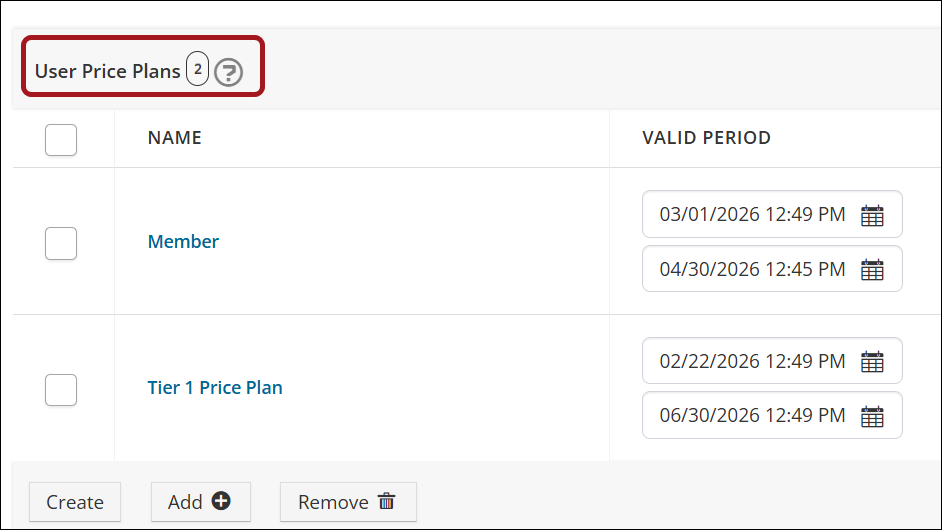
Users can be assigned multiple price plans. When a user with multiple price plans browses the Catalog, the system automatically applies the lowest-priced valid plan available to them, ensuring they can purchase the activity at the best rate or enroll at no cost. Enhancements to the Sales and Completed Transactions reports allow for reporting on price plans. See Assigning multiple price plans to users for details.
Processing Large Video Transcriptions with AI
Following the successful beta launch of the TopClass AI Test Generator in the February release, enhancements have been made to allow for the transcription of longer videos (over five minutes). The AI Generator runs the transcription in the background so that admin users can perform other tasks while waiting. Once processing is complete, admins are notified that the transcription is ready. See AI Test Generator for details.
Expanded Learning Contracts Capabilities
Learning Contracts were introduced in the February release, and significant enhancements have been made to create an even better user experience. The focus was to align Learning Contract functionality with existing functionality in terms of Group Actions, Valid Periods, and Auto-Enrollments. Contract Admin rights have also been extended to allow for Restricted Access and Renaming of Learning Contracts.
Review the following notes to learn more about the expanded Learning Contracts capabilities:
- Associating a Learning Contract with a group – If the Learning Contract is linked to a group and it is the first time a user enrolls in any activity through the Learning Contract, they are automatically added to the group. This allows managers to monitor the groups' progress in activities through the Manager Dashboard.
- Aligning Learning Activity valid periods with the Learning Contract valid period – Super Administrators can choose to align the valid period of associated Learning Activities with the Learning Contract valid period. When enabled, if a Learning Contract has a defined valid period, valid periods for associated Learning Activities (Online Activities only) are automatically adjusted to reflect the Learning Contract valid period.
- Restricting Learning Contract access – A new setting on the Learning Contract allows administrators to restrict who can access the Learning Contract. Configure invitation codes to allow only those who are explicitly invited to redeem the code. This ensures that invitation codes cannot be shared outside of the users chosen by the Contract Admin.
- Auto-enrolling students in a Learning Contract Learning Activity – When a user is invited to a single activity Learning Contract (Online Activity only) and redeems the invitation code in the Learning Contract Invitation widget, the user is automatically enrolled in the online activity and can bypass the need to manually enroll.
- Renaming the Learning Contract – To assist Contract Admins in tracking and managing their Learning Contracts, Learning Contracts can be renamed via the Learning Contract Dashboard. The name change is reflected consistently across dashboards, lists, and reports.
Using TopClass Learning Contracts via iMIS Integration
TopClass users with an iMIS integration can now create a Learning Contract directly from their iMIS shopping cart. By bulk purchasing seats in a Learning Activity, users can create and manage Learning Contracts, which provides a scalable way to distribute and manage learning access across their organization. See Using TopClass Learning Contracts via iMIS integration for full details.
Creating Custom Menu Items
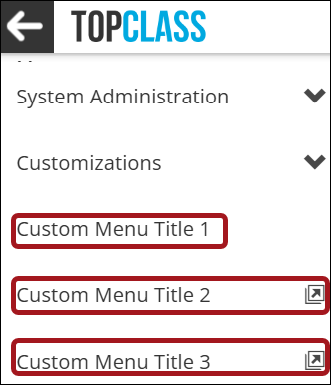
Super Administrators can add up to three custom menu items into the menu navigation panel, making it easier to direct users to specific resources. See Creating Custom Menu Items for details.
Enhancements to Test Setup, Results, & Feedback
Based on client feedback and suggestions, the following enhancements have been made to the TopClass test settings:
- Separating 'Hide Test Feedback' into two separate settings – The Hide Test Feedback setting has been separated into two new settings: Hide Test Score and Hide Pass/Fail Message. Administrators can choose to show either, both, or none to the learner.
- Flagging questions for review enhancement – When a test is configured to display as all questions on one page, it is now possible for learners to mark specific questions For Review so they can move on and then review all flagged questions before submitting the test for grading.
- Controlling answer visibility for failed tests – Administrators can choose to hide the full answer breakdown when a user fails a test by enabling the Hide full answer for test failure setting. When enabled, users only see the answers they selected and whether each answer is correct or incorrect, without additional detail.
- Hiding question text for unanswered questions – Administrators can choose to hide question text from learners in the review summary for unanswered or flagged questions. When this option is enabled, learners must open each question individually to view the full question text.
Granting Additional Privileges for Admin Users
Super Administrators can grant Admin users access to additional areas of TopClass, allowing them to perform specific administrative tasks without providing full platform access. Available privileges include the following:
- Reports menu – Allows admin users to view, create, or edit Reports and Scheduled Reports.
- Customizations menu – Allows admin users to access the customizations menu, which includes areas such as branding, landing page, and login page.
- Read Only Users – Allows admin users to view users in the Users list screen but prevents them from creating or editing any user profiles.
These options allow Super Administrators to delegate responsibilities while maintaining control over broader platform permissions. See User privileges for details.
Additional Enhancements
- Maintaining WCAG 2.0 Level AA accessibility standards (Manager and Instructor Screens) – To maintain WCAG 2.0 Level AA accessibility standards, updates were made to the Manager and Instructor screens.
- Enhancements to My Credit Report – To align the My Credits Report with standard transcription documentation, a dynamic credit total column has been added, and user identification (name) is included on exported versions.
- Enhancements to the Test Responses report – The Test Responses report has been enhanced with a new Question Title column and the Test Title filter has been improved. Previously, if a test was linked to multiple online activities, duplicate test title records could appear in the report. This has been resolved — only a single test title record is displayed, regardless of the number of linked activities.
- Changes to ILT Sessions List report – An Assigned Instructors column has been added to the ILT Sessions List report so that administrators have increased visibility of ILT session stakeholders in one place.
- Allowing partition admins to use general partition catalog categories on activities – A new system setting can be enabled to allow partition admins to use general partition catalog categories on learning activities. This will negate the need for admins to duplicate catalog categories in each partition.
- Configuring Personify SSO integration through TopClass – The Personify integration bridge and SSO can now be configured directly in TopClass, allowing system administrators to connect the two platforms more easily. See Using the TopClass – Personify Bridge for details.
February 2026 (10.7.8)
The February 2026 release (10.7.8) introduces new capabilities designed to make learning management more scalable, efficient, and personalized. From structured bulk access through Learning Contracts to AI-assisted test creation, these enhancements help administrators streamline processes while maintaining full control. Learners also benefit from improved visibility into their progress with tools to track earned credits and set meaningful goals.
In addition, expanded branding options provide greater flexibility to align completed learning documents with your organization’s visual identity.
Key Enhancements
Learning Contracts for Bulk Learning Access
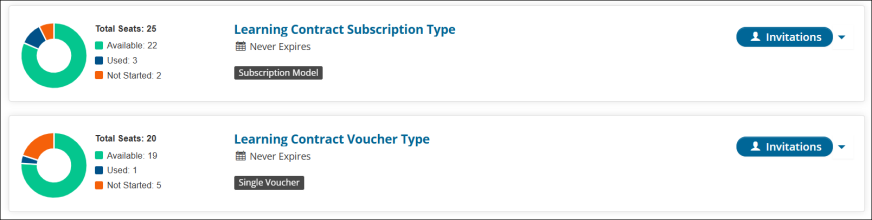
Learning Contracts enable time-bound, seat-based access to learning in TopClass. Administrators can create and manage contracts with configurable details such as validity dates, seat limits, linked activities, and invitation codes.
Contract Admins can invite users and track usage through the Learning Contracts Dashboard. Two types are supported: Voucher (one seat per activity invitation) and Subscription (one seat per user for multiple activities). Students access invitations through a Learning Center widget or by entering an invitation code. This feature provides a scalable way to distribute and manage learning access across organizations. See Learning Contracts for more information.
Using TopClass AI to create tests and quizzes
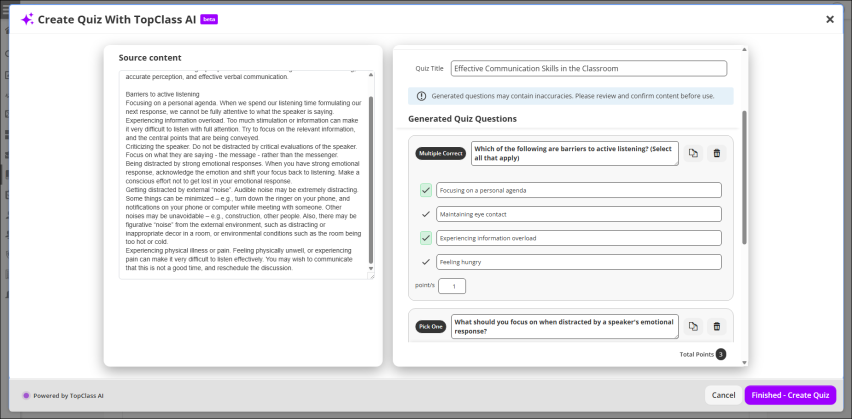
The AI Test Generator helps administrators quickly create draft test questions using AI, based on all content within a course, a single course item, custom text provided by the user from any source, and videos. After questions are generated, administrators can review, refine, and add them directly to a test, streamlining the assessment creation process while maintaining full control over the final content.
When used with videos, the AI Test Generator can create captions and test questions. The video’s spoken content is first converted to text, which is then used to generate captions and assessment questions.
The AI Test Generator is intended as a starting point for test creation. Generated questions can be edited, removed, or supplemented before publishing to ensure they align with organizational standards and learning objectives. See AI Test Generator for more information.
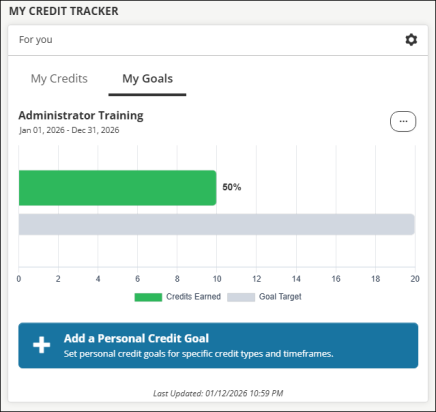
Tracking earned credits and learning goals
The My Credit Tracker widget gives learners a centralized way to track earned credits without relying on certifications. The widget provides a clear, at-a-glance view of credits earned by type within a configurable timeframe, helping users stay informed and motivated throughout the year.
To support ongoing learning objectives, users can also set personal credit goals directly within the widget. Goals can be defined by credit type and timeframe (for example, earning a specific number of CPD credits within a calendar year). Progress toward each goal is visually tracked, making it easy for users to see how close they are to achieving their targets. See Using the My Credit Tracker widget.
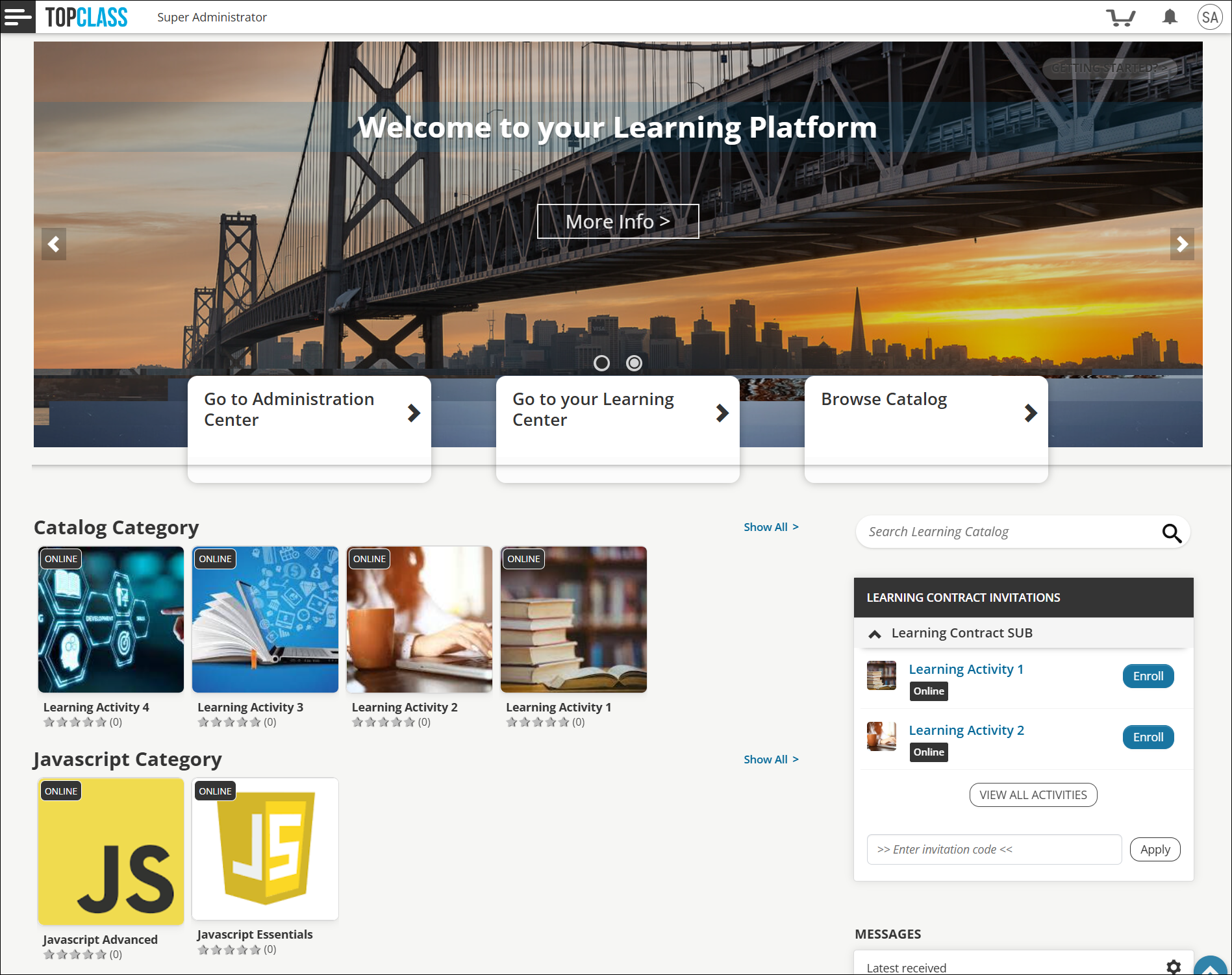
Displaying TopClass Catalog Categories as Learning Streams
Catalog Categories are now available to display as a Learning Stream on the TopClass Landing page. See Learning Streams.
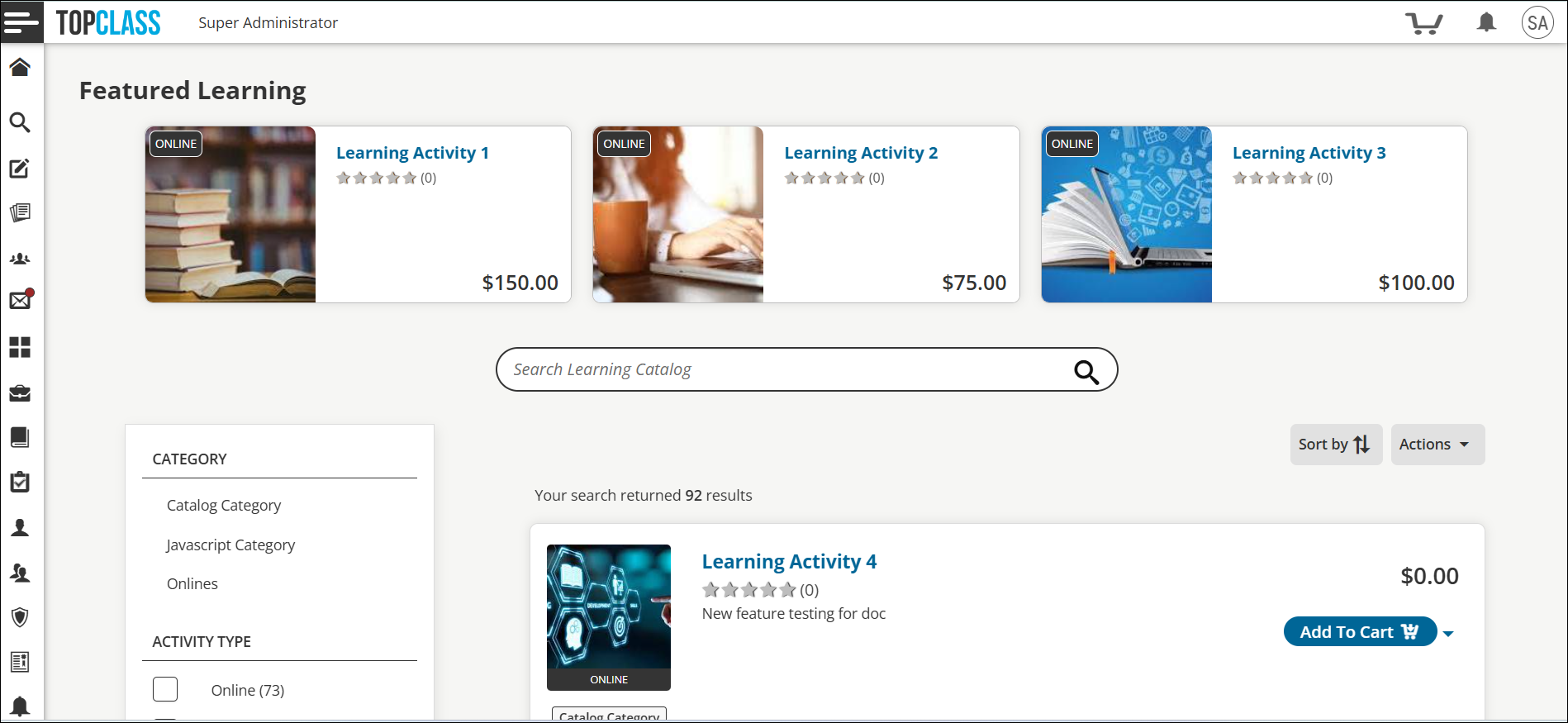
Displaying Featured Learning Items in the Catalog
UI updates have been made to the appearance of the Featured Learning carousel in the Catalog to boost visibility and user engagement.
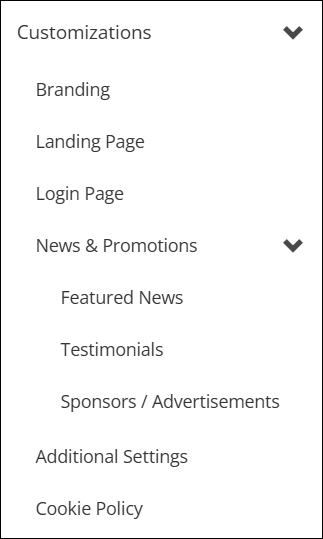
Customizing TopClass made simpler
The Customizations menu has been redesigned, and it is now even simpler for Super Administrators to design and customize TopClass in line with their specific requirements. See Branding for more information.
Customizing the Completed Learning PDF
Within the Branding tools, Super Administrators now have the ability to customize the header (including logo) and footer of the Completed Learning PDF. This empowers organizations to control and maintain the appearance of completed learning PDFs themselves, affording brand consistency and enhanced brand recognition with their learners. See Customizing the Completed Learning PDF.
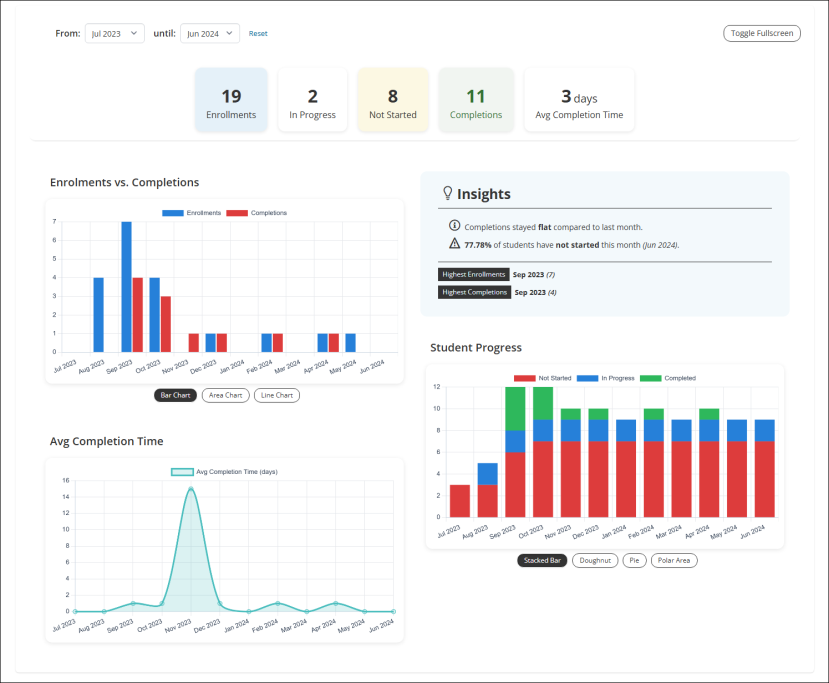
Online Activities Overview Dashboard (BETA version)
TopClass has BETA launched the first in a series of Interactive Overview Dashboards. The Online Activity Overview dashboard provides a live overview of learner engagement and progress in your online activity. See Analyzing learner engagement with Online Activities Overview Dashboard (BETA version).
WarningAs this feature is currently in beta, dashboard visuals are for informational use only and may not represent final or audited statistics. This feature is subject to change. Explore the dashboard, as we welcome your feedback to help us refine and enhance the performance, accuracy, usability, and experience of this feature.
Additional Enhancements
- Transferring users between groups as a manager - Managers can now move users from one group to another, provided they have management rights over both groups. When Allow Manager to Transfer User Groups is set to Yes, managers have access to the Transfer to Group option from their My Team dashboard. This allows managers to more efficiently and quickly manage their users.
- Automatically enrolling in ILT sessions for blended activities - When the Auto-enroll single session ILTs within blended activities system setting (Catalog tab) is set to Yes, users are automatically enrolled in any ILT within a blended activity that has only one session, as long as that session has a future date and is not hidden. By default, the setting is set to No.
- New Report: Activity Evaluation Report - The Activity Evaluation Report is available to help administrators review completed learning activities along with post-test exam results and evaluation responses. This report returns one row per learner per evaluation question and includes activity details, learner information, completion date, post-test exam scores, and individual evaluation or post-work question responses. It also indicates whether the learner passed the activity, confirming that all required components, such as post-tests and evaluations, were completed. The report supports filtering by multiple activities, making it well suited for tracking completions across many courses.
- iMIS EMS Integration: Test In Progress Writeback - Enhancements have been made to the iMIS EMS integration function to allow for the writeback of In Progress status on TopClass Tests.
- Sales report enhanced with external ID columns - The Sales report now includes Enrolee External ID and Purchaser External ID columns. These additions make it easier to identify purchasers and enrolees across systems, support third-party integrations, and improve reconciliation for eCommerce transactions where the purchaser and participant differ.
- Hiding published offerings from the Catalog - A new setting, Hide from Catalog, allows Super Administrators to hide published offerings, including Online Activities, from the Catalog. This enables offerings to be included in Certification Programs, Certification Paths, and Equivalent Activities, while preventing enrollment via the Catalog, ensuring students can only access them through the designated path.
- Customizing languages with custom strings - Administrators can customize the out-of-the-box languages or use any language by using Custom Strings to replace Default Values for a language.
- Redirecting the TopClass Catalog to an external catalog site - Super Administrators can use a new system setting to redirect users from the TopClass catalog to their own external catalog and to specific URLs based on Activity type.
- Salesforce Bridge integration no longer requires a username and password - To adhere to Salesforce’s guidance and security requirements, the TopClass-Salesforce no longer requires a username and password to access the endpoint.
- Re-sizing of Learning Stream Items - When designing and customizing the layout of the TopClass Landing page, Super Administrators can now choose the size of the items within each Learning Stream.
Updated about 2 months ago