

Assigning Learning Contracts privileges to Admin users
Super Administrators and Administrators (with privileges) have the ability to view, create and edit Learning Contracts. When Learning Contracts are enabled, an option to add Learning Contracts privileges will appear on the Privileges screen.
To add Learning Contract privileges to an admin user, do the following:
-
Go to Resource Management > Users.
-
Select the relevant user.
NoteUser must be marked as an Admin.
-
Click the Advanced Options tab, then choose Privileges.
-
Set Learning Contracts to Yes.
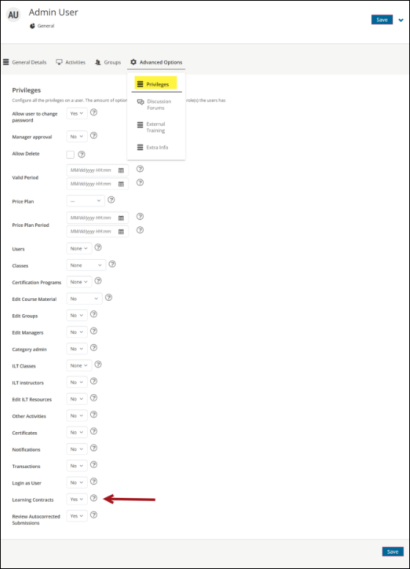
- Click Save.
Once enabled, the admin user is granted full permissions to view, create, and edit Learning Contracts.
WarningWhen an admin user is granted Learning Contract privileges, they will have full access to all users in the system via the Learning Contracts invitations.
Updated 5 months ago