

Creating a token
Do the following to create a token:
- Go to eCommerce > Tokens.
- Click Create to create a new token.
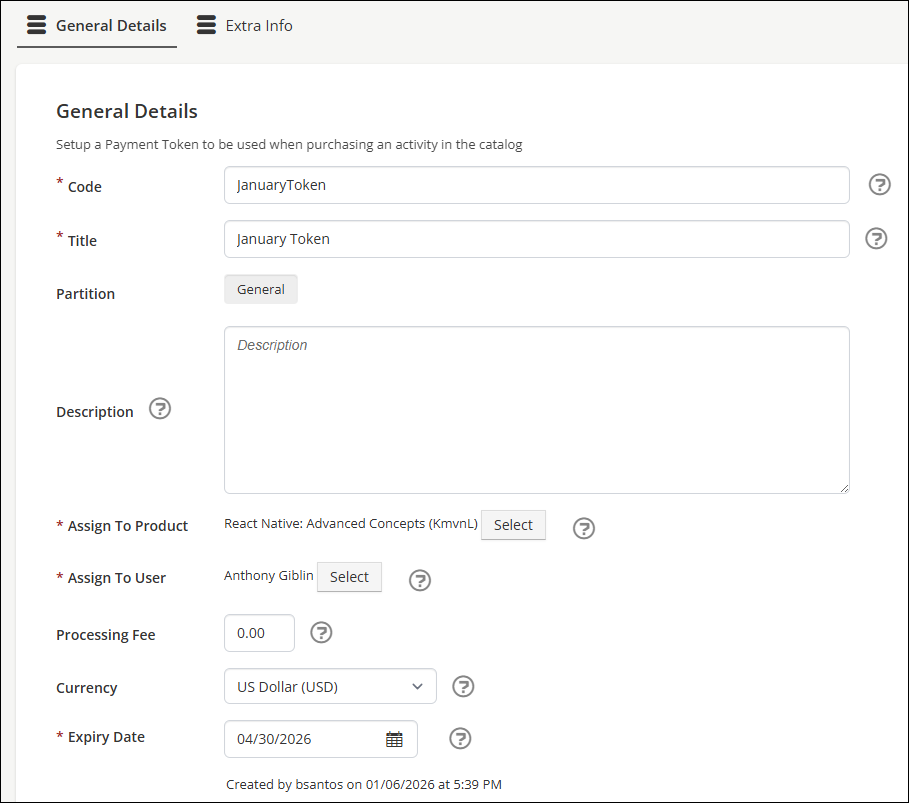
- Enter a Code and Title for the token.
- Configure the token's assignments:
-
Assign to Product - Sets the product that the token is associated with.
-
Assign To User - Sets the user that the token is associated with.
NoteTokens can only be assigned to one product and one user.
-
- Enter an Expiry Date.
- Click Save.
Once the token has been created, mark the token as Active to make it available for use.
Additional fields
Use the following fields to further customize a token:
- Description - Enters a description for the token.
- Currency - Sets the currency for the processing fee of the token.
- Processing Fee - Sets the cost of the processing fee when a token is used. Set to 0 to remove the processing fee.
Updated 5 months ago
Did this page help you?