

2023 Release Notes
December 2023 (10.6.5)
New Features
NEW Reporting Solution (BETA)
TopClass is delighted to announce the new BETA Reporting Solution is now available for review. It is positioned to replace the current reports (available under Launch Reports). The new BETA Reporting solution can be accessed by super administrators via a new Main Menu item or the new Landing Page link. Feel free to explore and offer your feedback.
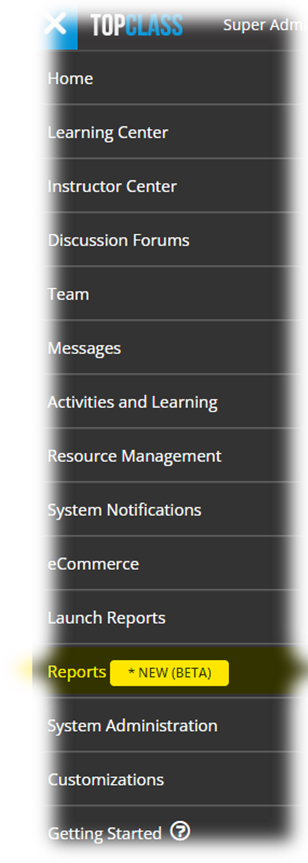
Super administrators have the ability to:
- Sort and filter data
- Show and Hide columns
- Export to PDF & CSV files
- Pagination for large data set – over 1000 records
NoteA limited list of reports under the Administrators Listing and People Management categories have been made available within the BETA Reporting Solution. Super administrators still have access to the complete suite of TopClass reports through Launch Reports.
NEW - Instructor Document Upload
For Upload type questions on tests, instructor users now have the ability to upload a corrected response document back to the learner for feedback when reviewing/marking submissions.
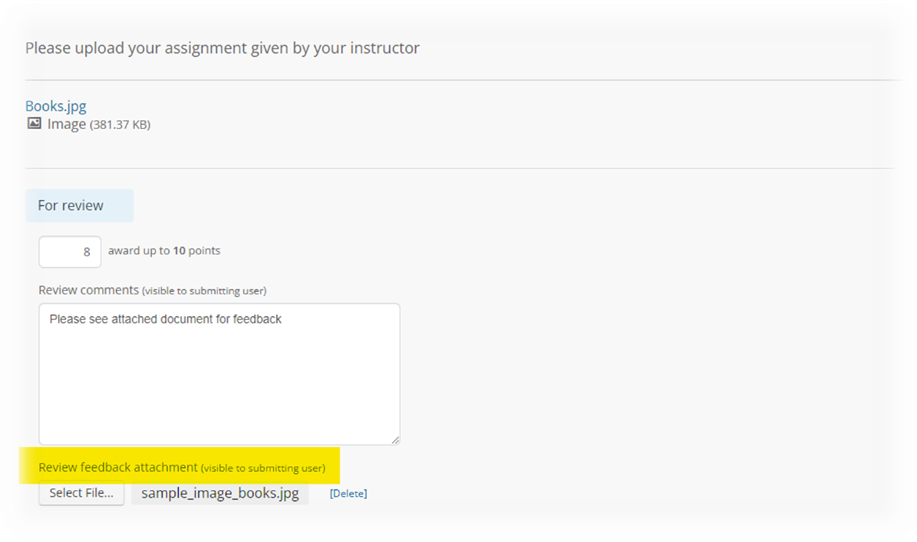
This instructor uploaded document can be accessed by the learner from their Submissions tab in the Learning Center.
Group Based Certificates
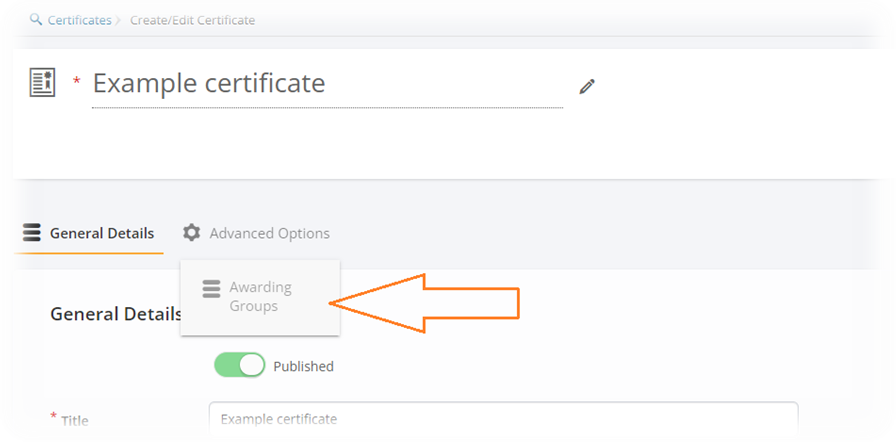
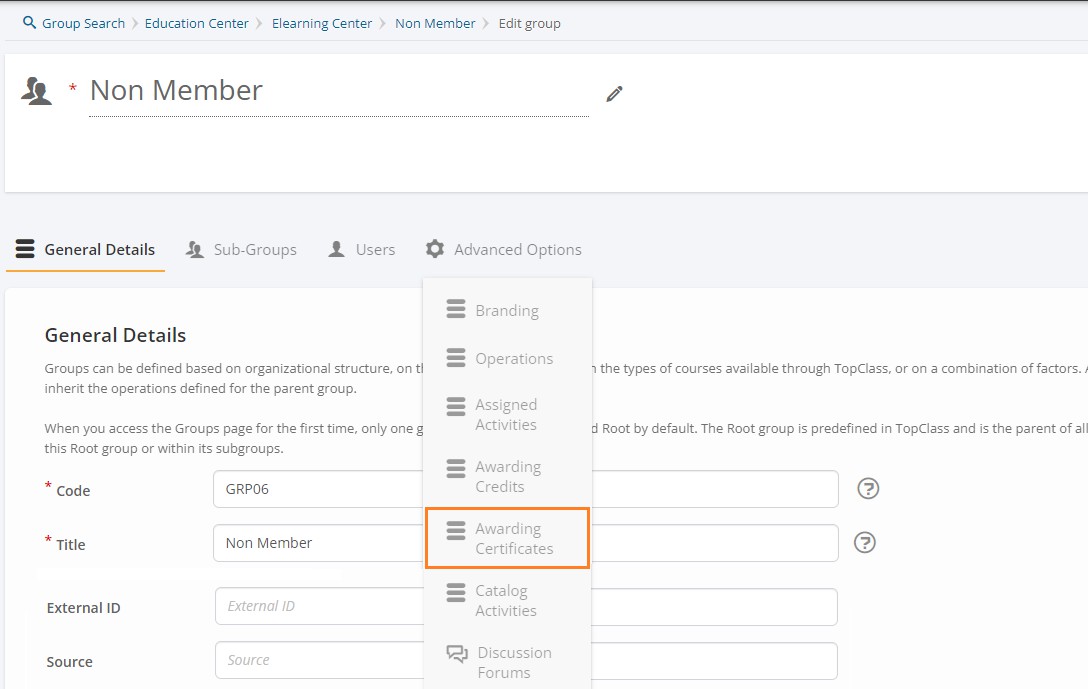
TopClass now allows for group-specific certificates to be awarded upon successful completion of a TopClass activity. Groups can now be linked to certificates at a system level so that when a learner associated with that group completes an activity, they will be awarded a certificate.
It is also now possible to display a list of groups a learner is a member of on their awarded certificates.
Website cookie policy notification and management
In an effort to increase transparency around user data, how it will be used, and how long it will be stored, super administrators can enable a notification to inform users that website cookies are in use.
- Learners are given the option to manage their cookie preferences.
- Placement and content of the website cookie policy message is configurable.
- Sample notification of website cookie policy included.
NoteThis must be updated to your organization's cookie policy.
- Option to link to existing organization cookie policy.
- Super administrators can add their own third-party custom website cookie description and user notification.
- Super administrators can preview how the website cookie notification will appear on Desktop, Tablet and Mobile devices.
Self Registration Protection
As an increased security measure, TopClass has introduced reCAPTCHA to prevent bot attacks spamming Self Registration
- Configured via System Settings > ReCaptcha > Enable ReCaptcha. Set to OFF by default.
It is also recommended that if using Self Registration functionality, super administrators should enable Self Registration approval for enhanced security.
- Configured under System Settings > Catalog > Self Registration needs approval.
Integrations
 Hubspot Integration
Hubspot IntegrationHubspot is now integrated with TopClass; including
- User synchronization – JIT/ ETL
Enhancements
Branding Enhancements
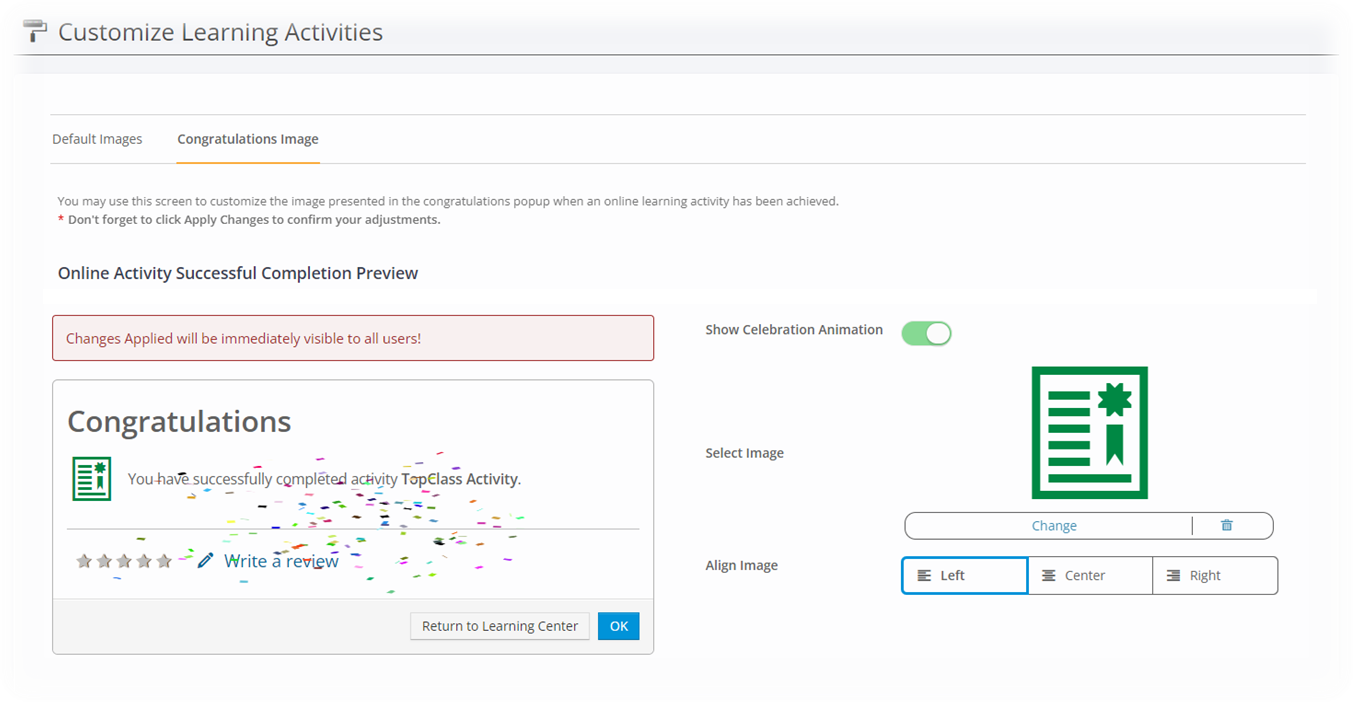
Super administrators can now change the icon that appears within the Congratulations popup message on completion of an Online Activity. There is also the option to turn off the celebration animation.
It is configurable under Main Menu > Customizations > Learning Activities > Congratulations Image tab.
Content Enhancements
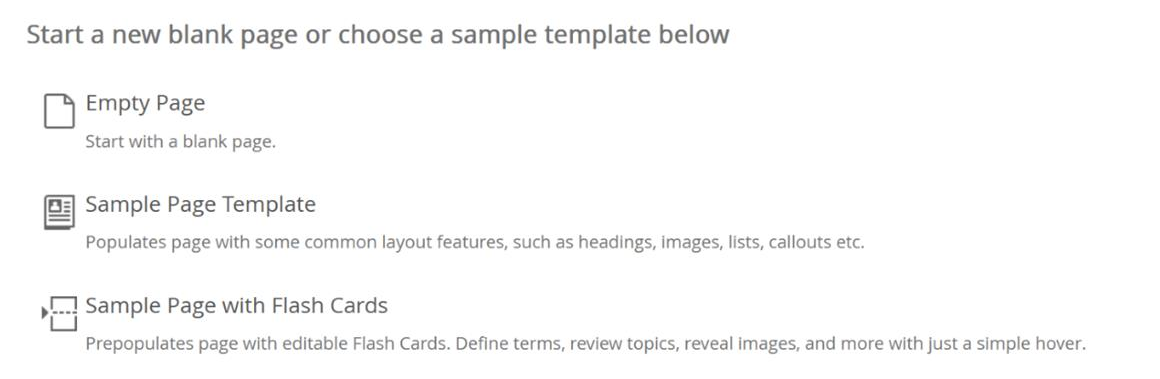
TopClass has introduced template options for content creation. This feature is available within Page and Course Overview editing windows.
- Page Template - this contains common layout features such as headings, images, lists, callouts, etc.
- Flash Cards Template - this prepopulates the page with editable flash cards to enable super administrators to reveal information, images and more to learners with a simple hover.
- FAQ Template – this provides editable accordion/collapsing sections. These allow super administrators to create step-by-step processes in media-rich interactions for their learners.
The Content Creator Assistant is disabled by default. To enable, go to System Settings > Content > Enable Content Creator Assistant.
Integration Enhancements
MemberSuite
- Completion writeback for Certification Program added.
Miscellaneous
- New Notification – Notification of Upcoming Expiry. If a recertification period has been set on an activity, super administrators can enable a new notification to let learners know that they have an upcoming expiry date for the Online Activity. This is a batch notification which can be scheduled to send a specific number of times leading up to the learner’s expiry date.
NoteThis is not active by default.
- Hide Submissions tab. Super administrators can now hide the Submissions tab in the Learning Center for learners.
- Configured via System Settings > Configuration > Show Submissions in Learning Center. This is set to YES by default.
- New Report – Text Questions Responses Cross Tab Format. A new report to generate learner responses, earned points and pass/fail status for individual tests. This report is specific to Text Type Questions.
- Back to Master System Main Menu item has been extended to be used outside of Integrations. Super administrators can configure this item for any URL.
- Generic UI Improvements
- General enhancements and bug fixes
July 2023 (10.6.4)
New Features
Integrations
Revamped Integration Configuration UI
Our design team have been working hard to redesign our integration configuration UI making it much easier for you, our customers, to set & update your integration configurations. The most notable changes you will see are:
- Integration UI screens updated to be in line with rest of TopClass UI.
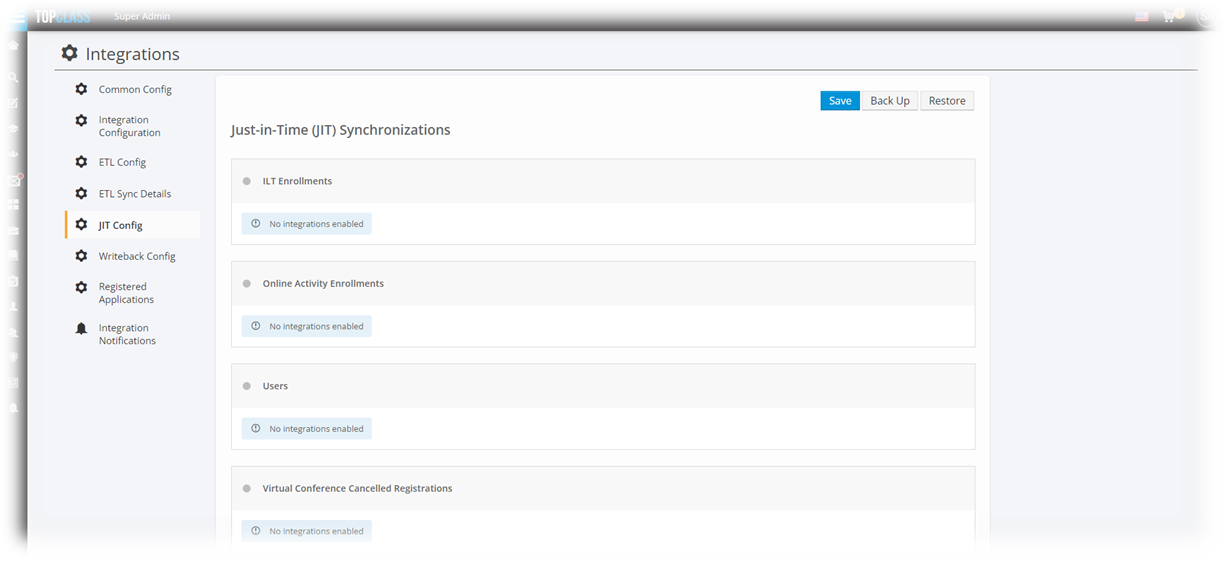
- All ETL Configuration is now under ETL Config tab including scheduling settings.
- New intuitive button to set default date synchronization date for a specified ETL.
- New Integrations Queues UI for each enabled vendor that has writeback queue functionality.
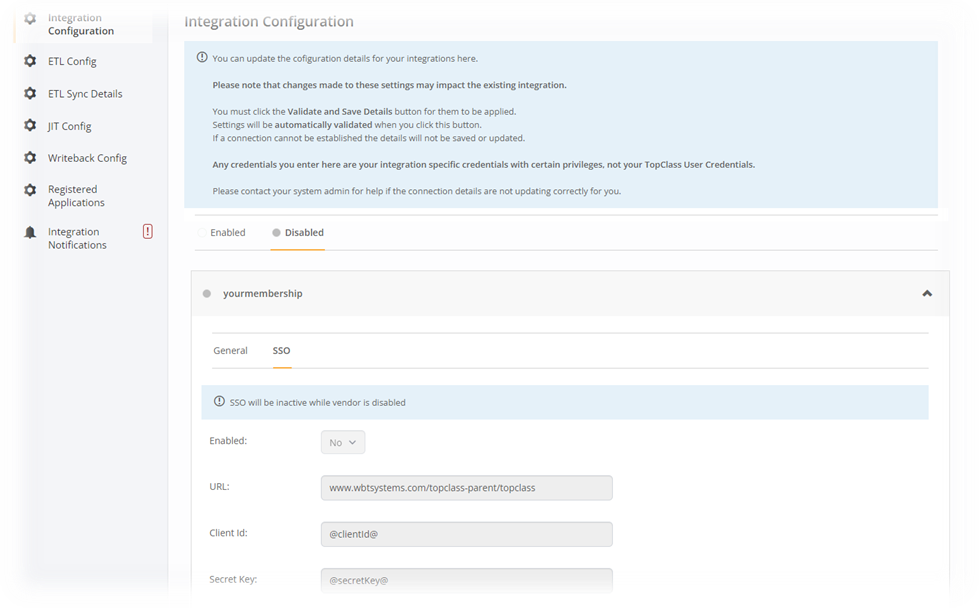
Vendor SSO configuration via TopClass UI
Administrators now have the ability to configure 3rd party vendor SSO via TopClass UI. This new functionality is available for the integrations for the following vendors:
- GrowthZone
- HigherLogic
- iMIS
- Impexium
- YourMembership
The setting can be accessed via System Administration > Integrations > Integration Configuration.
- SSO tab where applicable
NotePlease contact your TopClass representative for further assistance using the new integration configuration functionality.
YourMembership Integration

YourMembership is now integrated with TopClass; including
- SSO
- URL needs to include bridgeSource=yourmembership
- User synchronization – JIT/ ETL
Enhancements
Instructor Enhancements
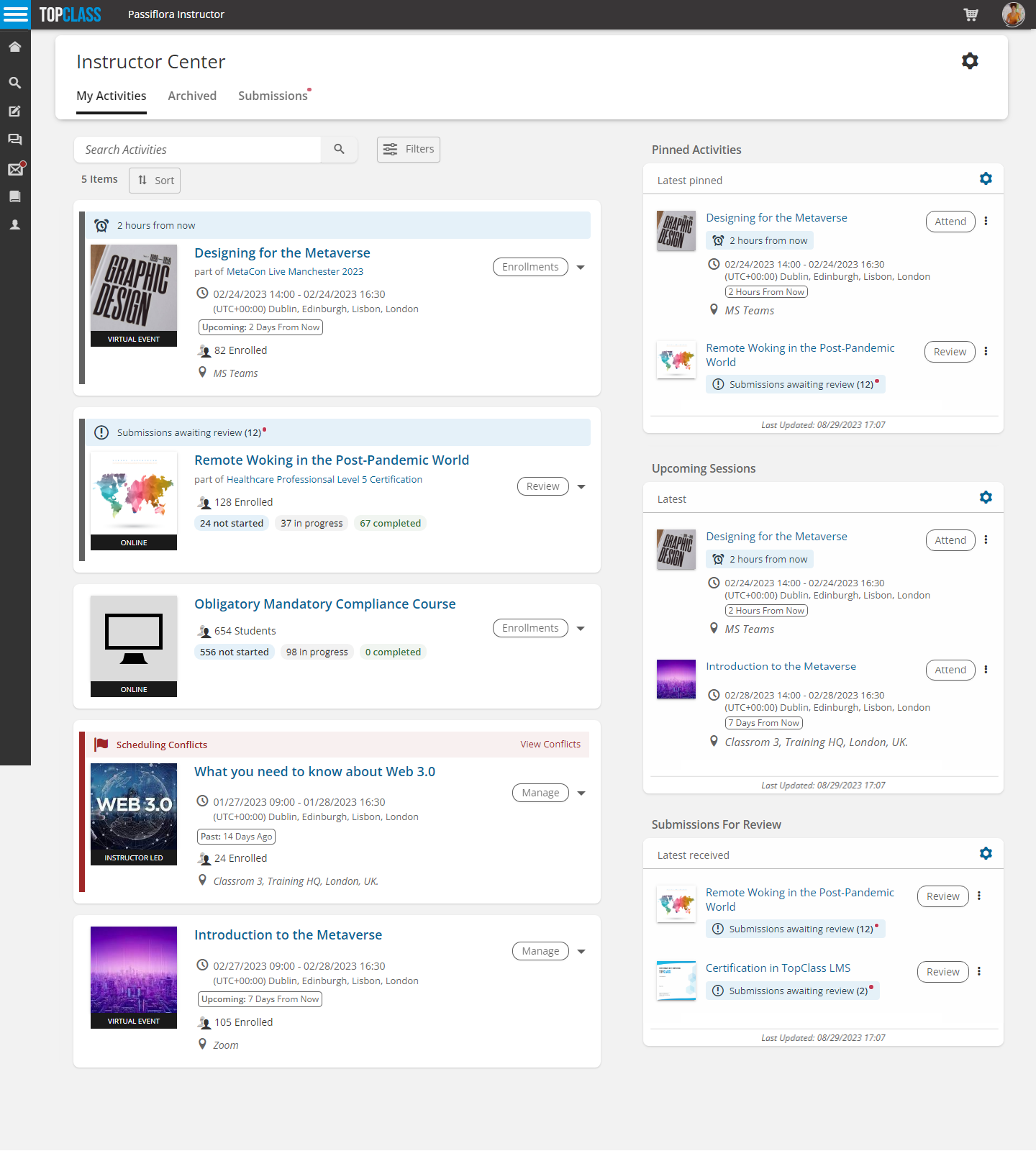
To improve the effectiveness of your instructors and allow them to track learners’ progress more easily, TopClass has launched a New Instructor Center.
- Instructors can preview online activity content as learners would see it.
- Instructors can archive past ILTs and Online Activities if they are no longer in use or relevant.
- Easy visibility on number of enrollees in various statuses for Online Activities.
- Easy visibility on number of enrollees for ILT sessions.
- Easy visibility of scheduling conflicts.
- Easy access to submissions.
- New Instructor Upcoming Sessions widget.
- New Instructor Pinned Activities widget.
- New Instructor Submissions for Review widget.
- Instructors can bulk email learners in an Online Activity from the Instructor Center.
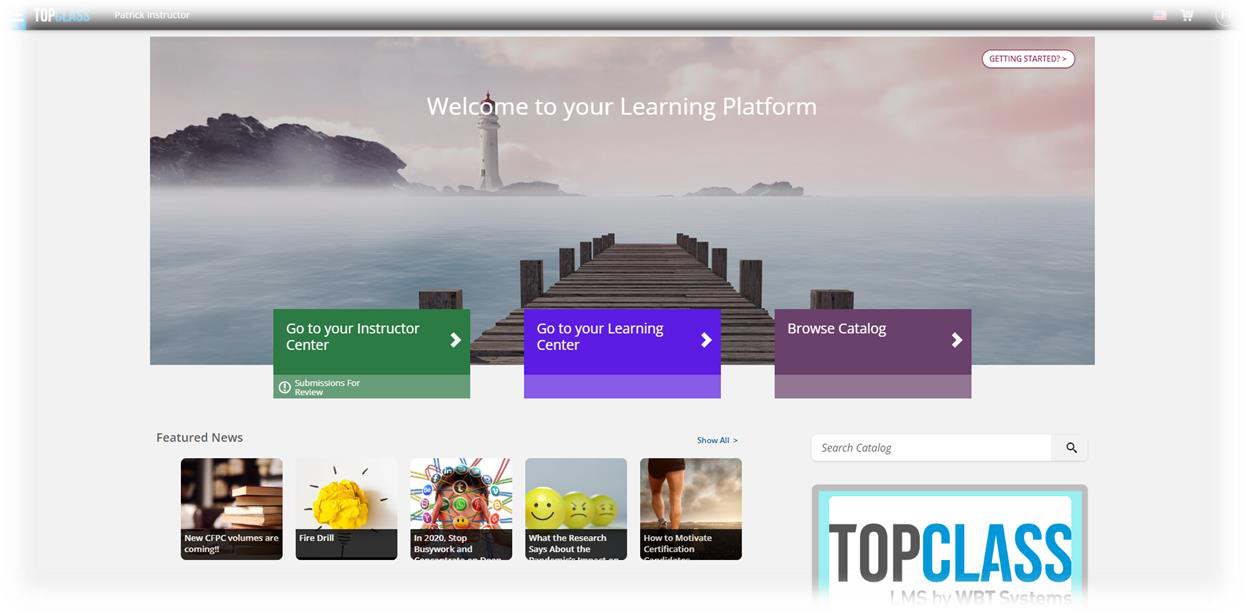
- Quick access button to Instructor Center from Home/Landing Page.
- Submission pending review note on quick access button to Instructor Center from
- Home/Landing Page.
Credit Enhancements
Credits can now be awarded based on a user’s group membership. This action can be carried out on the Credit Type under Advanced Options > Awarding Groups .
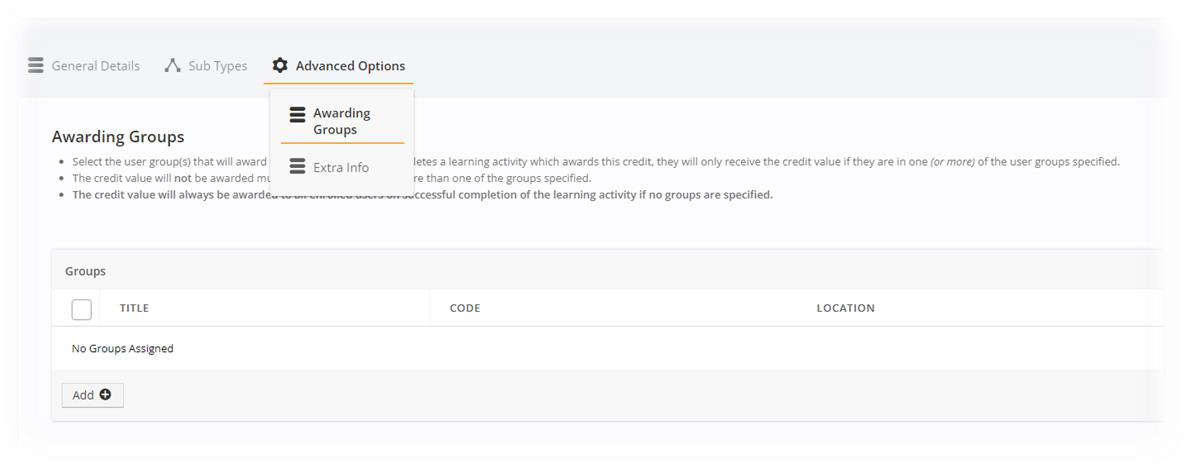
If there is no group linked to the credit type and it is assigned to a course, everyone who takes that course will receive that credit. (No restrictions)
If a group is linked to the credit type and it is assigned to a course, only users who are in that group (or in its respective subgroup) will receive the credit. If one or more groups are selected on the credit type, the user can be in any one of those groups to be awarded the credit.
NoteThe credit will not be awarded multiple times if the user is in more than one group specified as an awarding group for that credit type.
Credit Type filter in catalog will only show Credit Types that logged in users can achieve. If a Credit Type is restricted to Groups and logged in users are not in that Group, then Credit Type will not be listed as option to filter by under Credit Type in catalog.
Test Enhancements
Aggregate Answer Choices
Test answers can now be configured so that learner answers can be compared against peer answers. This will allow learners to see how their fellow learners have answered the and give instructors a deeper insight into their learners’ understanding of the course materials.
Configuration can be set either at Test level, under Test Settings > Test Results & Feedback tab > Show Aggregate Answer Choices, or inherited at a System level , with a new setting, which can be found by going to System Settings > Content > Show Aggregate Answer Choices. The new setting is not on by default.
If configured, will display percentage overview of answer choices selected by other users within same activity for the following question types:
- True/False
- Pick One
- Likert question
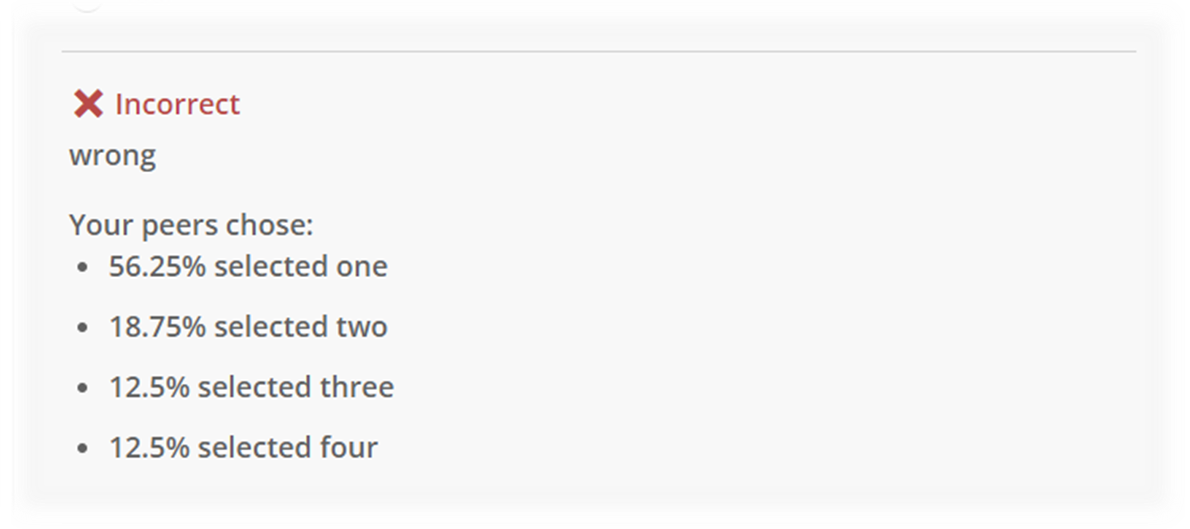
If configured, will also display percentage overview on:
- Submissions Tab in Students Learning Center.
- Completed Tab in Students Learning Center.
- Display per question in Try Out mode when Answer Feedback test setting is enabled.
Integration Enhancements
HigherLogic
Added support for OAuth authentication.
NetForum
Additional integration points now available:
- New Online synchronization – ETL
- New ILT synchronization – ETL
- New Enrolment synchronization
- New Online – JIT/ETL
- New ILT Activities – JIT/ETL
- New Completion Writeback with Credits
Miscellaneous
- Online Activities – within the Enrollments & Submissions tab, administrators can configure which columns are visible.
- New - Dropdown list
- Price Plan Visibility – administrators can determine which price plans can be shown/hidden when users are viewing TopClass anonymously.
- New - Flag on Price Plan
- Header Logo link – administrators can choose whether the link within the header logo should open in a new tab. This setting is not enabled by default.
- New - System Administration > Branding > Header Settings > Header Logo to open in new tab
- External Shopping Cart redirect link – for those using an external shopping cart, the ability to specify whether the redirect link to the external system is opened in a new tab or not.
- System Settings > Catalog > Open External Catalog in New Window/tab
- Generic UI improvements
- General enhancements and bug fixes
April 2023 (10.6.3)
New Features
Re-Enrollment
In line with our commitment to our customers, and their learners, to continually improve the TopClass experience, we are pleased to share the new re-enrollment and recertification functionality for online activities.
-
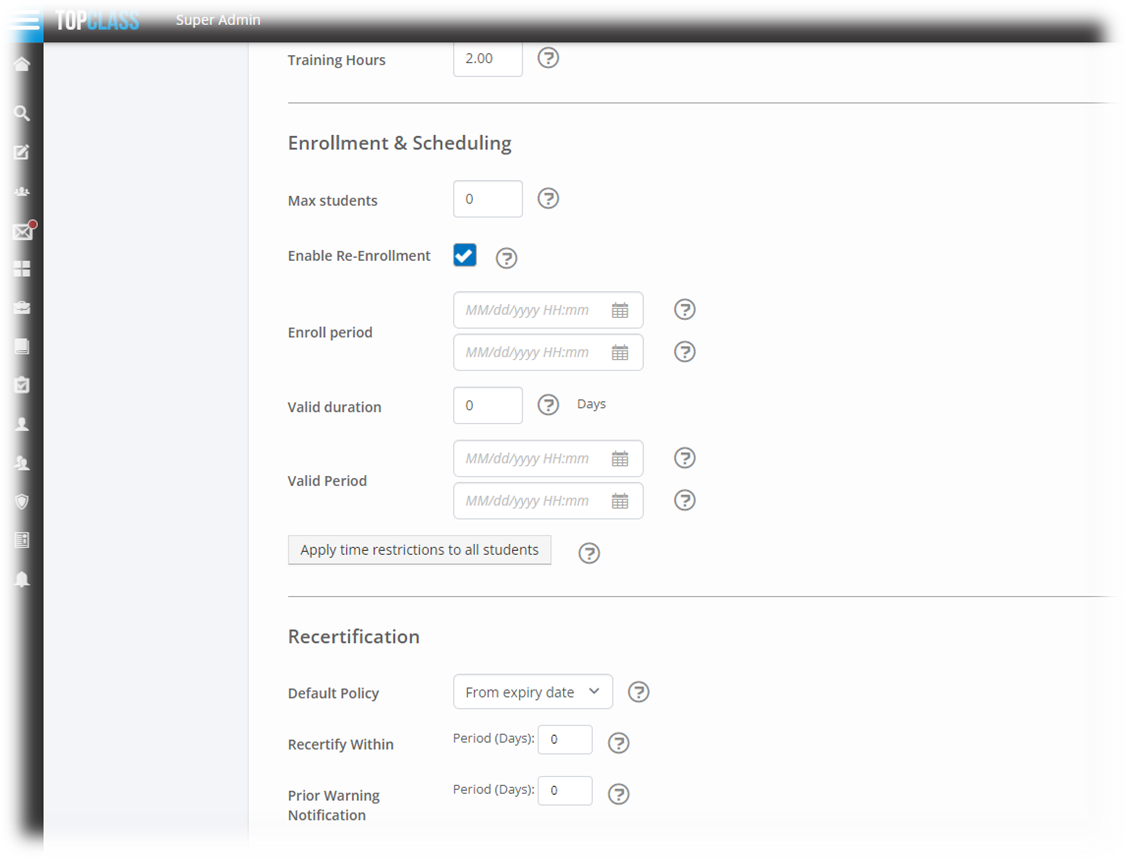
Customers can now specify, at an Online Activity level, if that activity is open to re-enrollment. New Enrollment & Scheduling and Recertification sections are now available on the General Details tab of online activities to configure these settings. The Valid Duration and Valid Period settings have also been moved from the Policy Rules tab to provide a more streamlined workflow for Super Administrators.
-
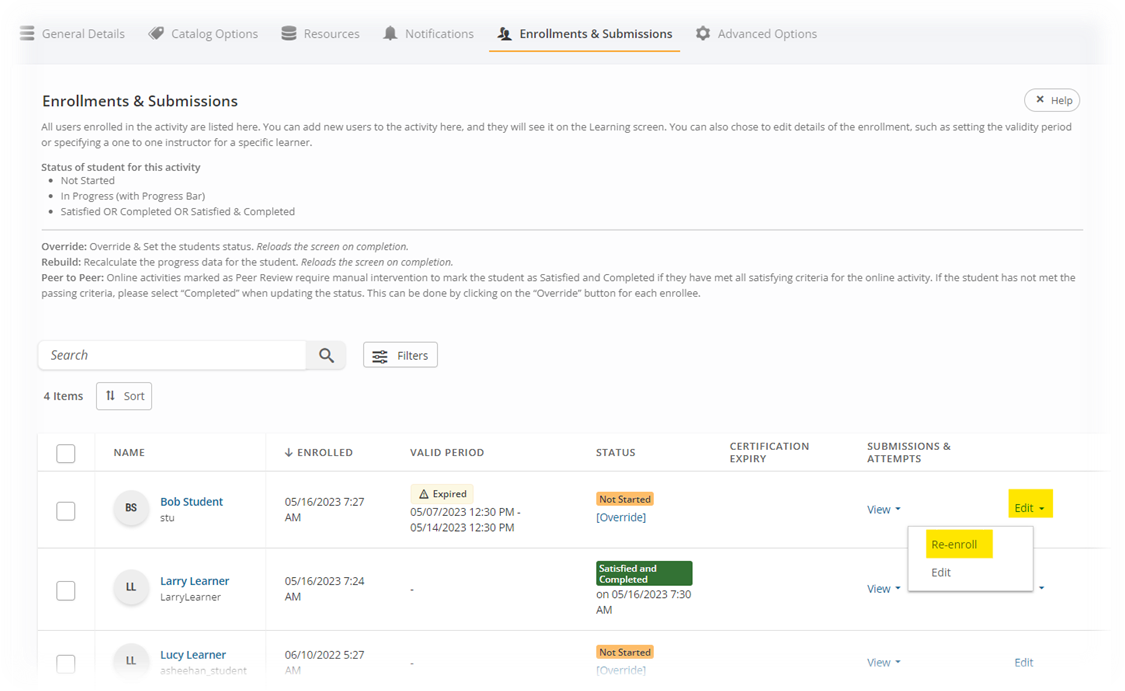
Super Administrators can re-enroll Learners on expiration of a Valid Period, or post completion from the Enrollments & Submissions tab of an Online Activity.
-
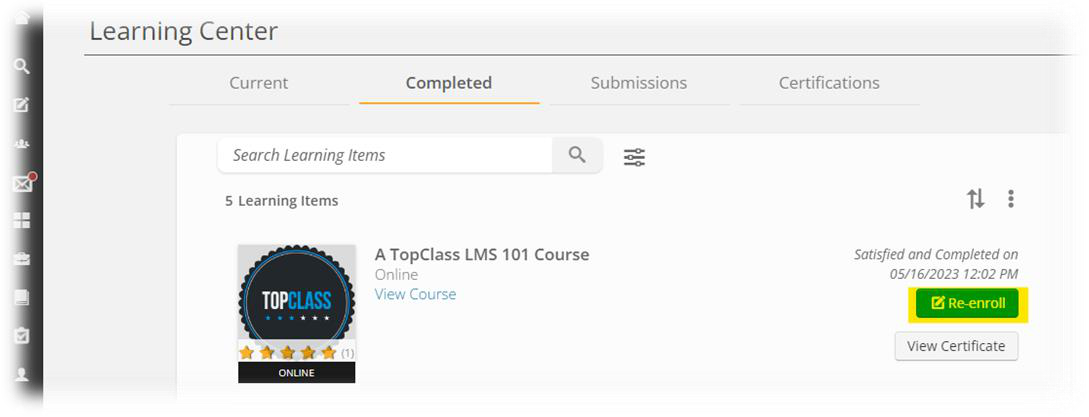
Learners can re-enroll directly into an online activity from the Completed tab in their Learning Center,
Custom Strings
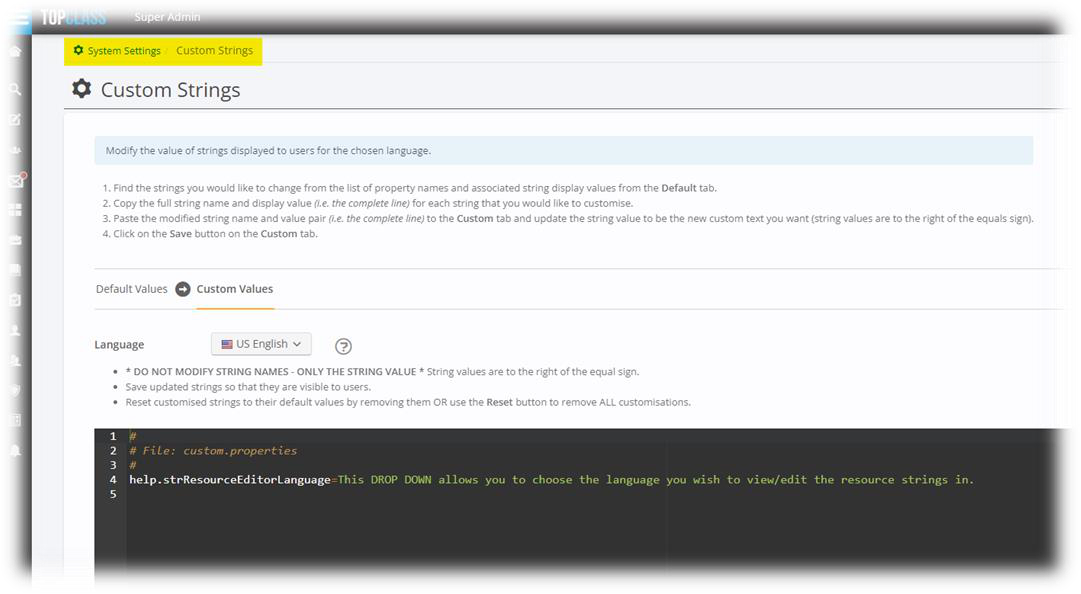
A new TopClass system setting allows Super Administrators to modify the value of TopClass strings displayed to users in a chosen language. This new feature gives you the opportunity to incorporate your preferred wording style and customize your Learning Platform further.
Integrations

NEW – Impexium Integration
Impexium is now integrated with TopClass; including:
- SSO
- User synchronization – JIT/ELT
- Online synchronization – ELT
- Enrollment synchronization
- Online – JIT
- ILT Activities – JIT
- Group synchronization – ELT
- Completion writeback
Enhancements
Instructor Enhancements
To improve administrational efficiency, TopClass has introduced the following instructor enhancements:
- ILT Instructor and Manager role types can now be set via a Group Operation.
- Instructor information can be added to certificates for online activities.
- New system setting allows you to specify default ‘Days not available’ for Instructors.
Email Enhancements
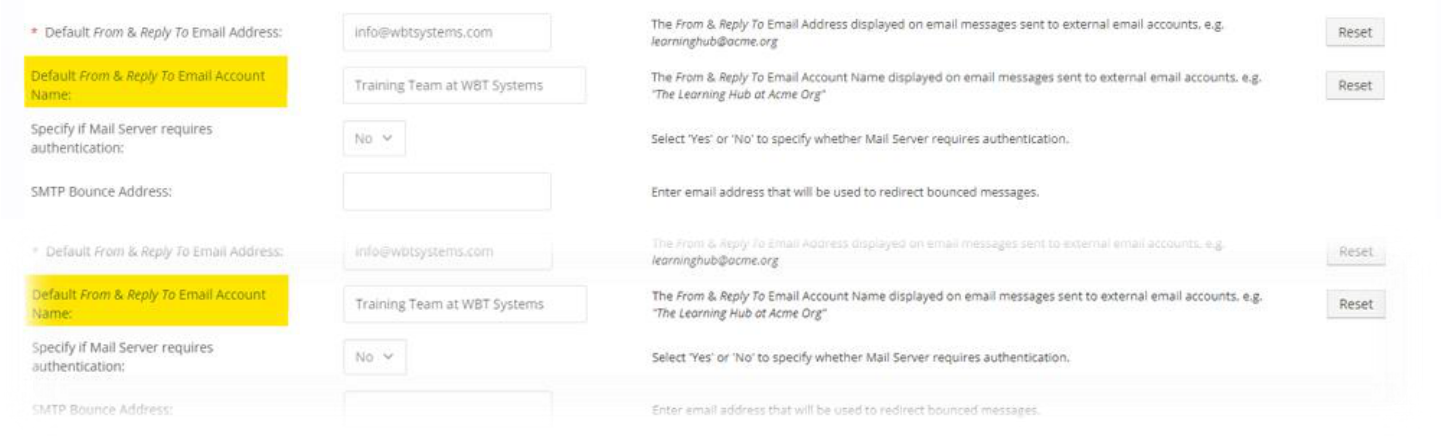
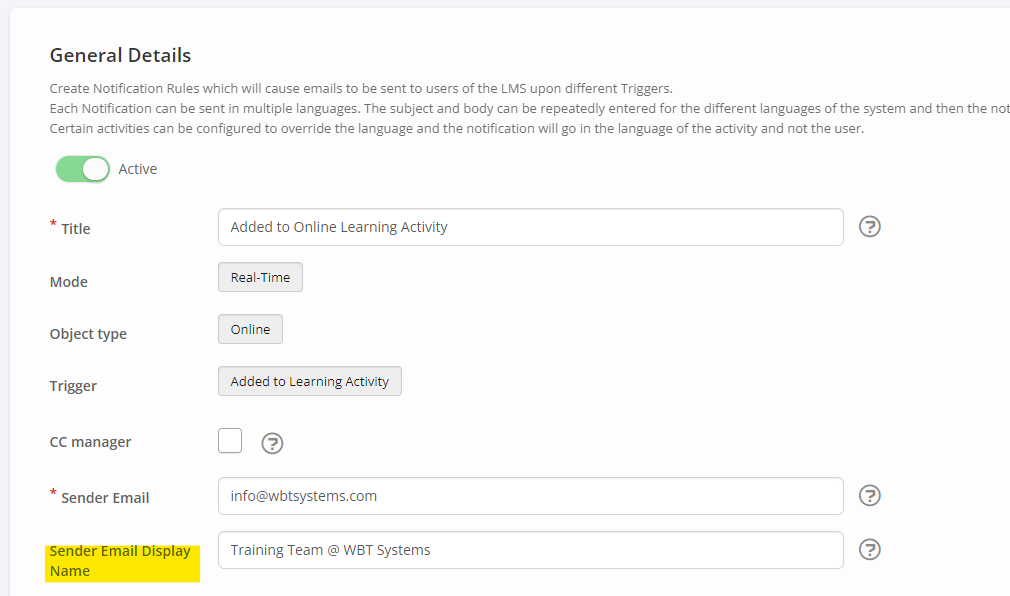
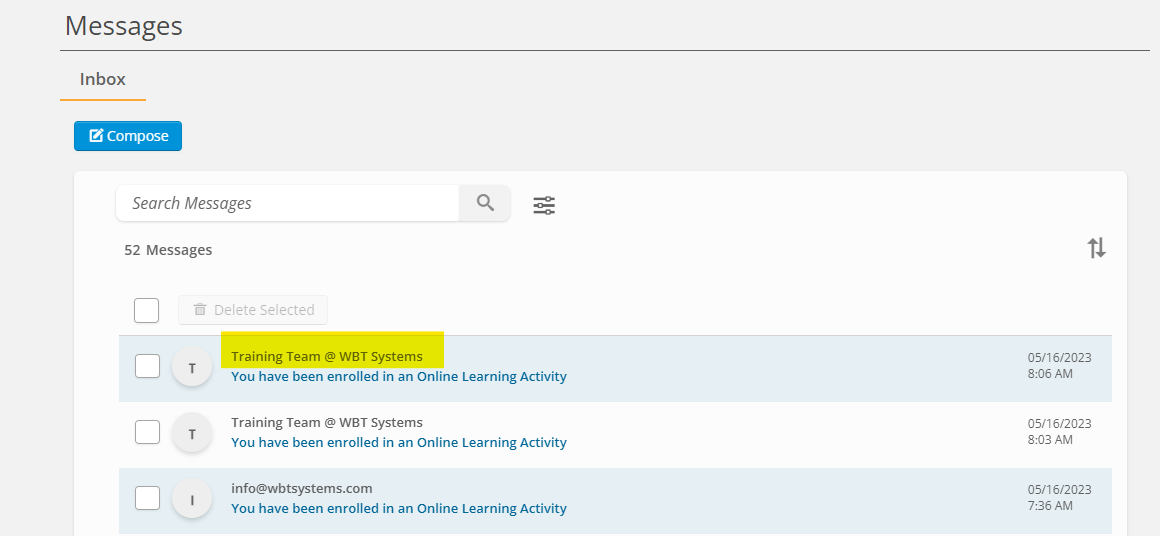
TopClass now offers the ability to configure and customize the notification sender name, aligning to other standard email inboxes.
- A default name can be configured at the system level and applied to notifications.
- This can also be set at a Notification level.
- Displays as the specified name in
- The TopClass message center
- On external emails
Catalog Enhancements
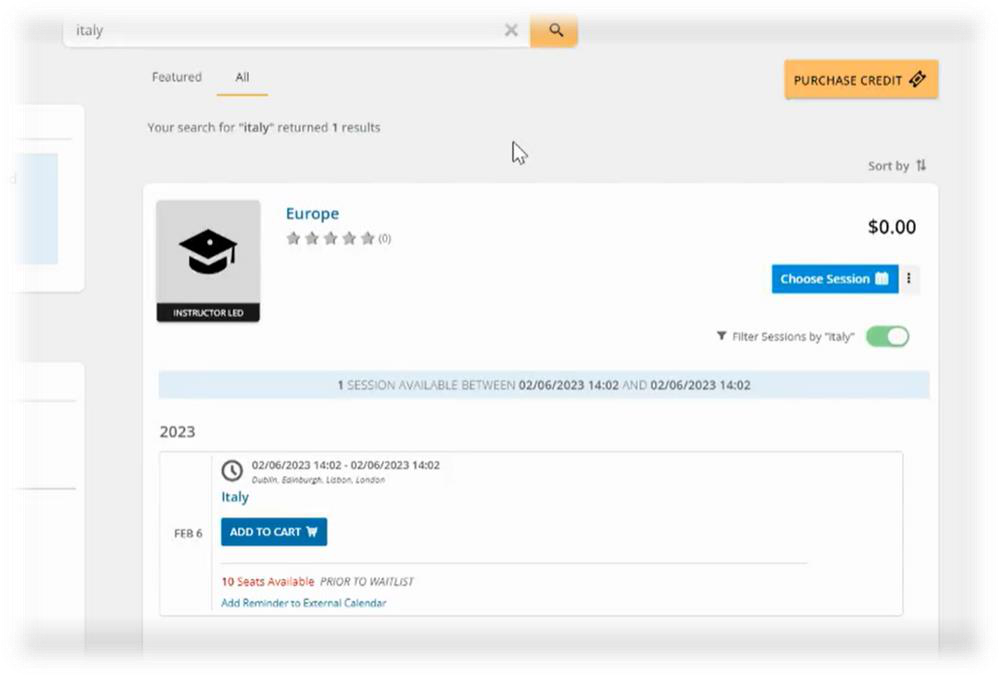
Ability to search by ILT session title
Search by session title is now an option within TopClass. Learners can also enroll into an ILT session directly from the catalog without the need to navigate to a new screen.
NoteContact your TopClass representative if you would like to enable this functionality.
Self-Registration Enhancements
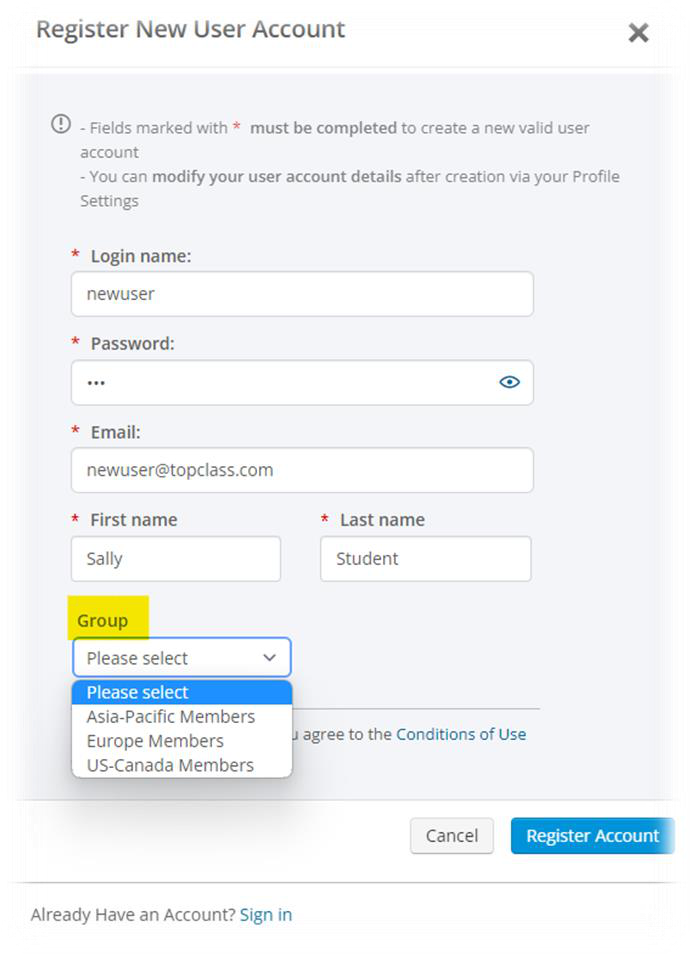
Group availability on Self-Registration screen
For customers utilizing Self-Registration, TopClass now provides the ability to specify what Groups should be available for selection on the Self-Registration screen.
External Training Enhancements
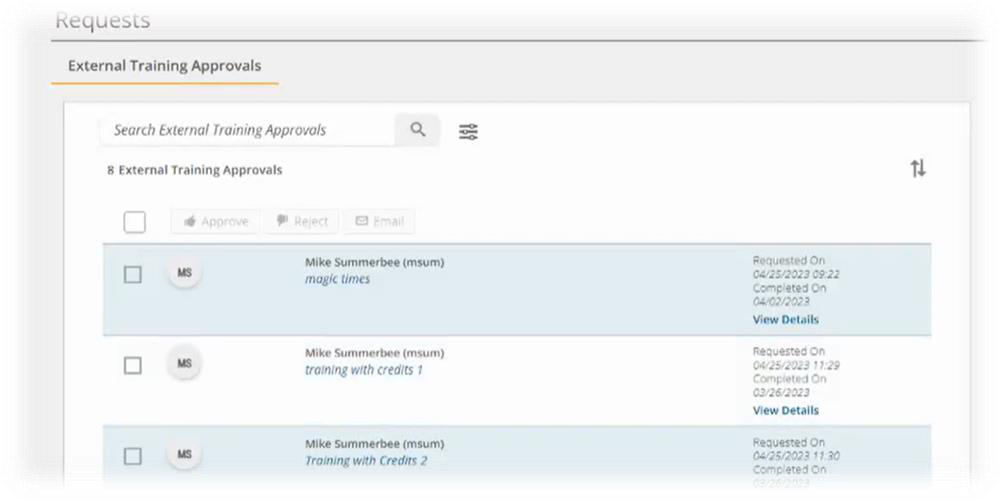
New approval workflow
Approval for external training, submitted by a Learner can now be configured as a system setting.
Approval rights can be granted to either a specified user or a group of users.
Manager-added external training
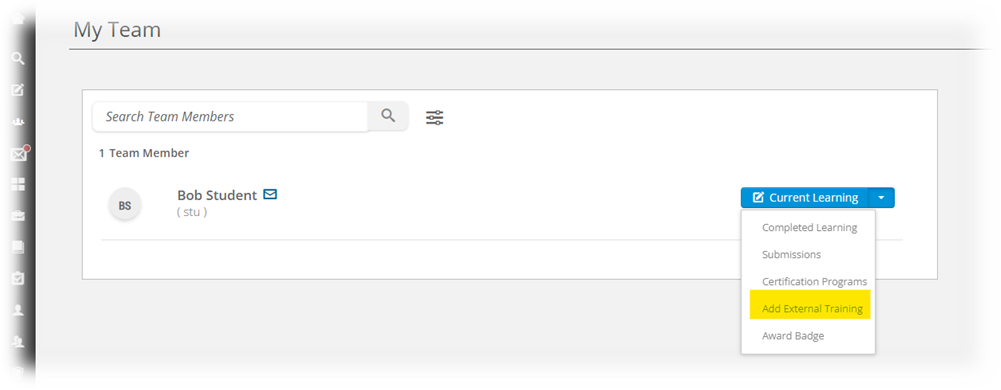
TopClass now has the option to allow Managers to add external training for members of their team.
This can be configured within System Settings.
Integration Enhancements
iMIS
- Completions Writeback update for iMIS Professional
- New ILT Cancellation Sync
Zoom & MS Teams
- New UI to configure Upstream functionality available for Zoom and MS Teams
Reports
New ILT Attendance Report - This new report provides a summary of User attendance in TopClass ILT sessions, Virtual ILT session and Conferences.
Miscellaneous
- General enhancements and bug fixes
February 2023 (10.6.2)
New Features
Alert Banners
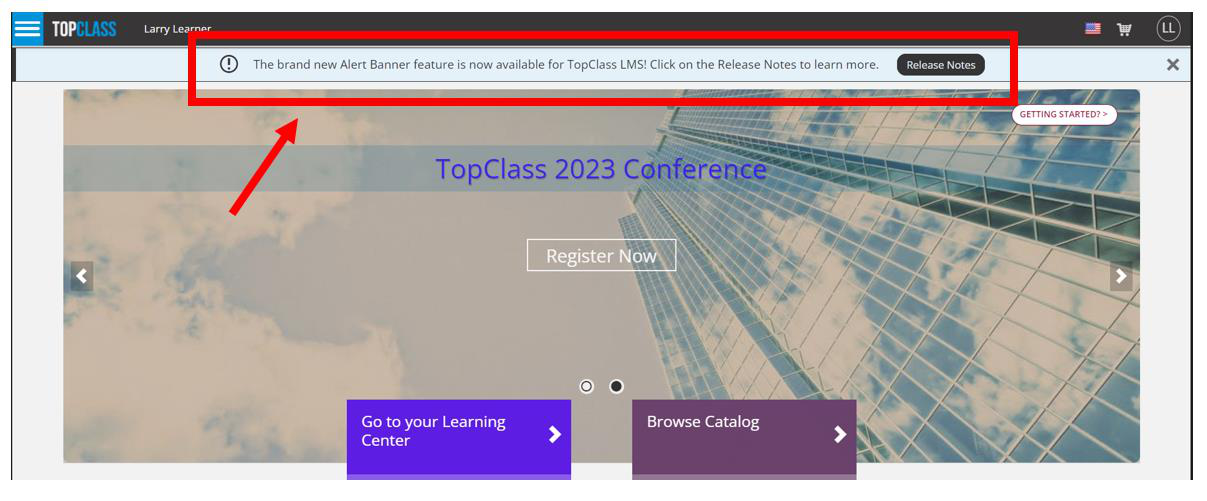
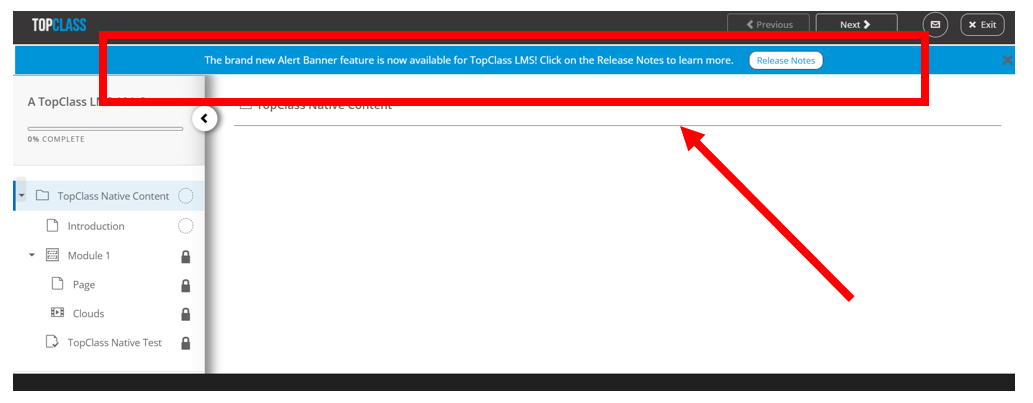
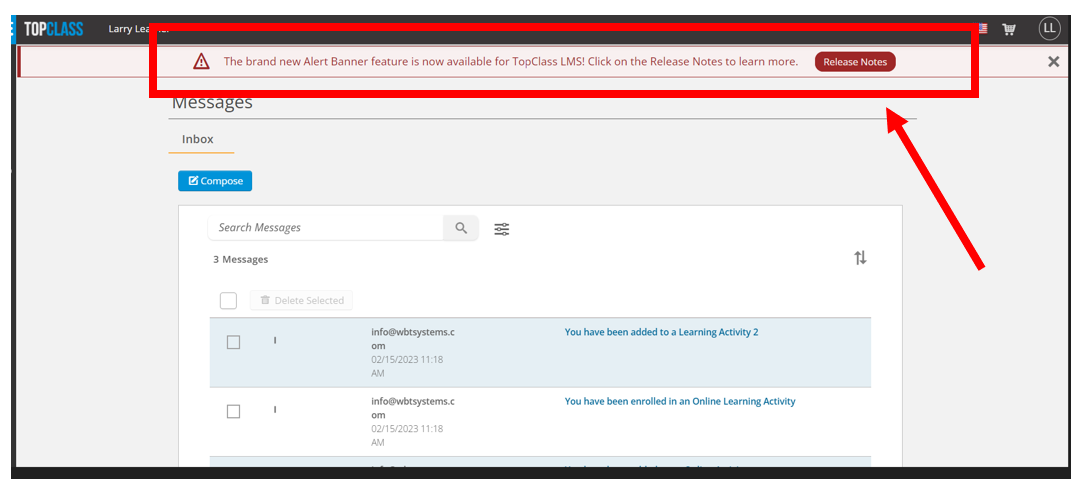
NEW - TopClass have added the ability for Super Administrators to create Alert Banners that are displayed on all your TopClass screens. These Alert Banners can be used to convey messages of varying importance or warning messages for a specified period.
- Customers can customize the look and feel of Alert banners, specifying background and text color.
- Customizable Call-To-Action button to redirect learners to specific TopClass screens or custom URLs.
- Multi-language support for Alert Banner messages.
- This new feature also allows WBT to create alert banners to be displayed to TopClass Super Administrators. Going forward, this information will be used to communicate important TopClass information including Upgrade Schedules and planned maintenance, for example.
NEW – GrowthZone Integration
TopClass now has limited integration points with GrowthZone, including:
- SSO using oAuth
- User synchronization – JIT/ELT
NEW – CE Broker Integration
- TopClass integrates with CE Broker for completions writeback, where the following is populated:
- User’s license number
- User’s job title
- Activity has an external ID
NEW - Infrastructure for NARS Integration
Enhancements
Certification Program Enhancements
Due to ongoing demand, development of the TopClass Certification Programs module remains at
the forefront for enhancements.
- New - Within the TopClass Certification Programs module, you can now manually edit Completion Due dates and Valid Until dates on the Certification Path Enrollments tab.
- Notifications can be configured to trigger if dates are changed.
- New – Added ability to lock any final exam until all other items are completed within the Certification Path.
- New – TopClass can now specify pre-requisites for Certification Program, ensuring Learners will not be able to enroll in the activity until they have satisfied the pre-requisite.
Learner Profile Enhancements
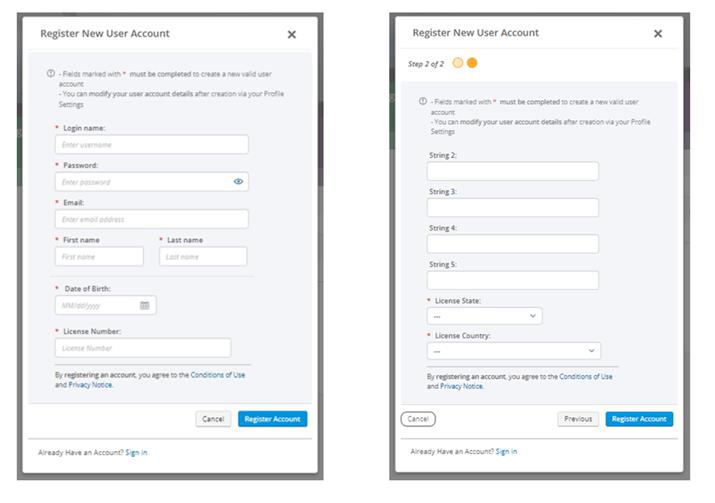
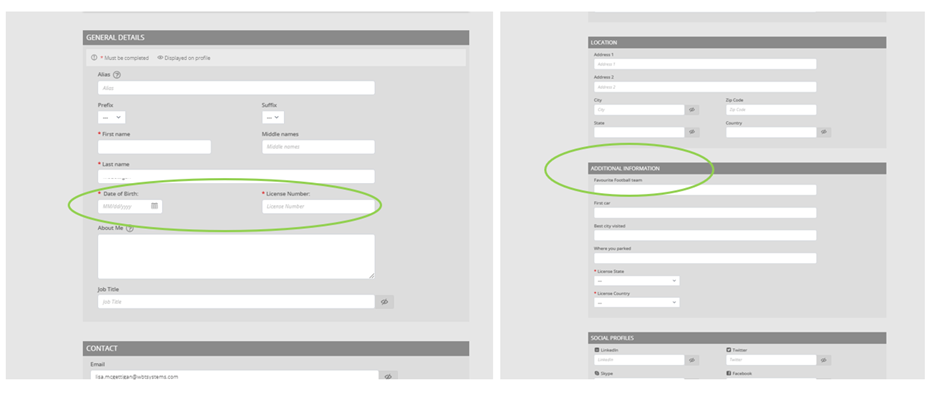
TopClass now offers the ability to utilize custom User fields to store additional attributes against a User record.
These fields can be used across several modules, including:
-
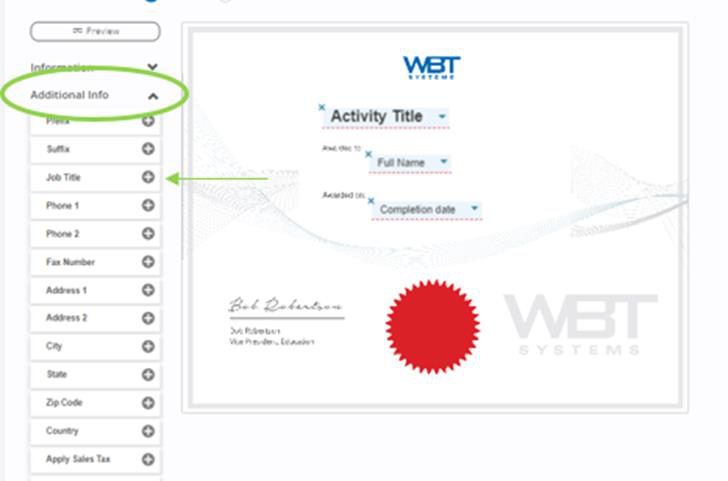
Configuration of Certificates.
- Drag and Drop has been replaced with a (+) (plus) icon beside each field that can be added to the Certificate.
-
Collection of User data on the Self Registration screen(s).
- Exposure on User Profile screen via a new Additional Information section.
Ability to specify email as Username
TopClass can be configured to ensure an email address is set as a username.
Improved Deletion Workflow
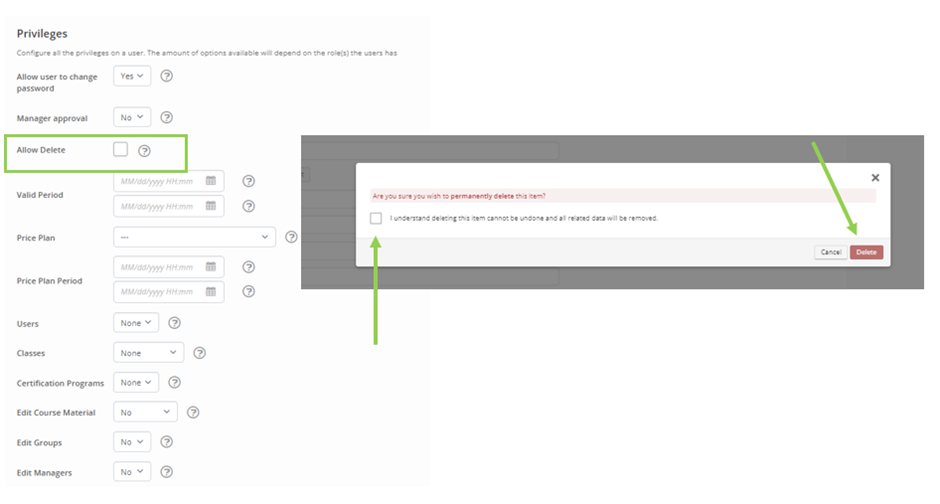
TopClass has implemented a new deletion workflow on administration screens to emphasize the consequences of deleting objects, and reduction of deletion errors within the TopClass.
- A new Allow Delete flag on the Privileges tab for Administrators determines if Administrators should have the Delete option on their administration screens.
- An additional checkbox is presented to the User as part of the Deletion confirmation.
Integration Enhancements
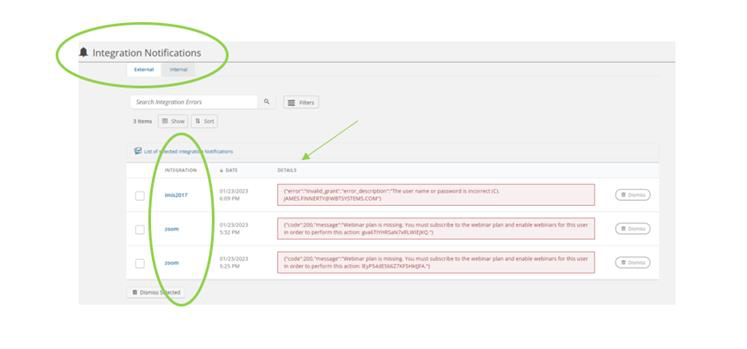
New – Added UI screen available to Super Administrators that highlights any vendor integration connection issues, and errors encountered during integration tasks. This allows Customers to identify any potential errors easily through the TopClass UI.
- The Internal tab will list any errors or failures thrown by TopClass integration tasks or synchs, for example, user creation skipped due to invalid username.
- The External tab will list any errors or failures that TopClass encounters when calling external vendors. For example, writeback issues or if integrations connection has stopped working due to password change.
New - Additional integration points for Salesforce.
- Completion Writeback
- Enrollment Writeback
- User Writeback, including User Lookup
New - TopClass integration bridge now supports multiple vendors.
Reports
New – Time Tracking report
- This new report shows the time Learners have spent taking any tests in an online activity, including TopClass tests, SCORM & xAPI.
- New - Test Responses Cross Tab format report
- Provides a list of Users and their progress through specified Activities they are registered for.
- Reports on Question types; Boolean, Pick One, Likert and Text.
The Student Progress by Activity report has been extended to include:
- ILT Activities
- Conferences (Standard & Virtual)
- A new Completion date filter
Miscellaneous
- General enhancements and bug fixes
Updated 5 months ago