

Supported file types
When creating content, TopClass supports the following files types to be embedded onto a TopClass page:
| - asf, - avi, - css, - dcr, - doc, - docx, - epub, - flv, - gif, - htm, - jpeg, - jpg, - mov, - mp3 - mp4,* - mpeg, | - mpg, - ogv, - pdf, - png, - ppt, - pptx, - qt, - ram, - rm, - swf, - txt, - webm, - wmv, - xls, - xlsx, - zip, |
NoteIt is recommended to use the TopClass interactive videos for mp4 video files.
Embedding a video in learning content
Do the following to embed a video in learning content:
- Go to Activities and Learning > Content.
- Open the content.
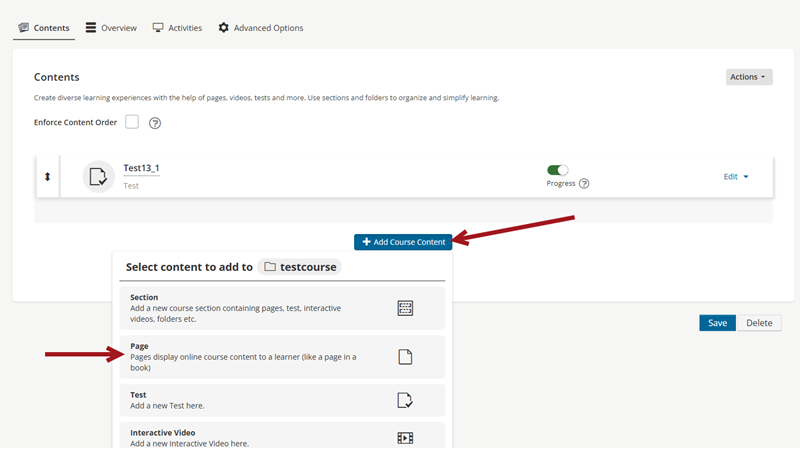
- Click Add Course Content, then select Page.
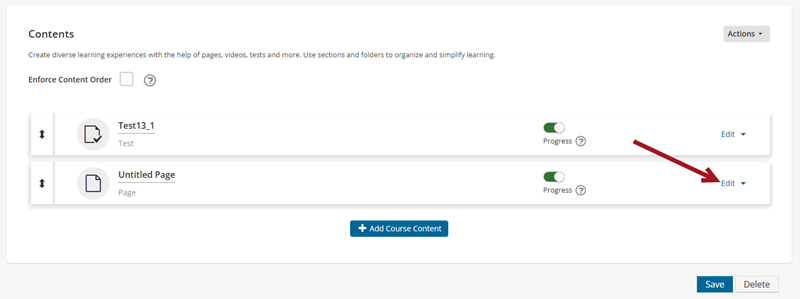
- Select Edit.
- From the tool bar, select one of the three image icons:
 insert file - this will embed your file onto the page allowing student to download it.
 insert image - this will embed your image on screen
 insert media - this will embed your video clip on screen.
- Click Save .
Updated 5 months ago
Did this page help you?