

User types
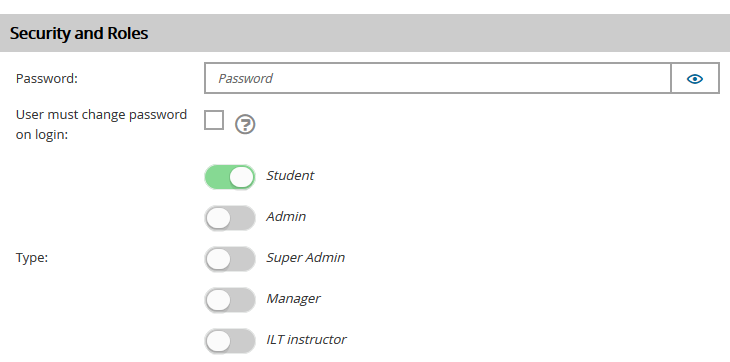
TopClass includes five primary user types: Students, Admins, Super Admins, Managers, and ILT Instructors. A user may be assigned multiple types to provide access to different functions. For example, a user may be assigned the Admin type to perform administrative tasks, while also retaining the Student type so they can enroll in classes. Super Admins determine the rights available to both administrators and students.
You can assign user types on the General Details tab of the user account:
Students
Students are standard users who can enroll in training and events, access the catalog, view class materials, track their training history, collaborate via email or discussion forums, and manage their calendar. Every new user is assigned the Student type by default. Users with only this type have no administrative privileges within TopClass.
Admins
Admins monitor and support learners’ progress through online activities. They can review student progress, access course content, and contact students if needed. Additional administrative privileges can be granted through the Privileges tab on the user account. For example, one Admin may be allowed to create content, another may manage activities, and another may handle user creation.
To assign a user as an instructor for an online activity, the user must first be marked as an Admin on their account.
Super Admins
Super Admins configure and manage all aspects of TopClass. They have access to the full System Administration menu, allowing them to configure, debug, and maintain the system. Their daily responsibilities may include creating and managing users, online activities, instructor-led training (ILTs), discussion forums, and other system components.
Managers
Any user can be granted Manager rights. Managers can oversee individual users or entire groups of users. When users are assigned to a manager, a new Team screen becomes available to that manager. The Team screen allows managers to review progress and set learning objectives for their team members.
ILT Instructors
ILT Instructors are qualified individuals who lead instructor-led training sessions. They do not need to be TopClass users. However, if a registered TopClass user will lead an ILT session, they must first be assigned the ILT Instructor type and then be added to the ILT and its sessions.
For each ILT Instructor, you can maintain details such as teaching locations, available languages, regular availability, blackout dates, and the activities they are qualified to lead. You can also view their full schedule to see upcoming training commitments.
Online Instructors
Online Instructors are Admins who have been granted specific privileges that allow them to create and edit classes, content, question pools, and pre- and post-work. A user must have the Admin user type before they can be assigned as an instructor for an online activity.
Updated 3 months ago