

Cancelling AutoPay enrollments
Membership Training Fundraising Training
NoteTo allow public users to cancel their own enrollments, see Allowing members and donors to cancel their own enrollments.
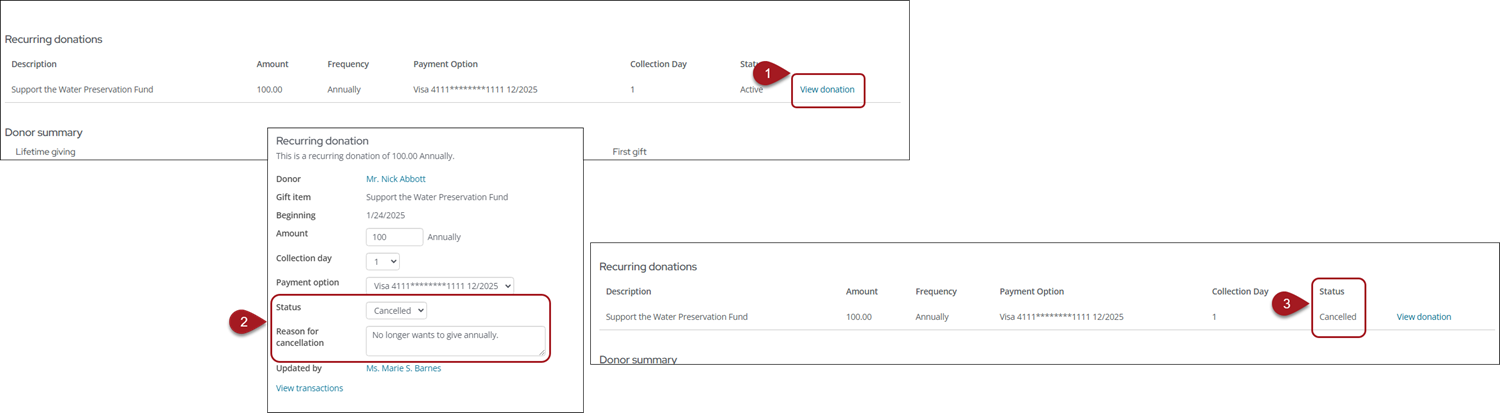
To cancel a recurring enrollment as a staff user, do the following:
- Navigate to the member or donor's account page.
- Do one of the following:
- Update a membership enrollment: Click the Membership tab.
- Update a donation enrollment: Click the Giving tab.
- Select View membership or View donation.
- From the Status drop-down, select Cancelled.
- Enter a Reason for cancellation.
- Save the changes to cancel the enrollment.
A Cancelled on date is displayed with the current date of the cancellation; this date cannot be overwritten. The name of the staff user who modified the enrollment will be automatically added to the Updated by field.
NoteCancelled automatic payment enrollments cannot be reactivated. When an enrollment is cancelled the Amount, Payment option, and Status fields are greyed out.
Updated 5 months ago
Did this page help you?