

Enrolling a member with AutoPay
After AutoPay is configured, members can begin enrolling themselves with recurring membership payments. If the member has a join or renewal in their cart, they are presented with the recurring membership options. Before you begin, confirm the following are completed:
NoteIt is suggested that a member enrolls themselves with AutoPay, since their credit card details are required at the time of enrollment. It is never recommended that a member shares their credit card information over the phone or by email.
The following is how a member enrolls themselves with AutoPay:
-
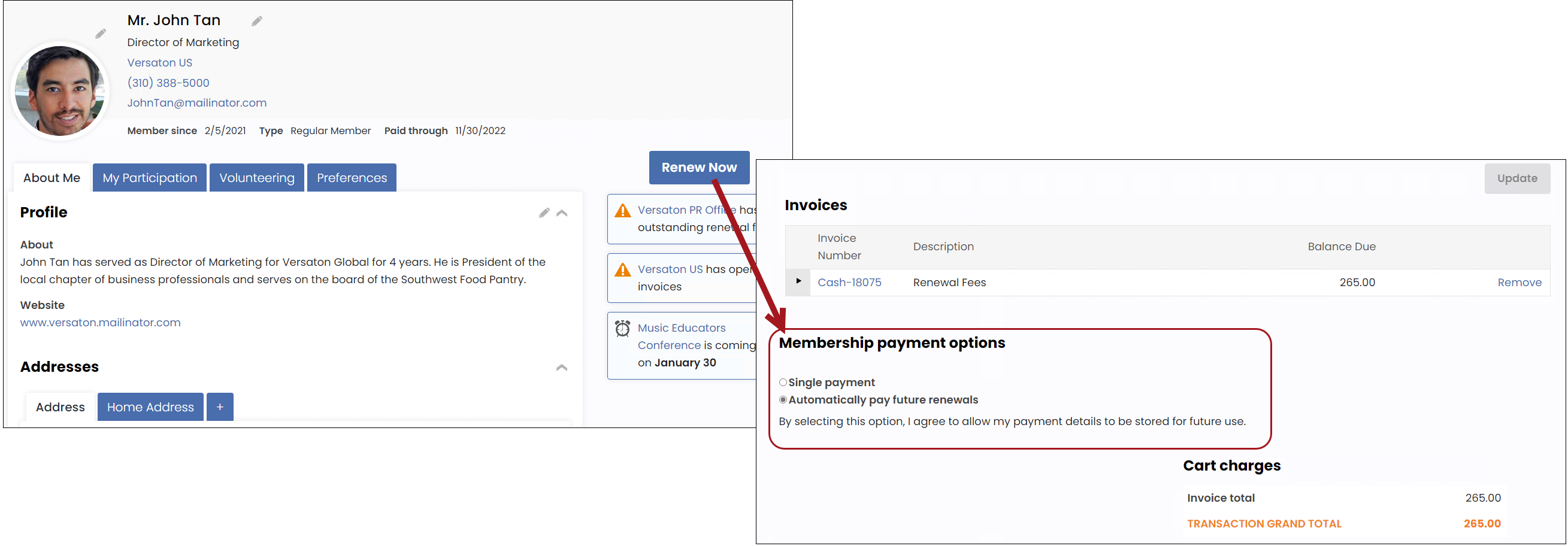
The member navigates to their account page and clicks Renew Now.
-
From the Cart, the member must select Automatically pay future renewals.
-
The member enters their credit card details. This is the card that is charged on the recurring cycle.
-
The member clicks Submit Order. They are now enrolled with AutoPay.
Once members are enrolled with AutoPay, you may need to perform the following tasks:
- View automatic payment transactions
- Cancel AutoPay enrollments
- Modify an existing AutoPay payment method
- Adjust the amount and collection date for recurring donations
Updated 3 months ago