

Setting up funds
Funds, also known as financial entities, are the entities within your organization that serve as asset accounts for your fundraising activities. Frequently, for legal and accounting reasons, an organization must maintain separate accounting records for each gift item.
In iMIS, a fund is an organization. Gifts and pledges are directed to a fund, for example, a capital fund, a fixed asset fund, or a general unrestricted fund.
WarningDo not delete funds after you have completed fundraising transactions. Deleting funds affects the completed transactions.
Defining funds
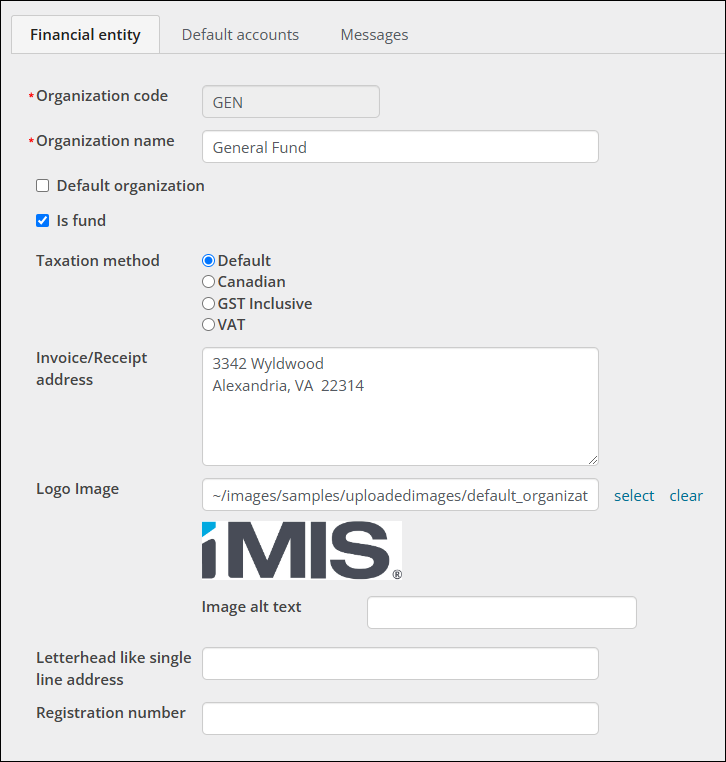
Defining a new fund follows a similar process to defining a new financial entity. Do the following to define a new fund:
- Go to Settings > Finance > Financial entities.
- Select Add new financial entity.
- Enter the fund code in the Organization code field.
- Enter the name of the fund in the Organization name field.
- Enable Is fund.
- Select the appropriate Taxation method option.
- (optional) Enter the fund's Invoice/Receipt address. This designates the mailing address of the fund.
- (optional) Select the fund's Logo if available. This designates the fund's logo that is used on reports that include a logo.
- (optional) Enter the Letterhead like single line address if applicable.
- Click Save & Exit.
Updated about 1 month ago
Did this page help you?