

Adding out-of-the-box content to custom account pages
Access requiredTo create and update RiSE content, you must be a system administrator or a staff user that belongs to at least one content authority group.
After you start using custom account pages, any new content added to the out-of-the-box account page tabs is not automatically added to your custom account pages.
To add the new content on out-of-the-box account pages to your custom account pages, do the following:
- Go to RiSE > Page Builder > Manage content.
- Navigate to the out-of-the-box account page tabs:
- Individuals: @/iCore/Contacts/ContactLayouts/Staff/Tabs
- Organizations: @/iCore/Contacts/OrganizationLayouts/Staff/Tabs
- Open the content record that contains the new content you want to use. For example, if there is content on the Membership tab that you want to use on your Membership account page tab, open the Membership content record.
-
Find the content item, then click Copy To.
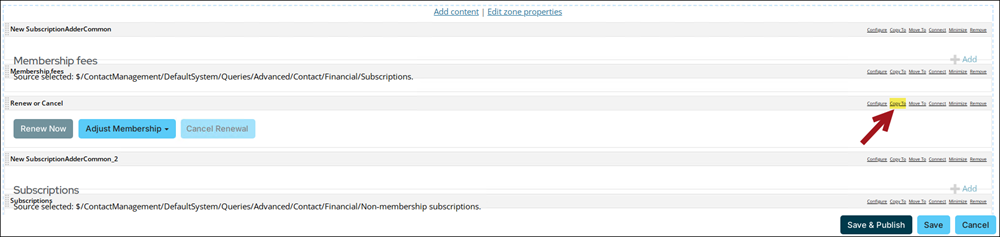
- From the Document Browser, navigate to the page you want to move the content to.
- Click OK.
- Continue that process for each content item you want to use, then close the content record.
- Navigate to the page you moved the content to, then open it for edit.
- Move the content item around to the desired location, then click Save & Publish.
Updated about 1 month ago
Did this page help you?