

Using out-of-the-box queries: iMIS Learning
A set of sample IQA queries is available in the $/Samples/iMISLearning/ folder. These queries are locked and need to be copied before making any modifications.
Do the following to copy a query:
- Go to RiSE > Document system and navigate to $/Samples/iMISLearning/.
- Click the query, then select Copy.
- Paste the copy to the appropriate location before editing.
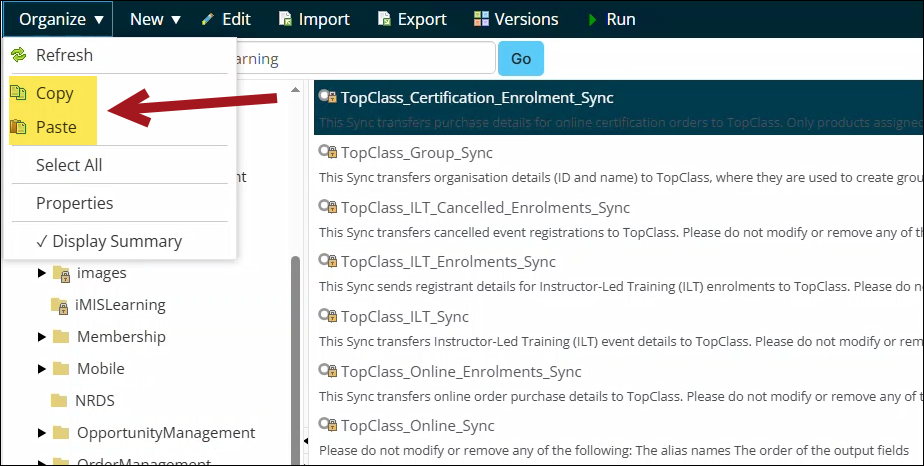
The following sample queries are available:
| Query | Purpose |
|---|---|
| TopClass_Certification_Enrolment_Sync | Syncs purchase details for online certification orders to TopClass. |
| TopClass_Group_Sync | Syncs organization details to TopClass. |
| TopClass_ILT_Cancelled_Enrolments_Sync | Syncs cancelled event registrations to TopClass. |
| TopClass_ILT_Enrolments_Sync | Syncs registrant details for Instructor-Led enrollments to TopClass. |
| TopClass_ILT_Sync | Syncs instructor-led training event details to TopClass. |
| TopClass_Online_Enrolments_Sync | Syncs online order purchases to TopClass. |
| TopClass_Online_Sync | Syncs online course details to TopClass. |
| TopClass_Users_Sync | Syncs user data to TopClass. |
| TopClass_VC_Cancelled_Registrations | Syncs cancelled virtual classroom registrations to TopClass. |
| TopClass_VC_Registrations | Syncs virtual classroom registrations to TopClass. |
Updated about 2 months ago
Did this page help you?