

Generative Engine Optimization (GEO) for iMIS
Access requiredTo create and update RiSE content, you must be a system administrator or a staff user that belongs to at least one content authority group.
Generative Engine Optimization (GEO) is the practice of optimizing digital footprints so that AI-powered search tools can understand, trust, and surface its content in generated answers. Tools such as Google AI Overviews, ChatGPT Search, Perplexity, and Microsoft Copilot are increasingly the first-place members, prospective members, and event attendees look for information. GEO helps ensure that an organization's website content is the source those tools draw from.
NoteGEO builds on existing SEO practices rather than replacing them. The technical and content fundamentals that improve search rankings also improve AI visibility. See Using RiSE to maximize SEO results and Optimizing iMIS content for better search results.
Understanding how GEO differs from SEO
Traditional SEO targets ranking in a list of links. GEO targets a different outcome: becoming the source that an AI tool quotes or paraphrases when generating a direct answer to a user's question. The following table summarizes the key differences:
| SEO | GEO |
|---|---|
| Ranks pages in a list of links. | Cited or summarized in an AI-generated answer. |
| Measured by ranking position and click-through rate. | Measured by citation frequency and inclusion in AI answers. |
| Rewards authority and relevance. | Rewards credibility, structure, and topical depth. |
| Drives clicks to the site. | Drives awareness and trust before a user visits. |
Optimizing RiSE pages for GEO
The following steps can be taken directly in iMIS to improve GEO visibility:
Adding meta descriptions to content records
A clear, concise meta description helps AI systems understand what a page covers before crawling the full content.
Do the following to add a meta description to a content record:
-
Go to RiSE > Page Builder > Manage content.
-
Edit or create a new content record.
-
Click the Properties tab.
-
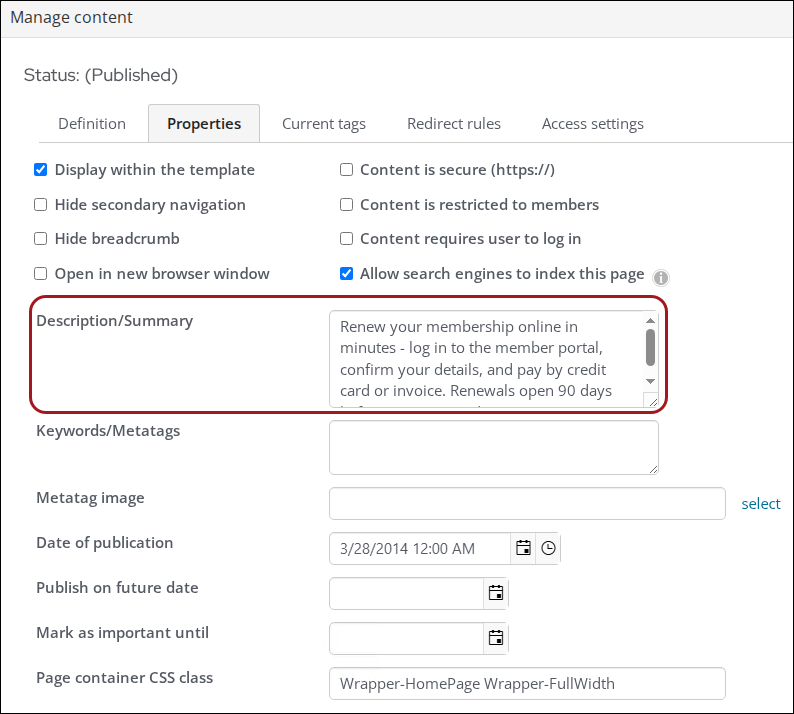
Enter a description in the Description/Summary field. Keep the description to 155 characters or fewer and write it as a direct answer to the question the page addresses.
-
Click Save & Publish.
TipWrite the description as if answering a specific question a member might ask an AI tool. For example, "Find out how to renew your membership online, update contact details, and manage event registrations through the member portal."
See Defining and publishing content.
Adding FAQ sections to high-traffic pages
FAQ sections are especially useful on membership, events, and renewal pages because they present information in the same question-and-answer format that AI tools use to generate responses.
Do the following to add FAQ content:
-
Go to RiSE > Page Builder > Manage content.
-
Edit or create a new content record.
-
Add the Content Html content item and enter the following:
-
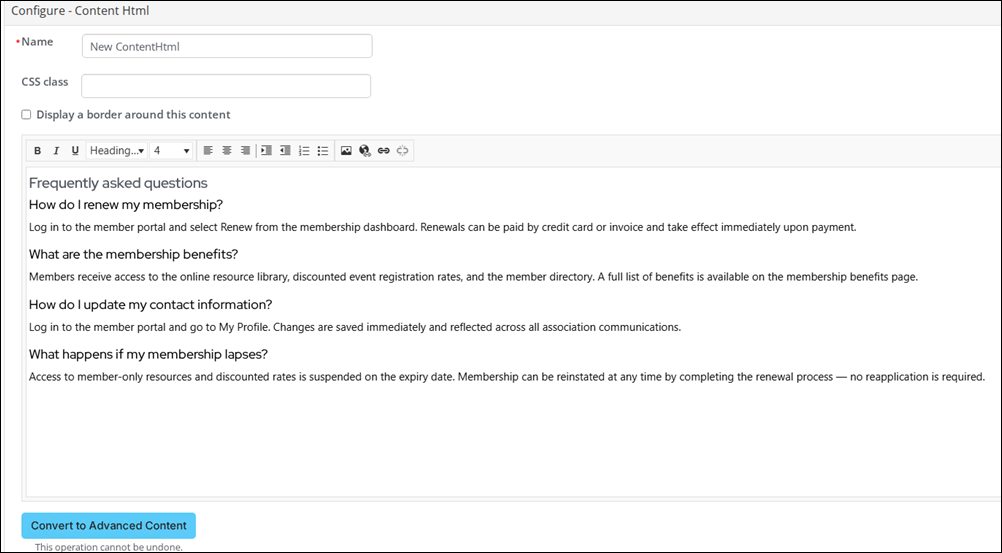
Add a section heading such as "Frequently asked questions" or "Common questions about [topic]".
-
Under the heading, list each question as a subheading (H3 or H4) and write the answer directly below it in one to three sentences.
-
Click Save & Publish.
Using keywords and page titles effectively
Page titles and keyword metatags help AI systems categorize content. See Choosing keywords and description text for a content record.
When writing titles and keywords:
- Use the specific terms members are likely to search for, including full questions such as "how to register for the annual conference."
- Give every page a unique title that describes what the page does, not just what it is. For example, "Renew your membership" rather than "Membership."
- Avoid generic placeholder titles such as "Home" or "Page 1."
Adding schema.org structured data markup
Schema.org is a shared vocabulary created by Google, Bing, Yahoo, and Yandex that gives web publishers a standardized way to describe page content in terms AI systems can read directly. Without it, an AI tool has to infer what a page is about from its text alone.
Schema markup removes that ambiguity by adding explicit labels to the HTML. Instead of an AI system guessing that a block of text describes an event, the Event schema type states it directly, along with structured properties such as the event name, date, location, and organizer. This allows AI systems to extract and use that information with greater accuracy when generating answers.
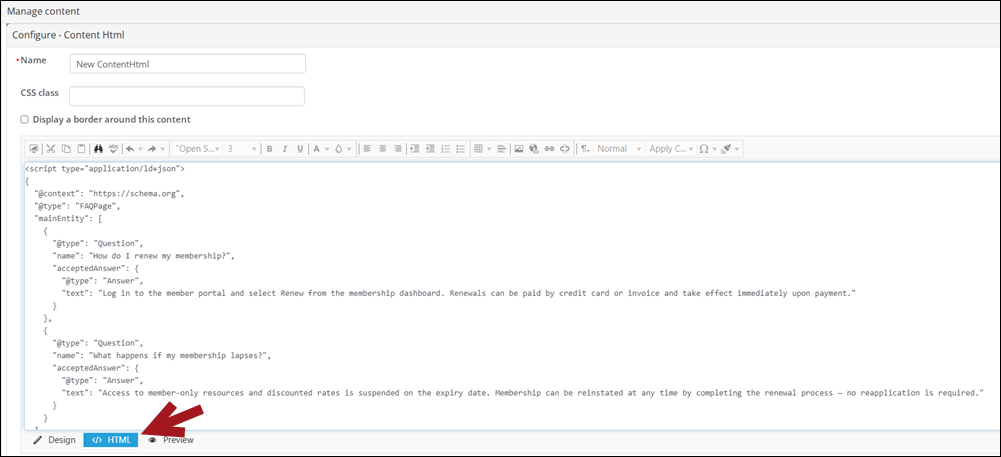
Schema.org markup can be added to a website by adding a JSON script into an HTML editor. The most useful schema types for association websites are the following:
| Schema type | Use for |
|---|---|
| Organization | The organization's homepage or About page |
| FAQ Page | Pages that contain FAQ sections |
| Event | Conference, webinar, and event pages |
| Article | Blog posts, news updates, and resource pages |
| How-To | Step-by-step instructional content |
Do the following to add a schema markup script to a website:
-
Go to RiSE > Page Builder > Manage content.
-
Edit or create a new content record.
-
Add the Content Html content item.
-
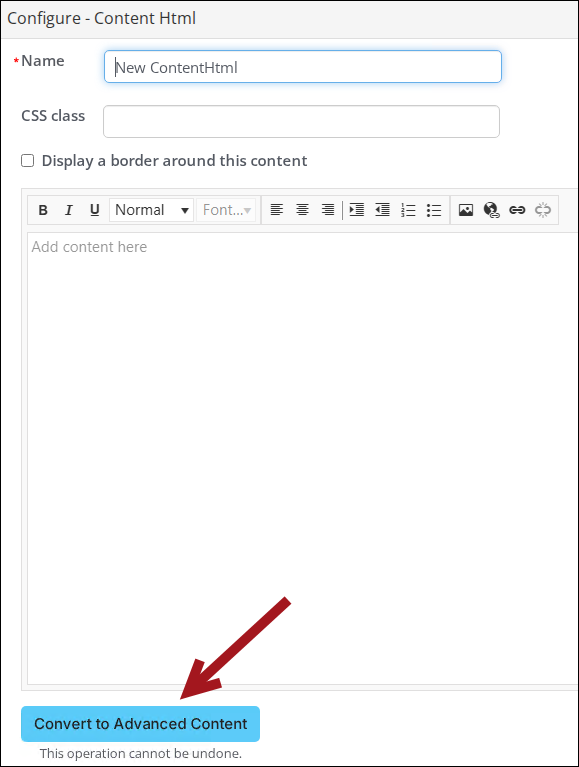
Click Convert to Advanced Content.
-
Click HTML and add the JSON code to the content field.
-
Click OK, then click Save.
-
Click Publish.
Keeping content current
Review and update key pages regularly so publication and update dates continue to support credibility, especially for time-sensitive content.
A practical review schedule for association websites:
- Quarterly - Membership pages, renewal instructions, and benefit descriptions.
- Before each event - Event pages, registration instructions, and FAQs.
- Annually - About pages, staff and leadership listings, and policy pages.
Checking how AI currently represents the organization
Before making changes, it is useful to understand what AI tools currently say about the organization. This provides a baseline and helps identify inaccurate or missing information.
Do the following to conduct a basic AI visibility audit:
- Open an AI tool such as ChatGPT, Perplexity, or Microsoft Copilot.
- Enter a question a prospective member might ask. For example, "What is [Organization Name]?" or "What are the benefits of joining [Association]?"
- Review the response for accuracy. Note any incorrect details, outdated information, or missing facts.
- Check which sources the AI cites. If the organization's own website is not listed, the content may need to be restructured or supplemented with off-site presence.
- Repeat the audit after making changes to content to assess whether visibility has improved.
NoteContent changes do not appear in AI answers immediately. Google AI Overviews typically picks up updated content within 24 hours; ChatGPT Search and Perplexity generally take 1 to 4 weeks; full visibility across all platforms can take 2 to 3 months. Re-run the audit at least 4 to 6 weeks after making significant changes before drawing conclusions about whether they have had an effect.
ImportantAI-generated answers can contain inaccuracies. Direct control over how AI summarizes content, which sources it references, or whether it links back to the site is not possible. The best way to influence AI output is to publish accurate, well-structured content on the organization's own site and maintain consistent information on trusted third-party sources.
Maintaining off-site presence
AI models draw from a wide range of sources, not just the organization's website. Ensuring that information is accurate and consistent across the following platforms reinforces the signals that AI systems use to build their understanding of an organization.
| Platform | What to verify |
|---|---|
| LinkedIn (organization page) | Name, description, website URL, industry, and staff affiliations |
| Google Business Profile | Address, phone, website, hours, and category |
| Industry directories | Organization name, website URL, and description match the website exactly |
| Wikipedia (if applicable) | Factual accuracy and current information |
Best practices
The following best practices apply across all areas of GEO. Applying them consistently across a RiSE website will have a greater cumulative effect than any single change.
Write for questions, not just topics
AI tools are built to answer questions, so content written as direct answers to specific questions is more likely to be cited. Rather than a page titled "Membership" that describes the program generally, consider structuring content around the questions members actually ask: "How do I renew my membership?", "What is included in my membership?", or "How do I access member-only resources?". This applies to page titles, headings, and the opening sentences of sections.
Put the answer first
AI systems often pull the first substantive sentence from a section rather than reading to the end of a page. Lead with the key point, then expand on it. For example, an event registration page should open with what the event is and how to register, not with a general welcome paragraph. This approach benefits members reading the page directly as well as AI tools parsing the content.
Be specific and use concrete details
Vague content is less likely to be cited because it is less useful as an answer. Wherever possible, include specific details: dates, prices, eligibility criteria, step counts, and named outcomes. For example, "Members receive a 20% discount on all conference registrations" is more likely to be surfaced by an AI than "Members enjoy exclusive benefits." Specificity also signals to AI systems that the content is current and authoritative.
Keep structure consistent across pages
AI systems develop expectations about where to find certain types of information based on patterns across a site. Using consistent heading structures, placing FAQs in predictable locations, and following the same layout for similar page types (all event pages structured the same way, for example) makes the site easier for both AI systems and members to navigate. Consistent structure also makes content easier to maintain and update over time.
Do not duplicate content across pages
Pages that closely mirror each other create ambiguity for AI systems. It is unclear which page is the authoritative source for a given topic. If similar content must exist on multiple pages (for example, a brief membership overview on both the homepage and a dedicated membership page), the detailed version should live on one canonical page and other pages should link to it rather than repeat the content in full.
Validate technical changes after publishing
After publishing, confirm that structured data and meta descriptions still appear correctly. Building this check into the publishing workflow prevents technical issues from going unnoticed.
Treat GEO as ongoing, not a one-time task
GEO visibility can change as content ages, terminology shifts, and AI retrieval systems evolve. Treat GEO as a recurring maintenance activity by reviewing priority pages on a regular schedule.
Updated 27 days ago