

AutoPay Fundraising: Dashboard
Access requiredTo access the AutoPay Fundraising Dashboard, you must be a system administrator or a staff user with Fundraising: 4 module authorization.
The following information can be found in the AutoPay Fundraising dashboard:
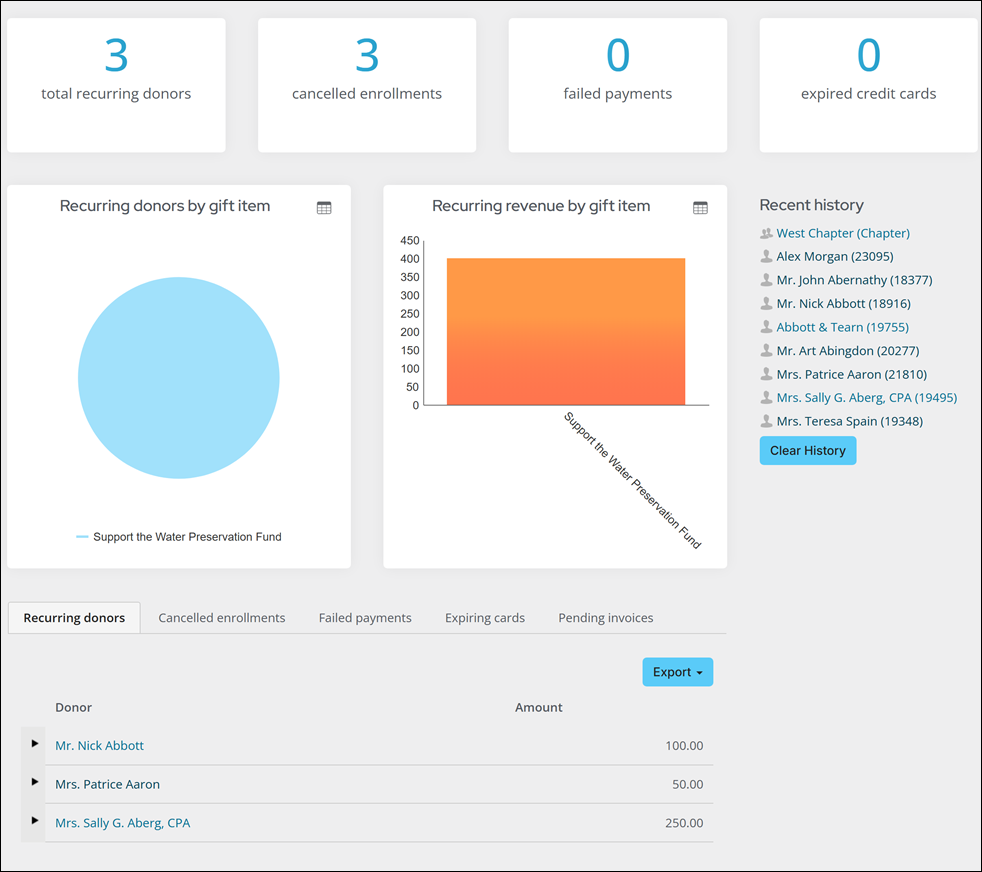
- Recurring donor (count)
- Cancelled enrollments (count)
- Failed payments (count)
- Expired credit cards (count)
- Recurring donors by gift item (pie)
- Recurring revenue by gift item (bar)
- Recurring donors with expandable detail history (table)
- Cancelled enrollments (table)
- Failed payments (table) with email
- Expiring cards (table) with email
- Pending invoices (table)
- Alert for recurring donation cancellations
Updated 18 days ago
Did this page help you?