

Finance Settings: Aging
These options allow you to define the guidelines for determining the aging groups to use for statements, aged trial balances, and account inquiries. Aging is the length of time an amount is past due for payment on an invoice.
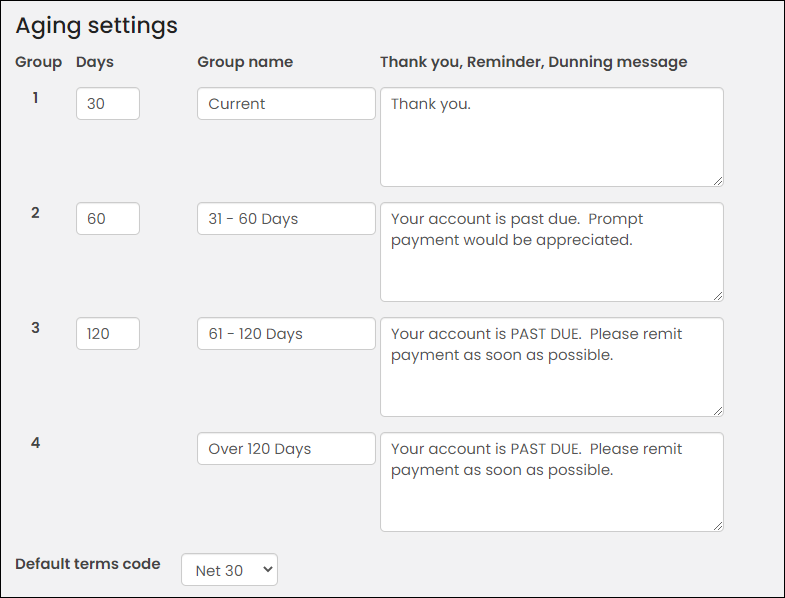
The following settings are available from Settings > Finance > Aging:
- Group - Four groups define the guidelines for determining the Aging Groups to use for statements, aging trial balances, and account inquiries.
- Days - The number of days indicates how many days old the invoice can be before the invoice moves out of this particular age group. When the invoice passes this age group by one day, the system automatically moves the invoice to the next age group.
- Group name - Enter a short name for each age group that names the group for all statements, aged trial balances, and account inquiries.
- Thank you, Reminder, Dunning Message - If you would like a message to appear on statements when an account reaches a certain age, enter the message next to the appropriate age group. You can have different messages print for different ages.
- Default Terms Code - The Default Terms Code applies to all levels of order entry. For example, a default term code of 30 would represent Net 30 days. Select the code value of the code you wish to use by default.
Updated about 1 month ago
Did this page help you?