

Contacts Business Objects
The following Contact business objects are commonly used in contact-related queries. Review the descriptions to see how each can be joined with other business objects and what properties they include.
Comparing the contact business objects
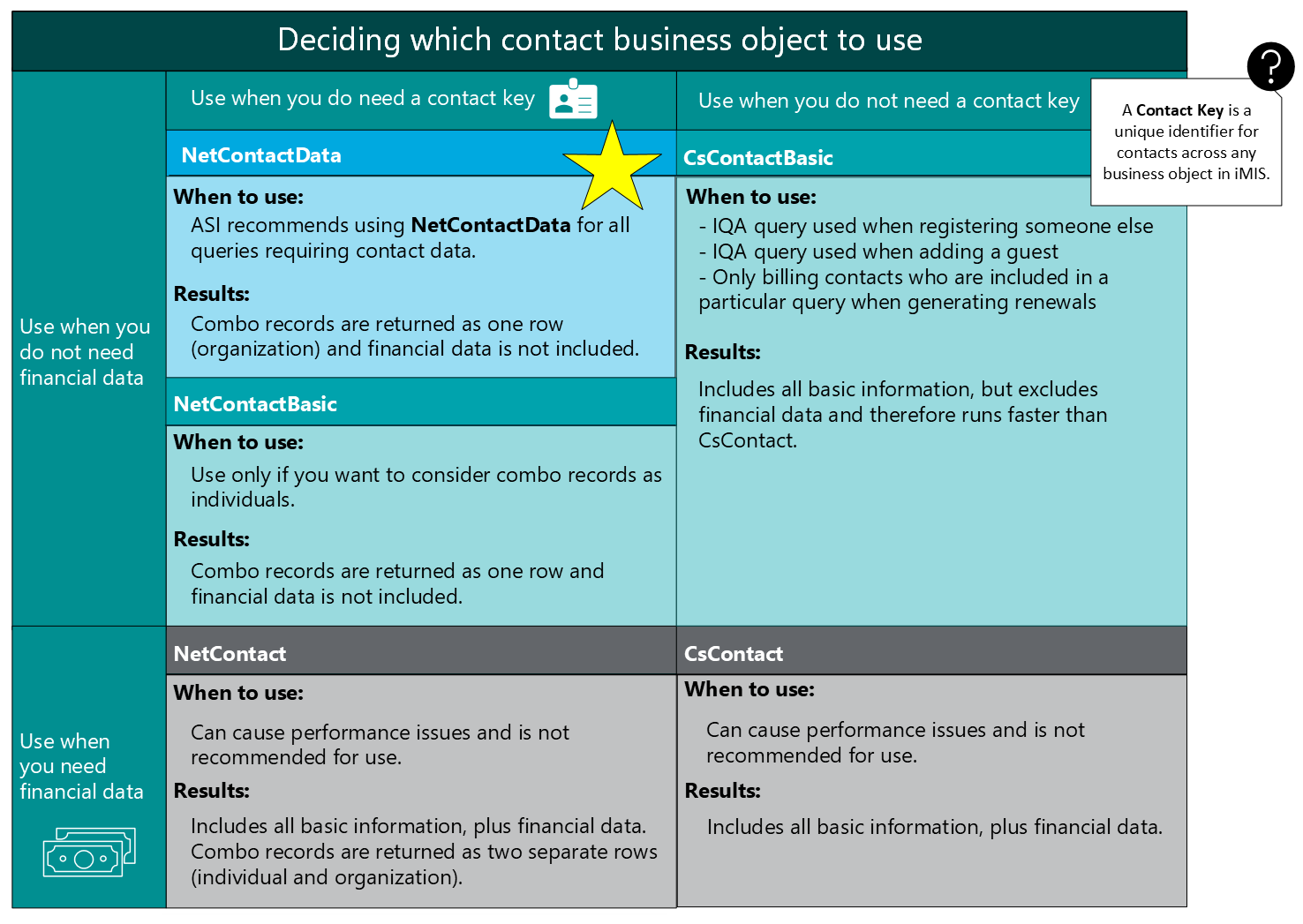
The following table goes over the differences between the contact-specific business objects.
What is a Contact Key?
A Contact Key is a unique identifier for contacts across any business object in iMIS. For example, a contact may have an ID of 1000, however, there may also be a GL Account with a code of 1000, a commerce product with a code of 1000, and so forth. A contact may have a Contact Key of 8B00A23E-9C15-41A2-A1F3-0007DB3AF5B9 that will only ever appear for that particular contact.
NetContactData
Contains name, primary mailing address, and contact information along with membership type, category and status. Contains both individual and organization records. Combo records are returned as one row (organization).
Common joins
- NetContactData.Id = CsActivity.ID
- NetContactData.Id = CsCommitteeMember.ID
- NetContactData.Id = CsRelationship.ID
- NetContactData.Id = CsInvoice.Bt Id
- NetContactData.Id = CsSubscriptions.Id
- NetContactData.Id = CsOrders.Ship to Id
Properties
- AddressNumber1
- AddressNumber2
- AddressNumber3
- BarCode
- BillAddressNum
- BirthDate
- Category
- Chapter
- CompanyId
- CompanyMemberType
- Company
- CompanySort
- ContactRank
- Country
- County
- Crrt
- DateAdded
- Designation
- DupMatchKey
- ExcludeDirectory
- ExcludeEmail
- StateProvinceId *
- Fax
- FullAddress
- FunctionalTitle
- Gender
- HomePhone
- Informal
- IntentToEdit
- JoinDate
- LastFirst
- LastName
- LastUpdated
- MailAddressNumber
- MailCode
- MajorKey
- IsMember
- MemberStatus
- MemberStatusDate
- MemberType
- MiddleName
- MemberTypeChangeDate
- EntityCode
- PaidThrough
- Prefix
- PreviousMemberType
- SicCode
- SourceCode
- StateHouse
- StateProvince *
- StateSenate
- Status
- Suffix
- Title
- UpdatedBy
- UsCongress
- Website
- WorkPhone
- Zip
- FirstName
- City
- TollFree
- ShipAddressNum
- ID
- ContactKey
- CreatedByUserKey
- CreatedOn
- UpdatedByUserKey
- UpdatedOn
- AccessKey
- FullName
- IsCompany
- Backorders
- CreditLimit
- NoStatements
- RenewMonths
- RenewedThru
- DefaultTaxAuthority
- TaxExempt
- DefaultTermsCode
- VatExempt
- VatCountry
- VatRegNumber
- ContactStatusCode
- SortName
- TaxIDNumber
- MobilePhone
- BillToID
CsActivity
Contains all the information stored in traditional iMIS activities. These include calls or emails, meetings attended, dues history, product orders and committee membership among others. It will also contain any user defined activity types you have created. There are likely multiple rows per iMIS ID in this BO.
Activity is multi-purpose, so the fields you want to use in your queries will depend on the type of activity you are using. Some fields are used for certain purposes in one activity but may not be used the same for other types of activities, or not at all. Refer to the activity setup in the Advanced Accounting Console to better understand the setup.
Panel Editor creates a data source for each Activity, with the prompts you use for the fields, as the field names, making it easy to use.
Common joins
- CsActivity.Id = NetContactData.Id
- CsActivity.Activity Type = CsProductType.Prod Type
Properties
- ActionCodes
- ActivityType
- Amount
- CampaignCode
- Category
- CompanyID
- Description
- EffectiveDate
- GracePeriod
- ID
- MemberType
- NextInstallDate
- Note
- FollowUp
- EntityCode
- OtherCode
- PayMethod
- ProductCode
- Quantity
- RecurringRequest
- Sequence
- SolicitorID
- SourceCode
- SourceSystem
- StatusCode
- TaxableValue
- ThruDate
- ReminderDate
- TransactionDate
- UserField1
- UserField2
- UserField3
- UserField4
- UserField5
- UserField6
- UserField7
- Units
- Originating_Trans_Num
- MemberTributeCode
CsAddress
Contains all the address information for records in iMIS.
There is likely multiple rows per iMIS ID in this BO, making it multi-instance.
Address contains multiple rows per record based on the number of addresses that have been entered. Querying will need to consider which specific address information you are looking for. NetContactData also contains address information which is a copy of the primary mailing address from CsAddress.
Common joins
- Primary billing address: CsAddress.Address Number = NetContactData.Bill Address Num
- All address details: CsAddress.Id = NetContactData.Id
Properties
- Address1
- Address2
- Address3
- AddressFormat
- AddressNumber
- BadAddress
- BarCode
- City
- Country
- County
- CRRT
- Fax
- FullAddress
- ID
- LastUpdated
- LastVerified
- MailCode
- Phone
- PreferredBill
- PreferredMail
- PreferredShip
- AddressPurpose
- StateHouse
- StatusProvince
- StateSenate
- UsCongress
- Zip
CsNameLog
Contains standard iMIS change log details. There are likely multiple rows per iMIS ID in this BO, one row for each change recorded on the record. Log text contains lengthy change details which require parsing to get individual change details. Use Contains filters to search on this field.
Common joins
Some common joins include:
- CsNameLog.Id = NetContactData.Id
Properties
- Date_Time
- ID
- Log_Text
- Log_Type
- Sub_Type
- User_Id
CsRelationship
Stores relationships between two contacts. There is one row per relationship. This means there is likely multiple rows per iMIS ID. Commonly used to view relationships between two people and/or organizations.
Common joins
- CsRelationship.Id = NetContactData.Id
- CsRelationship.Relationship = CsRelationshipTypes.Relationship type
Properties
- BeginDate
- EndDate
- FunctionalTitle
- GroupCode
- ID
- Note
- RelatedToID
- RelatedToName
- Relationship
- Status
- Title
Updated 20 days ago