

Upgrading iMIS EMS (20.3) On-Premise
Once you have an instance of iMIS EMS (20.3) on premise, you will have access to quarterly upgrades provided by ASI.
ImportantUpgrades are provided to on-premise clients typically once a quarter. Once the upgrade is made available, the AiSP or client must upgrade to the latest version within 60 days. There are no exceptions to this upgrade timeline requirement.
The following information details how to upgrade an on-premise iMIS database from one version of 20.3 to another (20.3.xxx to 20.3.xxx).
Do the following to upgrade iMIS:
-
Take a backup of the DB.
-
Run the installer:
-
Copy the installer to the app server.
-
Right-click the Setup.exe and click Run as administrator.
-
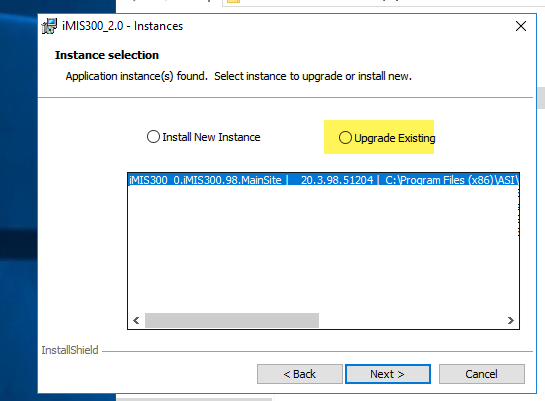
Select Install a new instance, then click Next.
-
Select the current instance you are upgrading, then select Upgrade Existing.
-
-
Click Install. The installer takes about 15 minutes to complete. This part of the installation is installing the actual version of iMIS (the upgrade has not started at this point).
-
After the installation is complete, click Finish. The iMISservice page will load once complete and will signify the upgrade has started. From this step, the DB upgrade can take hours to fully complete; the time varies depending on the size of the database.
ImportantDuring this time, it is extremely important that you do not perform any resets, recycles, or relaunch the iMISservice page.
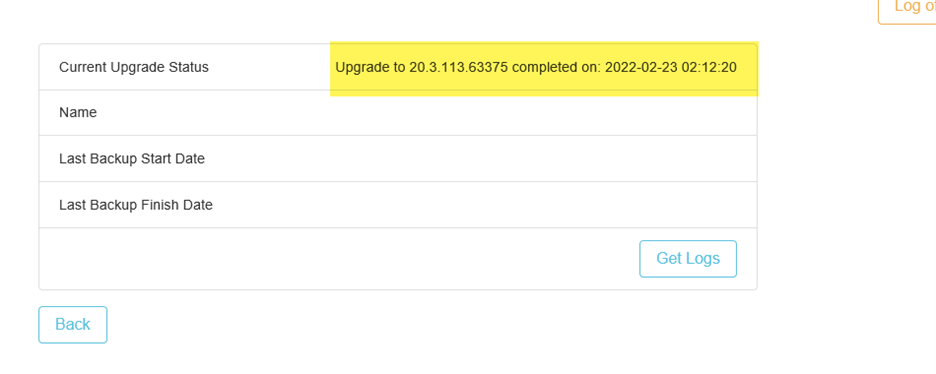
Click on Tenant ID > Database Information on the iMISservice page to see the Current Upgrade Status. The status changes as steps are completed. Wait until it completes.
When the upgrade has completed, the Current Upgrade Status will display a completed message (as seen in the following screenshot):
-
Click Get Logs to review if there were any errors to ensure the full upgrade completed.
-
Review the New Features and Upgrade changes to learn more about what is new in this version of iMIS and to understand if there are any upgrade changes that require action.
Updated about 3 hours ago