

Module authorization levels
Review module authorization levels and required Staff site navigation access for Full staff users and Casual staff users.
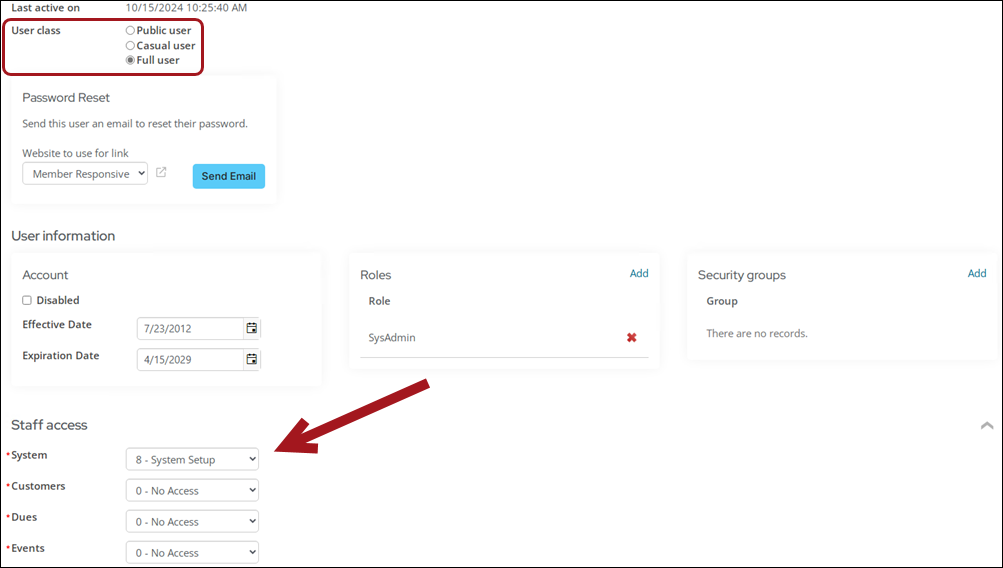
Each Staff access area grants a Full staff user or Casual staff user permission to perform a function in the Staff site. These areas are assigned from a drop-down on a user's account Security tab, and each drop-down uses the same 0–8 numeric scale below — though no module uses every level.
Understanding how the level scale works
| Level | Name | What it generally adds |
|---|---|---|
| 0 | No access | Default. Grants no access to the area. |
| 1 | Basic Display Only | View-only access to a small set of records (for example, Fundraising gift requests). |
| 2 | Reports | Dashboards and reports for the area. |
| 3 | Limited Entry/Edit | Day-to-day data entry on records that already exist (for example, entering gifts, managing enrollments). |
| 4 | Full Entry/Edit | Broader entry/edit rights: processing, generating, and importing records. |
| 5 | Table Maintenance | Configuring the supporting tables and settings a module depends on (billing cycles, pricing groups, unit types). |
| 6 | Reserved | Not tied to any out-of-the-box functionality in any module. |
| 7 | Reserved | Not tied to any out-of-the-box functionality in any module. |
| 8 | System Setup | System-wide administrative functionality for the module. |
NoteLevels 6 and 7 are intentionally not covered below — they're numeric slots in the scale that no module ties to any out-of-the-box feature. If your organization has a custom need for them, they're available; otherwise you can ignore them.
Module areas and where to find them
Module names don't always match the Staff site menu section they control, which can make the tables below harder to scan than it should be. Use this as a lookup:
| Module (drop-down name) | Staff site menu section(s) it governs |
|---|---|
| Customers | Community (contacts, committees, duplicates), plus parts of Membership, Reports, and Settings |
| Dues | Membership |
| Events | Events |
| Fundraising | Fundraising |
| Orders | Commerce |
| Finance | Finance, plus parts of Commerce and Reports |
| Certification | Certification |
| System | No dedicated menu section — paired with the SysAdmin role and parts of Settings |
System
The System authorization level grants system administration, as the SysAdmin role does. They are intrinsically paired: assigning a user System: 8 automatically adds them to the SysAdmin role; removing System: 8 automatically drops it.
Don't remove a user's SysAdmin role without also lowering their System level, and vice versa — parts of iMIS that check for administrator status will conflict with the parts that don't. If a SysAdmin also needs access to other Staff access areas, assign those manually; they are not automatically raised to level 8. See Assigning security credentials and staff access for more information.
Levels 0–7 in the System drop-down have no effect on out-of-the-box content. The only level that changes access is 8 – System Setup, which applies the SysAdmin role. Level 8 cannot be assigned to a Casual staff user.
Security sets
Beyond module authorization levels, some navigation items are also gated by a security set — a separate mechanism that controls who can see a folder, object, or navigation item at all, independent of what a user can do once there. See Security sets for the full list, including Administrators Full Control, Reporting Users Full Control, and the security groups used by Campaigns, Segmentation, and RFM.
Out-of-the-box navigation
Full staff users and Casual staff users access the Staff site based on their authorization levels. These can be viewed and updated from RiSE > Site Builder > Manage sitemaps, selecting Staff site, then the Access settings tab, then expanding Staff module authorization levels.
The following tables outline the required authorization level a staff user must have to access each navigation item, organized by the Staff site menu section it appears under. See Module areas and where to find them above if a section name doesn't match the module drop-down you're looking for.
Community
NoteSee Contact account pages (Party.aspx) for more specific information about security when viewing contact and organization pages.
| Navigation Item | Security Set | Level Assignment | License Required |
|---|---|---|---|
| Dashboard | All Staff Full Control | ||
| Engagement: | |||
| All Staff Full Control | ||
| Find contacts | All Staff Full Control | ||
| Add contact | All Staff Full Control | ||
| Data integrity | All Staff Full Control | ||
| Manage duplicates | All Staff Full Control | Customers: 8 OR Events: 8 OR Fundraising: 8 | Note: There are two different versions of Duplicate Merge. Standard is available out-of-the-box, and Premium requires additional licensing. See [Standard versus Premium: Duplicate merge.](/docs/managing-duplicate-contacts) |
| Duplicate merge logs | All Staff Full Control | ||
| Committees | All Staff Full Control | Customers: 5 | |
| Communities | All Staff Full Control | Yes | |
| Volunteers: | |||
| All Staff Full Control | ||
| Groups | All Staff Full Control | ||
| Import contacts | All Staff Full Control | ||
| Security: | |||
| All Staff Full Control | Customers: 4 | |
| Administrators Full Control |
Membership
NoteSee Contact account pages (Party.aspx) for more specific information about security when viewing contact and organization pages.
| Navigation Item | Security Set | Level Assignment | License Required |
|---|---|---|---|
| Dashboard | All Staff Full Control | Customers: 2 | |
| Chapters | All Staff Full Control | ||
| Renewals: | |||
| All Staff Full Control | Dues: 4 | |
| All Staff Full Control | Dues: 4 | |
| Manage expired members | All Staff Full Control | Dues: 8 | |
| Automatic payments: | |||
| All Staff Full Control | Dues: 4 | Yes |
| All Staff Full Control | Customers: 4 | Yes |
| Billing cycles | All Staff Full Control | Dues: 5 | |
| Billing products | All Staff Full Control | Dues: 5 | |
| Prorating rules | All Staff Full Control | Dues: 5 | |
| Configuration wizard | Administrators Full Control |
Fundraising
| Navigation Item | Security Set | Level Assignment | License Required |
|---|---|---|---|
| Dashboard | All Staff Full Control | Fundraising: 2 | Yes |
| Enter gifts | All Staff Full Control | Fundraising: 3 | Yes |
| Gift requests | All Staff Full Control | Fundraising: 1 | |
| Find gifts | All Staff Full Control | Fundraising: 2 | Yes |
| Find gift items | All Staff Full Control | Yes | |
| Add gift item | All Staff Full Control | Fundraising: 5 | Yes |
| Moves management: | |||
| All Staff Full Control | Fundraising: 2 | Yes |
| All Staff Full Control | Yes | |
| Automatic payments: | |||
| All Staff Full Control | Fundraising: 4 | Yes |
| Receipting: | |||
| All Staff Full Control | Fundraising: 3 | |
| Tribute notification: | |||
| All Staff Full Control | Fundraising: 3 | Yes |
| Gift Aid | All Staff Full Control | Fundraising: 3 | Yes |
| Reverse open pledges | All Staff Full Control | Fundraising: 3 | Yes |
| Reverse a gift, pledge, or installment pledge invoice | All Staff Full Control | Fundraising: 3 OR Finance: 4 | |
| Recurring payments: | |||
| All Staff Full Control | Fundraising: 4 | Yes |
| Import donations | All Staff Full Control | Fundraising: 4 | Yes |
| Premium sets | All Staff Full Control | Fundraising: 4 | Yes |
| Adjustment logs | All Staff Full Control | Fundraising: 3 |
Events
| Navigation Item | Security Set | Level Assignment | License Required |
|---|---|---|---|
| Dashboard | All Staff Full Control | Events: 2 | |
| Find events | All Staff Full Control | ||
| Find registrations | All Staff Full Control | ||
| Add event | All Staff Full Control | Events: 5 | |
| Calendar | All Staff Full Control | ||
| Issue event confirmations | All Staff Full Control | ||
| Manage templates | All Staff Full Control | Events: 5 | |
| Event pricing group management | All Staff Full Control | Orders: 5 OR only Finance: 5 | |
| Settings > Events > Event resources (defining resource types) | Administrators Full Control |
Commerce
(Governed by the Orders module — see Module areas and where to find them.)
NoteThe Customers: 5 level also enables the Assign purchaser to a group setting within defining products (also requires Orders: 4). This setting lives on the product creation window, so it does not appear as its own row below.
| Navigation Item | Security Set | Level Assignment | License Required |
|---|---|---|---|
| Dashboard | All Staff Full Control | Orders: 2 | |
| Find products | All Staff Full Control | ||
| Add product | All Staff Full Control | Orders: 4 | |
| Find orders | All Staff Full Control | Orders: 2 | |
| Process orders: | |||
| All Staff Full Control | Orders: 4 | |
| Promotions | All Staff Full Control | Orders: 5 | |
| Pricing groups | All Staff Full Control | Orders: 5, Events: 5, OR Finance: 5 | |
| Inventory receipts | All Staff Full Control | Orders: 4 | |
| Cancel an order (not yet invoiced) | All Staff Full Control | Orders: 4 | |
| Adjust or reverse an order invoice | All Staff Full Control | Finance: 4 OR Orders: 4 | |
| Override the default order type in the cart | All Staff Full Control | Orders: 4 |
Advertising
| Navigation Item | Security Set | Level Assignment | License Required |
|---|---|---|---|
| Dashboard | All Staff Full Control | ||
| Media Orders | All Staff Full Control | ||
| Settings: | |||
| All Staff Full Control |
NoteAdvertising isn't currently gated by a module authorization level — access is controlled only by the All Staff Full Control security set above.
Marketing
| Navigation Item | Security Set | License Required |
|---|---|---|
| Communication dashboard | Everyone Full Control | |
| Advanced email | All Staff Full Control | Yes |
| Communication templates | All Staff Full Control | |
| Communication logs | All Staff Full Control | |
| Campaigns: | ||
| Campaign Users Full Control | |
| Campaign Admins Full Control | |
| Segmentation: | ||
| Segmentation Users Full Control | Yes |
| Segmentation Admins Full Control | Yes |
| RFM: | ||
| RFM Users Full Control | Yes |
| RFM Admins Full Control | Yes |
| Process manager: | ||
| Opportunity Users Full Control | Yes |
| Opportunity Admins Full Control | Yes |
NoteMarketing isn't gated by a module authorization level — access is controlled by the security groups listed above. See Security sets for how to assign them.
Certification
| Navigation Item | Security Set | Level Assignment | License Required |
|---|---|---|---|
| Enrollments: | |||
| All Staff Full Control | Certification: 3 | Yes |
| All Staff Full Control | Certification: 4 | Yes |
| Pending approvals: | |||
| All Staff Full Control | Certification: 3 | Yes |
| Define programs: | |||
| All Staff Full Control | Certification: 4 | Yes |
| All Staff Full Control | Certification: 5 | Yes |
| Providers | All Staff Full Control | Certification: 3 | Yes |
Finance
| Navigation Item | Security Set | Level Assignment | License Required |
|---|---|---|---|
| Dashboard | Everyone Full Control | Finance: 2 | |
| Invoices | All Staff Full Control | Finance: 2 | |
| Pay Central: | |||
| All Staff Full Control | Finance: 2 | |
| Administrators Full Control | ||
| Batches (find or post) | All Staff Full Control | Finance: 2 | |
| Batches (create, edit, or delete) | All Staff Full Control | Finance: 3 | |
| Closing procedures: | |||
| All Staff Full Control | Finance: 4 |
Reports
| Navigation Item | Security Set | Level Assignment | License Required |
|---|---|---|---|
| Report Writer | Reporting Users Full Control | ||
| All reports | Administrators Full Control | ||
| Contact reports | Reporting Users Full Control | Customers: 2 | |
| Membership reports | Reporting Users Full Control | Customers: 2 | |
| Fundraising reports | Reporting Users Full Control | Fundraising: 2 | Yes |
| Event reports | Reporting Users Full Control | Events: 2 | |
| Commerce reports | Reporting Users Full Control | Orders: 2 | |
| Accounting reports | Reporting Users Full Control | Customers: 2 | Yes |
| Certification reports | Reporting Users Full Control | Yes | |
| Content reports | Administrators Full Control |
RiSE
NoteIf you are not a SysAdmin, you must be at least a Full staff user who belongs to at least one content authority group to have access to certain areas of RiSE. Public users who are members of a content authority group cannot access RiSE, but they can interact with content records by using Easy Edit. See Administering security for more information about Full and Public user access.
| Navigation Item | Security Set | License Required |
|---|---|---|
| Dashboard | Administrators Full Control | |
| Site Builder: | ||
| Administrators Full Control OR Full user who also belongs to at least one content authority group | |
| Administrators Full Control | |
| Administrators Full Control OR Full staff user or Casual staff user who also belongs to at least one content authority group | |
| Page Builder: | ||
| Administrators Full Control OR Full staff user or Casual staff user who also belongs to at least one content authority group | |
| Theme Builder: | ||
| Administrators Full Control OR Full staff user or Casual staff user who also belongs to at least one content authority group | Yes |
| Administrators Full Control OR Full staff user or Casual staff user who also belongs to at least one content authority group | Yes |
| Administrators Full Control | Yes |
| Administrators Full Control OR Full staff user or Casual staff user who also belongs to at least one content authority group | Yes |
| Tagging: | ||
| Administrators Full Control OR Full staff user or Casual staff user who also belongs to at least one content authority group | |
| Maintenance: | ||
| Administrators Full Control | |
| Style Guide: | ||
| Administrators Full Control | |
| Intelligent Query Architect | Administrators Full Control | |
| Business Object Designer | Administrators Full Control | |
| Form Builder: | ||
| Administrators Full Control | Note: There are two different versions of Form Builder. Standard is available out-of-the-box, and Premium requires additional licensing. See Standard versus Premium: Scoring. |
| Panel Designer: | ||
| Administrators Full Control | |
| Process automation | Administrators Full Control | Note: There are two different versions of Process automation. Standard is available out-of-the-box, and Premium requires additional licensing. See Standard versus Premium: Process Automation. |
| Scoring | Administrators Full Control | Note: There are two different versions of Scoring. Standard is available out-of-the-box, and Premium requires additional licensing. See Standard versus Premium: Scoring. |
| Document system | Administrators Full Control | |
| Workflow: | ||
| Administrators Full Control | |
| Task viewer | Administrators Full Control | |
| Upgrade log | Administrators Full Control |
Settings
You must be a system administrator to have access to the settings.
Help
| Navigation Item | Security Set | Level Assignment | License Required |
|---|---|---|---|
| Documentation | Everyone Full Control | ||
| Support | Everyone Full Control | ||
| Learning Hub | Everyone Full Control | ||
| Marketplace | All Staff Full Control | ||
| Enhance iMIS | Everyone Full Control |
Updated about 1 month ago