

For AI agents: visit https://documentation.advsol.com/imis/llms.txt for an index of all pages formatted in Markdown and endpoints in OpenAPI.
Jump to Content
iMISiMIS
Documentation
iMIS
Documentation
Order Billing Details
  • iMIS EMS Documentation
  • Latest Release: July 2026 (20.3.231)
    • 2025: Release Notes
    • 2024: Release Notes
    • 2023: Release Notes
    • 2022: Release Notes
  • iMIS Video Tutorials
    • Advertising videos
    • Certification videos
    • Commerce videos
    • Community videos
    • Event videos
    • Finance videos
    • Fundraising videos
    • Marketing videos
    • Membership videos
    • Power Suite videos
    • Reports videos
    • RiSE videos
      • Videos: Creating a website
      • Videos: BOD & IQA
      • Videos: Forms & Panels
      • Videos: Process automation
      • Videos: Scoring
  • Upgrading
    • Phase 1: Planning for an upgrade
      • iMIS EMS Upgrade Packages
      • How to upgrade to iMIS EMS
      • Upgrading through the Advance 20/20 Direct SQL Program
      • System requirements (on-premise only)
      • Considerations before beginning an upgrade
      • iMIS Desktop to Staff site: Migrated features
      • iMIS Desktop to Staff site: Planned, under-consideration, and deprecated features
      • iMIS Desktop to Staff site: Functionality differences
      • iMIS Desktop to Staff site: Migrated reports
      • Upgrade Changes
      • Upgrade Dashboard
      • Pre-upgrade checklist
      • Upgrade Scripts
      • Ensuring panels and panel sources are not missing after an upgrade
      • Upgrading custom websites that are using the Constellations template
      • Updating deprecated templates and themes in websites
      • Updating custom system icons
      • Database Validation Scripts
      • Helpful upgrade tools
    • Phase 2: Staging the upgrade and performing tests
      • Testing iMIS EMS
      • Testing checklist
      • Settings configuration
      • Membership testing
      • Fundraising testing
      • Finance testing
      • Queries and reports testing
      • Commerce testing
      • Websites and account pages testing
      • Images and files testing
      • Events testing
      • Communications testing
      • Global Payments gateway
      • Upgrading with a TopClass integration
      • Upgrading with a Higher Logic integration
      • Accessing the API endpoint
      • Updating queries that must access the REST API
      • Standards for third-party integrations
      • Converting custom multi-year billing
      • Migrating campaigns and appeals from Desktop to EMS
    • Phase 3: Preparing for the live upgrade
      • iMIS EMS Checklist
    • Phase 4: Performing post-upgrade tasks
      • Setting up the Global Payments gateway
      • Post-upgrade checklist
      • On premise post-upgrade tasks
      • Reviewing and updating settings in iMIS EMS
      • Disabling Process Automation tasks using custom stored procedures
      • Updating the contact account page after an upgrade from iMIS 2017
      • Ensuring all dues invoices are available after upgrading
      • Working with AVAIL_CREDIT balances after upgrading
      • Publishing troubleshooting (on-premise only)
  • QuickStart Template
    • Directories: QST
      • Committee listing
      • Member directory
    • Events: QST
      • Event searches
      • Display pages
      • Event reminders
    • Dashboards
    • Jobs board: QST
    • Membership: QST
      • Membership dashboard
      • Individual and Organization Joins
      • Approving join applications
    • Reporting: QST
      • Query sources shortcuts
      • Storing queries
      • Panel definition audit
      • Panel source audit
      • QuickStart template dashboards
    • Staff site: QST
      • QST account pages
      • Naming recommendations
      • Standalone panels
    • Website: QST
      • Account pages
      • Contact us
      • Website themes
      • Websites
      • Widgets
  • Cloud Services
    • Cloud environment overview
    • Terms and Language
    • Upgrade support
    • Billable services
    • Cloud Services FAQ
  • iMIS Guides
    • Features Guide
    • Product Comparison Guide: EMS Enterprise, EMS Professional, & iMIS 2017
    • Product Comparison: iMIS 100 & EMS Enterprise
      • Business Objects: 100 & EMS Enterprise Differences
      • Groups & Membership: 100 & EMS Enterprise Differences
  • Glossary
  • Community: Dashboard
  • Committees
    • Administering committees
    • Committee Administrator role
    • Committee minutes
    • Creating a custom query to search for committee members
  • Account pages
    • Understanding account pages
    • Creating custom account pages
    • Updating the account page shortcuts
    • Finding custom account page content records
    • Modifying account page tabs
    • Creating a panel and adding it to account pages
    • Editing queries on account pages
    • Adding out-of-the-box content to custom account pages
    • Updating the account page banner
    • Updating the buttons on the public account pages
    • Adding alerts to account pages
    • Updating the contact account page after an upgrade from iMIS 2017
  • Contacts
    • Adding contacts
    • Deleting contacts
    • Creating an account for an individual
    • Editing contacts
    • Finding contacts, members, and companies
    • Data integrity: Dashboard
    • Managing duplicate contacts
      • Before merging: Important items to consider
      • Understanding what is merged
      • Tips for deterring duplicate account creation
      • Best Practices: Preventing duplicate contacts
      • Merging individuals and organizations
      • Managing multiple duplicates
      • Reporting on potential duplicate accounts and merged accounts
      • Reviewing the duplicate merge logs
      • Adding the resolve duplicates action to custom account pages
    • Adding notes to a contact's account
    • Updating email addresses
    • Managing activity tasks
    • Saving a PDF or other file to someone's account
    • Marking a contact for deletion
    • Erasing a contact's personal data
    • Change history overview
    • Setting primary organization
    • Assigning the company administrator role for one or more companies
    • Managing organizations as a company administrator
    • Organization flow down
    • Performing tasks as a public user
    • Importing contacts
    • Populating the address purpose
    • Address Verification Service (AVS)
    • Updating a contact's mailing preferences
    • Excluding contacts from a website's directory
    • Relationships
    • Editing the default search queries
  • Security
    • iMIS Security: Getting Started Guide
    • Overview of security throughout iMIS
    • Assigning security credentials and staff access
    • Contact security queries
    • Password security
    • Multi-factor authentication
    • Administrator responsibilities
    • Module authorization levels
    • Security sets
    • Granting a staff user access to RiSE without making them a system administrator
    • Securing RiSE websites
    • Unlocking a user's account
    • Updating usernames and passwords
    • OpenID Connect (OIDC)
      • Configuring Entra ID for Open ID Connect (OIDC)
      • Configuring Okta for OpenID Connect (OIDC)
      • Configuring and troubleshooting OIDC settings in iMIS
    • GDPR guidelines
    • Website cookies
  • Administering volunteers
  • Communities: Settings
    • Administering communities
    • Creating an effective communities plan
    • Creating content for communities
    • Designing communities
    • Implementing communities
  • Membership
  • Membership: Dashboard
  • iMIS Membership: Getting Started & Best Practices
  • Using the Membership Configuration Wizard
  • Batches & Invoices
    • Adjusting and reversing membership invoices
    • Understanding the membership invoice reversal options
    • Reviewing and printing membership fee batches
  • Billing cycles
    • Setting up billing cycles
    • Creating a non-dues billing cycle
    • Managing different start months for annual memberships
  • Billing products
    • Defining billing products
    • Defining special pricing for billing products
    • Creating billing categories
    • Creating flexible membership terms
    • Using an Expression Builder business object in dues special pricing
    • Creating billing products with negative amounts
    • Creating special pricing rules for Northern Territory or Western Australia
  • Cancelling & Adjusting
    • Cancelling membership subscriptions
    • Adjusting prices and term dates on subscription items
    • Changing member types
    • Adjusting and cancelling membership subscriptions outside of the renewal process (mid-term changes)
    • Deleting subscription records
  • Managing chapters
    • Chapter: Dashboard
    • Creating chapters
    • Assigning the Chapter Administrator role
    • Managing chapter members
    • Emailing chapter members
    • Searching for chapter members
    • Using a chapter as the primary fee
    • Managing non-fee based chapters
    • Assigning chapters by zip code
    • Importing zip codes for chapters.
    • Creating queries with chapter data
  • Joining (Join Now)
    • Understanding Join Now
    • Setting up Join Now
    • Setting up Organization Joins
    • Creating a Join Now page for prospective members
    • Finding new members
  • Defining prorating rules
  • Membership promotion codes
  • Renewing (Renew Now)
    • Billing for membership fees
    • List billing
    • Generating a renewal for single contact
    • Generating an invoice for a lapsed member
    • Persisted cash membership invoices
    • Automating the membership renewal process
    • Renewing memberships
    • Issuing renewal notifications
    • Reversing and rebilling membership renewals
    • Billing troubleshooting
    • Managing expired members
    • Allowing members to renew in advance
    • Allowing members to renew after their paid-through date has passed
    • Adding subscription items to member's accounts before generating renewals
    • Renewing a non-dues fee that was added outside of the membership fees
    • How term length is established when generating membership renewals
    • Configuring the itemized renewal page
  • Settings & Data
    • Configuring billing options
    • Overview: Member status and Contact status
    • Understanding the billing dates
    • Ensuring account pages have membership queries
    • Creating member-specific content
  • iMIS Fundraising: Getting Started Guide
  • Fundraising: Dashboard
  • Donations
    • Creating donation pages using the out-of-the-box Give Now pages
    • Setting up a custom donation page
    • Associating donations with specific gift items
    • Configuring specific donation pages
    • Providing suggested donation amounts
    • Tribute donations
    • Donating as an organization
    • Importing donor and donation data
    • Permitting donors to give without logging in
    • Donating without the Fundraising license
  • Gifts
    • Setting up funds
    • Defining gift items
    • Entering gifts
    • Splitting gifts
    • Finding gifts
    • Adjusting gift and pledge details
    • Adding custom data to gifts, pledges, and adjustments
    • Processing and reviewing credit card payments
    • Reviewing incomplete gift payments
    • Soft credits
    • Fundraising requests
    • Setting up In-Kind gifts
    • Paying installment pledges
    • Adding notes during gift entry
  • Receipting
    • Issuing and viewing charitable receipts
    • Voiding and issuing replacement charitable receipts
  • Gift Aid
    • Overview: Gift Aid and iMIS
    • Eligible Gift Aid donations
    • Setting up Gift Aid
    • Creating the Gift Aid donation page
    • Gift Aid claims
    • Gift Aid declarations
  • Adjusting and reversing fundraising invoices
  • Defining fundraising source codes
  • Fundraising business objects
  • Premiums
  • Setting up moves management
    • Moves Management: Dashboard
  • Events: Dashboard
  • iMIS Events: Getting Started & Best Practices
  • Creating an event
    • Defining event pricing and registration options
    • Specifying resources for an event
    • Setting up event speaker details
    • Adding program items to an event
    • Adding an event to the public website's navigation
    • Managing event templates
    • Creating event categories
    • Adding a Zoom meeting link to an event
  • Managing registrations
    • Registering for events
    • Registering for complimentary (free) events
    • Registering a guest or someone else
    • Registering multiple contacts
    • Finding registrations
    • Transferring a registration from one person to another
    • Changing registrations after registration is complete
    • Overriding event pricing
    • Creating an event invoice for someone else to pay later
    • Waitlisting for an event
    • Automatically sending event registration confirmations
    • Event invoices
    • Printing event tickets
    • Restricting event registration using pricing groups
    • Adding the event guest relationship types
  • Managing events
    • Searching for events
    • Issuing event confirmations
    • Editing events
    • Closing an event
    • Deleting an event
    • Changing the status of an event
    • Deleting registration options and program items
    • Event calendar
    • Defining and marking CEU/CPD attendance
    • Modifying the event landing page layout
    • Adding invoice data to an event dashboard registrant page
    • Reporting on event questions
    • Event reports
  • Cancellations
    • Cancelling an event
    • Cancelling an event registration
    • Adjusting or refunding a cancellation fee
    • Charging a cancellation fee
  • Advertising Management (SpaceMaster)
  • Advertising: Getting Started Guide
  • Media orders
    • Creating media orders
    • Updating media orders
    • Copying and deleting media orders
    • Posting and unposting orders
  • Media asset management
    • Advertising: Run dates
    • Advertising: Ad adjustments
    • Advertising: Rate cards
    • Advertising: Rate card details
    • Advertising: Inventory management
  • Setting up sales representatives, territories, and commissions
  • Setting up mappings
  • Defining production settings
  • Reversing advertising invoices
  • Advertising queries and business objects
  • iMIS Commerce: Getting Started & Best Practices
  • Commerce: Dashboard
  • Products
    • Defining products
    • Defining a collection of items
    • Entering and adjusting inventory
    • Granting access to secure website content
    • Defining product categories
    • Entering and reviewing order notes
    • Organizing the shop list of products
  • Order Confirmation emails
    • Defining the default order confirmation template
    • Customizing how the order confirmation is sent
    • Suppressing the order confirmation email from sending
    • Resending an order confirmation email
  • Shopping cart
    • Setting up the shopping cart
    • Clearing or deleting customer carts
  • Purchases
    • Making a purchase
    • Using On behalf of
    • Overriding a price
    • Overriding shipping and handling charges
    • Calculating shipping charges
    • Associating source codes with transactions
  • Orders
    • Defining order types
    • Creating a new order
    • Finding, reviewing, and printing orders
    • Processing orders
    • Adjusting and reversing order invoices
    • Overriding the default order type in the cart
    • Cancelling orders
    • Understanding order transactions in batches and reports
  • Defining promotion codes
    • Applying promotion codes
    • Using promotion codes: Examples
  • Pricing groups for products and events
  • Marketing
  • Communications
    • Communications Getting Started & Best Practices
    • Communication: Dashboard
    • Advanced Email
    • Sample communication templates
    • Communication checklist
    • Sending communications to contacts
    • Testing communications before they are sent en masse
      • Testing emails: Sending an email to a subset of contacts first
      • Testing Process Automation communication templates
      • Testing Process Automation communication triggers
    • Creating communications
      • Working with communication templates
      • Customizing the out-of-the-box templates
      • Creating a new communication template
      • Setting up a default communication template
      • Creating recipient queries for communications
      • Accessing and modifying a saved communication template
      • Attaching a Report Writer report to a communication template
      • Attaching a SSRS report to a communication template
      • Resolving warnings when 'Pass query values to matching report parameters' is enabled
      • Uploading a PDF to use as an attachment to a communication template
      • Customizing the salutation of a communication
      • Sending a communication to all members who renewed last year
      • Using the foreach placeholder
      • Adding links to communication templates
      • Using the insert fields in a communication template
      • Using conditional functions in communication templates
    • Communication logs
    • Recipient and data source queries
    • Tracking email interactions with contacts
    • Checking authentication for SPF records
    • Managing communication preferences
    • Maximizing deliverability
    • Recovering deleted communication templates
    • Enabling one-click unsubscribe for communications
    • Using Word Mail Merge
    • Understanding From addresses and email authentication
  • Campaigns
    • Overview: iMIS Campaigns
    • Marketing concepts and terms
    • Setting up campaigns
    • Planning a campaign
    • Hiding appeals and solicitations
    • Creating a basic campaign
    • Basic campaign example: Professional conference
    • Getting started with complex campaigns
    • Complex campaign example: Fundraising campaign
    • Best practices for complex campaigns
    • Campaign tips
    • Monitoring and measuring performance
    • Importing source codes
    • Assigning source codes to hyperlinks
  • Segmentation
  • RFM analytics
  • Certification
  • Migrating certification programs
  • Creating a certification program
  • Defining certification communications
  • Managing enrollments
  • Approving completions
  • Cancelling certification programs
  • Finance
  • iMIS Finance: Getting Started & Best Practices
  • Finance: Dashboard
  • Differences between Global Payments and Stripe
  • Global Payments gateway
    • Global Payments Getting Started
    • Setting up the Global Payments gateway
    • Global Payments application process: FAQ
    • Global Payments FAQ
    • ACH/direct debits FAQ for Global Payments gateway
    • Global Payments post-implementation guide
    • PCI Assure
  • Stripe: Getting Started Guide
    • Setting up UK direct debit payments
    • Setting up US ACH direct debit payments
    • Setting up AU BECS Direct Debit payments
    • Setting up NZ BECS direct debits
    • Setting up EU SEPA direct debit payments
    • Reconciliation for recurring direct debit payments
    • Multi-factor verification: 3D Secure for UK
    • Stripe Elements
    • Stripe rates
    • Stripe FAQ
    • Creating a query of cancelled Stripe direct debit mandates
  • Invoices
    • Generating invoices in iMIS
    • Overview of invoices
    • Adjusting invoices
    • Emailing and printing invoices
    • Paying open invoices
    • Customizing invoices
    • Writing off an invoice balance
    • Understanding the invoice types
    • Paying invoices using a direct link
    • Reversing advertising invoices
  • Payments
    • Searching for payments
    • Viewing payments
    • Payment Fundamentals
      • PayCentral: Dashboard
      • Understanding the payment workflow between iMIS, Pay Central, and payment gateways
      • Payment methods and payment method sets
      • Using Pay Central Live to review payments
    • Processing payments
      • Reconciling unsuccessful ACH/direct debit transactions
      • Understanding and reviewing failed or missing payments
      • Applying partial payments
      • Applying prepayments
      • Applying an open credit
      • Posting a payment without an invoice
      • Backdating cash and check transactions
      • Using Pay Later
      • Disabling the PO number when using Pay Later
      • Using the 'Retrieve processed payments from Pay Central' scheduled task
      • PayPal Express Checkout
    • Managing and Adjusting Payments
      • Unapplying a payment
      • Transferring a payment
      • Recording a payment reversal
      • Refunding payments
      • Deciding which payment adjustment option to use
      • Creating and using a custom payment receipt
    • Finding which card was used for a payment
    • Identifying who entered a payment
  • Managing batches
    • Configuring the batch mode
    • Creating a new batch
    • Selecting a new batch and switching between open batches
    • Posting batches
    • Modifying the batch status and reopening a batch
    • Finding and viewing batches
    • Deleting batches
    • Exporting batches
    • Running batch reports
    • Editing the batch description
  • Accounting
    • Deferred Income
      • Deferred income in iMIS
      • Understanding and enabling deferred income processing
      • Processing deferred income transactions
      • Exporting general ledger transactions
      • Deferred income reports
      • Best practices for Deferred Income
    • Exporting general ledger transactions
    • QuickBooks
    • Managing batches
    • Printing contact account statements
    • Printing trial balance reports
    • Processing closing procedures
    • Assigning financial entities to transactions
  • Automatic payments (AutoPay)
    • AutoPay Getting Started
    • AutoPay Membership: Dashboard
    • AutoPay Fundraising: Dashboard
    • General AutoPay information
      • iMIS AutoPay FAQ
      • AutoPay: Region and gateway comparison chart
    • Configuring AutoPay
      • Configuring the AutoPay settings
      • Configuring automatic membership renewals
      • Configuring automatic recurring donations
      • Configuring monthly, quarterly, or yearly membership offerings
      • Using the 'Retrieve processed payments from Pay Central' scheduled task
      • Allowing members and donors to cancel their own enrollments
      • Sending confirmation emails for recurring payment enrollments and cancellations
      • Customizing the AutoPay information displayed on account pages
    • Enrolling with AutoPay and managing enrollments
      • Enrolling a member with AutoPay
      • Enrolling a donor with AutoPay
      • Cancelling AutoPay enrollments
      • Adjusting the amount and collection date for recurring donations
      • Modifying an existing AutoPay payment method
      • Using saved payment methods
    • Processing AutoPay transactions
      • Processing recurring memberships
      • Processing recurring donations
      • Viewing automatic payment transactions
      • Automating the recurring donation process for staff users
      • Resubmitting failed automatic payments
  • Taxation
    • Asia-Pacific taxation (GSTINC)
    • Canadian taxation (GST and HST)
    • Defining tax codes
    • European taxation (VAT)
      • Configuring iMIS for VAT
      • Setting up VAT for events, orders, and contacts
    • United States taxation
  • Reports
  • iMIS Report Writer
    • iMIS Report Writer: Best Practices
    • Report Writer FAQs
    • Report Writer: Video Series
    • Sample Reports: Report Writer
      • Report Writer: Commerce Reports
      • Report Writer: Contacts Reports
      • Report Writer: Events Reports
      • Report Writer: Finance Reports
      • Report Writer: Fundraising Reports
      • Report Writer: Membership Reports
    • Adding business objects and queries as available sources in Report Writer
    • Creating an ExpressView report
    • Creating an Advanced Report
      • Creating an Advanced Report based on an imported template
      • Advanced Reports: Report Options
      • Advanced Reports: Report Viewer Options
    • Report Writer Sections
      • Creating sections
      • Repeating group headers
      • Section shading
    • Creating a Dashboard with Report Writer
    • Creating a chained report
    • Creating a CrossTab report
    • Creating barcodes
    • Attaching a Report Writer report to a communication template
    • Printing and Exporting
      • Printing an attached Report Writer report
      • Using Report Writer invoices on the Print tab of the invoice display
      • Exporting and importing Report Writer reports
    • Filtering reports using URL parameter values
    • Displaying Report Writer reports
    • Formatting dates in Report Writer reports
    • Using contact images and organizational logos in Report Writer reports
  • Reporting with IQA or SSRS
    • Reporting in IQA
    • SSRS reports
  • Provided SSRS reports
    • Sample reports
    • Contact reports
    • Membership reports
    • Fundraising reports
    • Event reports
    • Commerce reports
    • Accounting reports
    • Certification reports
    • Content reports
  • Modifying and creating SSRS reports
    • Setting up SQL Server Data Tools
    • Creating IQA-SSRS reports
    • Creating standalone SSRS reports
    • Modifying a sample SSRS report
    • Changing the default layout for reports
    • Adding or replacing a report logo
  • RiSE: Dashboard
  • Site Builder
    • Getting started with Site Builder
      • Creating a website: Getting Started & Best Practices
      • Performance: Best Practices
      • Using Quick Start Sites
      • Creating a site
    • Shortcuts and Sitemaps
      • Managing shortcuts
      • Using sitemaps
      • Controlling sitemap behavior
      • Using redirector ASPX pages
    • Managing Sites
      • Managing websites
      • Deactivating or deleting websites
      • Accessibility best practices
      • Creating custom 404 and 500 pages
      • Implementing Responsive Web Design (RWD)
      • Tailoring the homepage for logged-in users
      • Keeping users logged in while navigating through subdomains
      • Using iMIS with social media
      • Updating the iMIS time zone
      • Using RiSE to maximize SEO results
      • Generative Engine Optimization (GEO) for iMIS
      • Optimizing iMIS content for better search results
      • Tracking your site with Google Analytics 4 (GA4)
      • Moving content from one website to another
  • Page Builder
    • Creating content
      • Website content maintenance best practices
      • Overview of content records
      • Easy Edit overview
      • Defining and publishing content
      • Updating out-of-the-box content records
      • Copying or moving content
      • Reverting to an earlier version of a content record
      • Tracking and approving content
      • Troubleshooting content records
      • Hiding a page from the search
    • Managing Content
      • Creating custom layouts
      • Defining content folders
      • Configuration options for content folders
      • Editing text in the website footer
      • Managing files and images
      • Granting access to content using the Access Settings
      • Choosing keywords and description text for a content record
      • Purging or restoring deleted content records
      • Managing content set within an expiration
      • Planning for tag inheritance
      • Changing zone properties
      • Enabling workflow for content authoring
      • Using the contact redirector
  • Theme Builder
    • Using out-of-the-box themes
    • Creating RiSE-built website templates
    • Creating custom themes
    • Updating the homepage images on out-of-the-box themes
    • Changing Telerik skins
    • Customizing the colors of website icons
    • Using the Constellations_Classic template
    • Editing the CSS of a RiSE website
  • Dynamic Content Items
    • Finding content items (iParts)
    • Configuring content items
    • Configuring paging for query results
    • Commerce gallery
      • Cart Charges Display
      • Cart Checkout Button Link
      • Cart Details Display
      • Confirmation Display
      • Continue Shopping Button Link
      • General Product Display
      • Order Billing Details
      • Order Confirmation Display
      • Order Details Header
      • Order Line Items
      • Order Shipping Details
      • Payment Confirmation
      • Product Display List
      • Promotion Manager
      • Related Items
      • Shipping Method Selector
      • Submit Order Button Link
    • Communities gallery
    • Contact gallery
      • Address Mapper
      • Certification Program History
      • Change History Display
      • Change Logon Password
      • Communication Preferences Editor
      • Contact Account Creator
      • Contact Address Editor
      • Contact Communities
      • Contact Mini Profile
      • Contact Sign In
      • Display Name Editor
      • Engagement Score Display
      • Interaction Log
      • Social Profile List Creator
      • Subscription Adder
    • Content gallery
      • Alert Display
      • Big Button Panel
      • Content Block
      • Content Collection Organizer
      • Content File
      • Content Html
      • Content Reference
      • Content Tagged List
      • Data Showcase
      • Embedded Web Page
      • Forms
      • Panel Editor
      • Slideshow
      • Social Share
      • Video Player
    • Events gallery
      • Event Calendar
      • Event Display
      • Event Invoice Creator
      • Event Program Display
      • Event Update Attendance
      • Function Display
    • Finance gallery
      • Automatic Payment Enrollments
      • Auto Pay Instructions Creator
      • Batch Invoice Payment Processing
      • EFT Batch Status
      • Guest Invoice Payment
      • Invoice Payment Link
      • Open Credit Display
      • Open Invoice List Display
      • Payment Creator
      • Payment Method Set Creator
      • Payment Option Manager
    • Fundraising gallery
      • Donation Creator
      • Gift Aid Declaration
      • Gift Aid Tax Reclaim
      • Recurring Donation Creator
      • Recurring Donation Pledge Creator
      • Tribute Gift Editor
    • Groups gallery
      • Group List Editor
    • Utility gallery
      • Common Search
      • Communication Creator
      • Contact Us
      • File Importer For Web Services
      • File Viewer For Web Services
      • Log Viewer For Web Services
      • Progress Tracker
      • Query Chart Viewer
      • Query Menu
      • Query Template Display
      • Recent History
      • Report Display
      • Report Writer Display
      • SSRS Report
      • Summary Display
    • Website gallery
      • Content Display
      • Main Content Placeholder
      • Primary Navigation
      • Secondary Navigation
      • Utility Navigation
  • Tagging
    • Defining tags
    • Defining tagged list formats
    • Importing content from a staging server
    • Searching for tagged items
  • Maintenance
    • Defining user-defined fields
    • Defining content types
    • Defining content authority groups
    • Auditing queries
    • Navigation areas
  • Intelligent Query Architect (IQA)
    • Getting started with IQA
      • Understanding IQA
      • Best practices: Configuring queries
      • Best practices: Using and testing queries
      • Building IQA queries: Tutorials
      • Building a new query
      • Understanding query relations and joins
      • Defining queries
      • IQA tab options
      • Developing filters
      • Moving queries from one folder to another folder
    • Getting started with IQA queries: Business Objects
      • Contacts Business Objects
      • Committees Business Objects
      • Membership Business Objects
      • Events Business Objects
      • Invoice Business Objects
      • Commerce Business Objects
      • Fundraising Business Objects
      • Communications Business Objects
      • Settings & Other Business Objects
    • Using the out-of-the-box queries
      • Using out-of-the-box queries: Accounting and Finance
      • Using out-of-the-box queries: Commerce
      • Using out-of-the-box queries: Communications
      • Using out-of-the-box queries: Contacts
      • Using out-of-the-box queries: Events
      • Using out-of-the-box queries: Membership
    • Advanced processes
      • Adding a query source to the default list
      • Defining displays for users
      • Adding links to IQA results
      • Creating Groups with IQA
      • Creating templates to display query data
      • Examples: IQA templates
      • Displaying hierarchical grids
      • Finding and editing existing queries
      • Searching for queries
      • Locating the query behind a report
      • Reporting using the fiscal year
      • Finding queries that use a specific business object
      • Granting queries access to the REST API
      • iMIS IQA Update for TopClass
      • IQA SQL reference sheet
  • Business Objects
    • Business Objects: Best Practices
    • Understanding business objects
    • Using the Expression Builder
    • Working with Business Object Designer
    • Business Object Designer field reference
    • Examples of business object customizations
    • Building a new business object to display images
    • Reverting and deleting business objects
    • Using display values in runtime IQA filters
  • Form Builder
    • Creating Forms: Tutorials
    • Form Builder FAQ
    • Working with out-of-the-box Forms
    • Using Form Designer and the Form Library
      • Understanding the form elements
      • Using Drag-and-Drop mode
      • Using Advanced mode
      • Using activity fields
      • Using multi-layouts
      • Offering preferred billing, mailing, and shipping options on a form
    • Using Rules
    • Approvals
    • Health Check
    • Form groups
    • Creating a new source and adding it to a form
    • Displaying a form
    • Reporting and viewing submitted form information
    • Using the Form migration tool
    • Accessing forms based on authentication
    • Post processing with Forms
  • Panel Designer
    • Panel Sources and Properties
      • Understanding the difference between panels and panel sources
      • Creating panel sources
      • Viewing and editing panel sources
      • Deleting panel sources
      • Indexing panel properties
    • Panels
      • Using the out-of-the-box panels
      • Creating a panel and adding it to account pages
      • Creating a drop-down menu for a panel
      • Creating a file upload option for a panel
      • Creating a checkbox (yes/no) option for a panel
      • Querying and reporting on panel data
      • Creating a panel that allows multiple entries
      • Logging changes to panel data
      • Editing a panel with an explicit value list
      • Adding images to panels
      • Adding activity attachments
      • Adding invoice panels to invoice pages
    • Understanding the parent panel types
      • Creating standalone panels
      • Creating event-based panels
      • Creating invoice-based panels
  • Process automation
    • Process Automation: Getting Started & Best Practices
    • Process Automation FAQ
    • Licensing for Process automation
    • Understanding scheduled tasks
    • Overview of out-of-the-box scheduled tasks
    • Using out-of-the-box scheduled tasks
    • Creating and editing scheduled tasks
    • Sending scheduled communications
    • Sending scheduled reports
    • Sending an automatic email based on a change to a panel data source
    • Using stored procedures in Process Automation
    • Reviewing logs for scheduled and scheduling tasks
    • Overview of out-of-the-box alerts
    • Creating new alerts
      • Creating data sources (queries) for alert tasks
      • Formatting alerts
      • Adding an Alert Display content item to a content record
      • Creating alert tasks and sets
      • Using conditional functions in alerts
  • Scoring
    • Scoring: Getting Started Guide
    • Scoring Examples
      • Creating a score formula based on membership participation
      • Creating a score formula based on event participation
      • Finding all engagement score leaders
      • Locating at-risk engagement score contacts and sending them an email
      • Calculating yearly scores
      • Reviewing historical scores from previous months or years
    • Scoring licensing: Standard and Premium
    • Scoring FAQ
    • Understanding Scoring
    • Using the provided formulas
    • Copying or deleting formulas
    • Creating new formulas
    • Calculating scores
    • Engagement dashboards
      • Updating the account page to use custom scores
    • Reporting on scoring data
    • Viewing scores
  • Document system
  • Workflow
  • Task Viewer
  • Upgrade log
  • Settings
  • About iMIS
    • Configuring licensing in iMIS
    • Understanding the iMIS cache and how it affects performance
    • Resetting the website cache
    • Clearing the cache after an upgrade
    • Changing the iMIS date format
    • Enhancing your iMIS experience
  • Organization: Settings
  • Contacts: Settings
    • Contacts Settings: General
    • Contacts Settings: Contact security
    • Contacts Settings: Communication preferences
    • Contacts Settings: Account management
    • Contacts Settings: Authentication
    • Social media
    • Single Sign-On (SSO)
    • Contacts Settings: Customer types
    • Contacts Settings: Activity types
    • Contacts Settings: Committee positions
    • Contacts Settings: Committee minutes
    • Contacts Settings: Relationship types
    • Contacts Settings: System options
  • Addresses: Settings
    • Address Settings: Address Formats
    • Address Settings: States and provinces
    • Address Settings: Countries
  • Membership: Settings
  • Communities: Settings
  • Fundraising: Settings
    • Fundraising Settings: General
    • Fundraising Settings: Gift Aid (UK)
    • Fundraising Settings: Tribute Types
  • Events: Settings
    • Events Settings: Resource types
    • Events Settings: General
  • Commerce: Settings
    • Commerce Settings: General
    • Commerce Settings: Order Types
    • Commerce Settings: Product categories
    • Commerce Settings: Shipping and Zones
    • Commerce Settings: System options
  • Finance: Settings
    • Finance Settings: General
    • Finance Settings: Financial entities
    • Finance Settings: Due to/Due from
    • Finance Settings: GL accounts
    • Finance Settings: Pay Central
    • Finance Settings: Tax categories
    • Finance Settings: Tax codes
    • Finance Settings: Tax by zip code
    • Finance Settings: Terms
    • Finance Settings: Aging
  • RiSE: Settings
    • RiSE Settings: Quick setup
    • RiSE Settings: Page builder configuration
    • RiSE Settings: Search configuration
    • RiSE Settings: Indexing
    • RiSE Settings: Process automation
    • RiSE Settings: Workflow configuration
    • RiSE Settings: Report formats
    • RiSE Settings: Recent history
  • Language translation
    • Setting up and enabling iMIS Translation
    • Activating a version (dictionary)
    • Adding a language culture and importing dictionaries
    • Creating new dictionary versions for a language
    • Editing phrases in a dictionary
    • Designating a default language for the translation drop-down
    • Designating a RiSE website to appear in a specific language
    • Configuring Microsoft Azure Translator Text application
  • General lookup tables
    • iMIS general lookup tables
    • Creating, editing, and deleting tables
    • Creating a drop-down for an activity type property
    • Linking a general lookup table with Panel Editor to create a drop-down
  • Email settings
  • Advanced email: Settings
  • Implementing Change Notifications
  • AI
    • iMIS Assistant chatbot
  • Settings audit: Checking settings for warnings or errors
  • Data retention settings
  • Hub Union Suite for iMIS
  • Legacy iMIS versions
  • Using the Workbook Converter
    • Workbook Converter FAQ
    • Workbook Converter tips
    • Locating the Workbook Converter
    • Pre-conversion tasks
    • Preparing the workbook data
    • Importing the workbook data
    • Post-conversion tasks
    • Importing standalone panels
    • Importing AutoPay data into the Workbook Converter
    • Importing direct debit mandates
  • ASI's Commitment to Security
  • iMIS reserved words
  • Browser requirements
  • iMIS Technology
  • iMIS Assistant chat temporaily offline

Order Billing Details

The Order Billing Details content item displays billing information for an order.
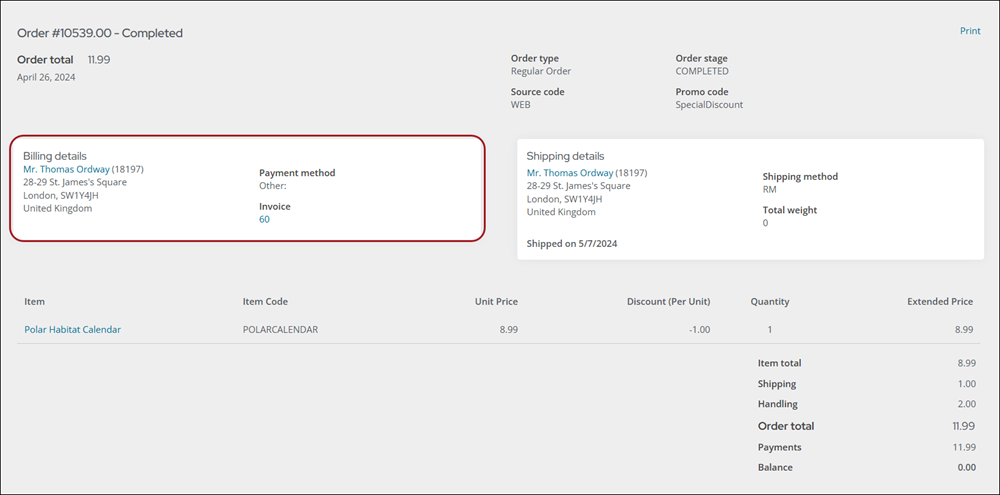
Order Billing Details configuration options

This content item uses the Common content item configuration options.

Updated 3 months ago


General Product Display
Order Confirmation Display
Did this page help you?
    • Order Billing Details configuration options