

Reporting using the fiscal year
Use the DateDimension business object to report on the fiscal year in IQA.
ExampleThe out-of-the-box fundraising dashboard reports on the current calendar year for fundraising totals. The fundraising team needs to know the total donations for the current fiscal year, which is July - June, rather than the calendar year of January - December. They must use the Date Dimension business object to return the fiscal year data.
Do the following to create the query:
-
Go to RiSE > Intelligent Query Architect > New > Query.
-
Name the query.
-
Sources tab:
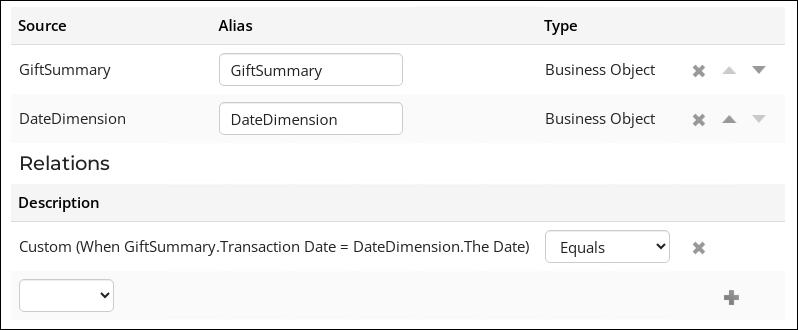
- Add the GiftSummary and DateDimension business objects.
- Add the following relation: GiftSummary.Transaction Date = DateDimension.The Date
-
Filters tab:
- Add the [GiftSummary] Amount property as a filter:
- From the Comparison drop-down, select Greater.
- In the Value field, enter 0.
- Add the [DateDimension] Fiscal Year Begin property as a filter:
- From the Comparison drop-down, select Within Years.
- In the Value field, enter 1.

- Add the [GiftSummary] Amount property as a filter:
-
Display tab:
- Select GiftSummary.Amount and set the Function column to Sum.

-
If needed, change the Format of the property to be displayed.
-
Click Run. The total gift amount for the fiscal year displays.
Updated 20 days ago
Did this page help you?