

Finding all engagement score leaders
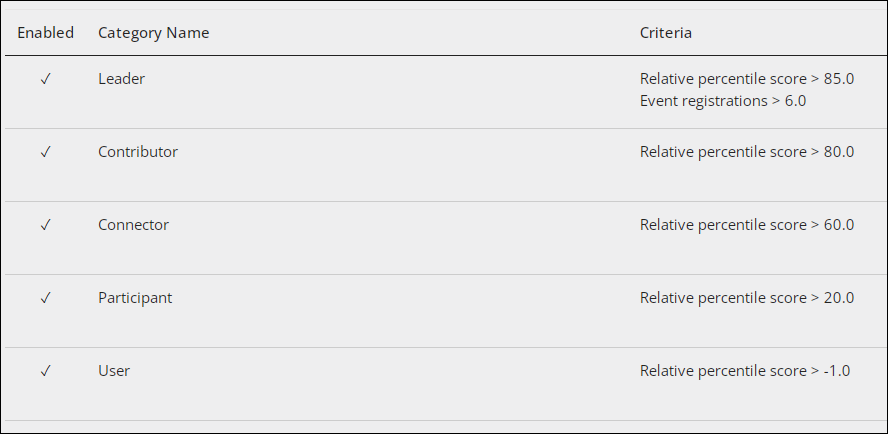
Each engagement score can be configured to include categories. These categories are used to classify constituents within the chosen formula. The following categories are defined in the out-of-the-box overall engagement formula and serve as rankings to help you better identify specific types of engagers within your organization:
- Leader: Constituents must have an overall percentile score that is greater than 85 and an event registration score greater than 6 in order to be a Leader. Out-of-the-box, this is the highest category ranking.
- Contributor: Constituents must have an overall percentile score greater than 50 in order to be a Contributor.
- Connector: Constituents must have an overall percentile score greater than 35 in order to be a Connector.
- Participant: Constituents must have an overall percentile score greater than 15 in order to be a Participant.
- User: Constituents must have an overall percentile score greater than zero in order to be a User. Out-of-the-box, this is the lowest category ranking.
ExampleAn association’s director needs to know which of their members are the most engaged with their association. The association has their engagement scoring configured with the out-of-the-box categories (who are in the Leader category).
To find engagement score leaders, do the following:
- Go to RiSE > Intelligent Query Architect.
- Click New > Query.
- Under Scoring sources, select Current scores.
- Click the Filters tab.
- Add the [CurrentScore] Category Name property and enter Leader as the Value.
- Add the [CurrentScore] Most Recent Engagement Month property to narrow results to the most active Leaders within the past year:
- Comparison – Within Years
- Value – 1
- Run the query.
- Click Save.
Updated about 1 month ago
Did this page help you?