

Hiding appeals and solicitations
The Hide Appeals and Solicitations setting simplifies the campaign management experience by removing appeals and solicitations from the campaign user interface. When enabled, users focus on defining simple campaigns and working with source codes while the underlying appeal and solicitation structure is hidden.
Important!Enabling this option hides appeals and solicitations. It does not delete any existing data. All appeals and solicitations remain intact.
Once enabled, the following occur:
- The Appeals tab is replaced by the Source Codes tab and appeals and solicitations are no longer visible and cannot be edited.
- The following happens when a new campaign is saved:
- One appeal and one solicitation that are not visible, and one visible source code are automatically created.
- The hidden appeal and solicitation inherit the campaign Start Date, End Date, and Predicted Response Rate.
- If a campaign already has an appeal and solicitation, new source codes are added under the existing solicitation instead of creating additional records.
- Source codes inherit the campaign’s Predicted Response Rate by default, but the value can be overridden, and the source code’s own value is what appears in the UI. Reminder Date is also not available.
- For campaigns that already contain multiple appeals and solicitations, the following is true:
- All source codes are listed in the Source Codes tab.
- Appeals and solicitations are still unavailable, and source code fields such as Predicted Response Rate and Last Response Date show each source code’s stored value rather than a parent value.
Enabling or disabling the setting
Do the following to enable or disable Hide Appeals and Solicitations:
-
Go to Marketing > Campaigns > Settings.
-
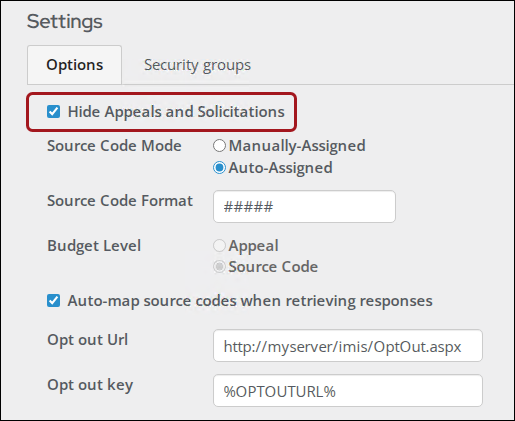
Enable or disable Hide Appeals and Solicitations.
-
Click Save.
NoteWhen you enable the checkbox, Budget Level is automatically set to Source Code and becomes read-only. You cannot change Budget Level while Hide Appeals and Solicitations is enabled.
Updated 4 months ago