

Gifts Guide
This intermediate-level guide covers gifts in iMIS EMS & iMIS 2017. Supported iDMS actions include insert.
This page reviews the process of inserting gifts through iDMS.
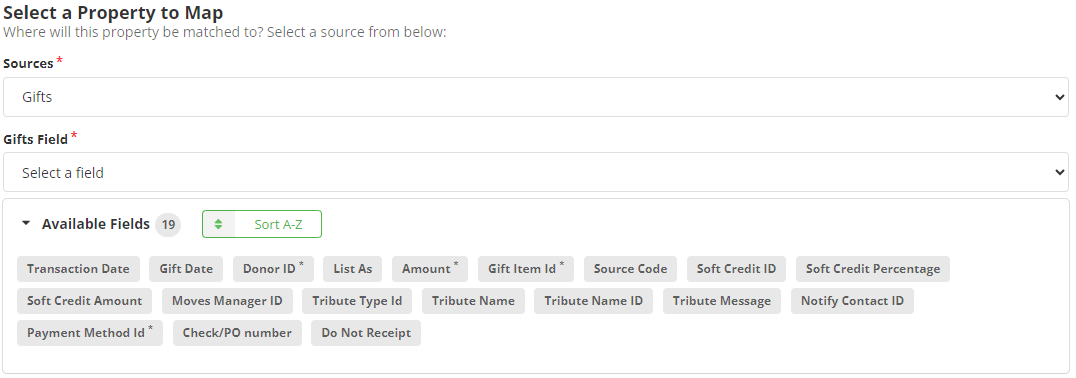
Mapping
Review the following required and optional field mappings:
Required
- Amount - The amount given.
- Donor ID - The iMIS ID of the donor.
- Gift Item Id - The item code of an already existing gift item.
- Payment Method Id - The code of an already existing payment method (for example, “CASH”).
Optional
- Gift Date - The date in which the gift was made.
- Transaction Date - The date of the gift transaction.
- Check/PO Number - The check/purchase order number associated with the gift.
- Do Not Receipt - Determines if a receipt should be created for the gift.
- List As - The designation that the donor wants to be listed as.
- Moves Manager ID - The ID of the contact who manages the gift.
- Notify Contact ID - The ID of the contact that will be notified about the gift.
- Soft Credit Amount - The amount of soft credit given for a gift.
- Soft Credit ID - The ID of the contact receiving the soft credit.
- Soft Credit Percentage - The percentage of the gift allocated as soft credit.
- Source Code - A code determining the source of the gift.
- Tribute Message - The message included with a tribute.
- Tribute Name - The name of the tribute.
- Tribute Name ID - The ID of the contact who made the tribute.
- Tribute Type ID - The ID determining the type of tribute.
Notes
- If GIFT DATE is not mapped during import, it defaults to the Transaction Date. A tribute may be recorded using a full name (Tribute Name) without requiring an iMIS ID.
- iDMS does not support importing gifts with a Credit Card payment method. As a workaround, create a Cash payment type with a title that indicates the gift was imported as a credit card transaction.
Sample Mapping
